

What is Text Enhance?
Text Enhance (Text-Enhance) is cross-browser adware and an advertising platform that uses multiple programs, browser extensions, and files to attach to internet browsers and gather personal data without user consent. Text Enhance is used by multiple third-parties in order to monetize freeware and other programs. This adware serves pop-up and targeted advertisements it feels users are most likely to click on across Chrome, Firefox, and Internet Explorer based off of the information it gathers.

Victims of Text Enhance adware usually notice they are infected with this adware when the content found on random webpages have links that display spam advertisements once they are hovered over. These types of advertisements are called in-text advertisements. *Hovering over the words racing teams opens up a small window showing a spam advertisement relative to racing teams (image).
Video example of a Text Enhance infection
Users who wish to install freeware may be given a “custom installation” option to accept or decline an offer to install Text Enhance adware and similar products during the installation; However, the user request to decline the adware from installing can be ignored by the program or presented in a confusing manner.
In some cases, Text Enhance and other unwanted programs are deceptively promoted through questionable advertisements. These advertisements may be dishonest, misleading, and cause the program to automatically download and install once clicked on.
How to remove Text Enhance (Removal Guide)
Botcrawl may earn a commission from purchases made through links in this article.
- Step 1: Remove unwanted add-ons and extensions
- Step 2: Uninstall Text Enhance
- Step 3: Remove Text Enhance malware with Malwarebytes Anti-Malware
- Step 4: Cleanup and repair settings with CCleaner by Piriform
Step 1: Remove Text Enhance add-ons and extensions
Google Chrome
1. Click the Customize and control Google Chrome icon on the top menu and navigate to More tools > Extensions.
2. Search for suspicious extensions in the list. Remove unwanted browser extensions individually by clicking the trashcan icon next to each one.
Mozilla Firefox
1. Type Ctrl+Shift+A.
2. Search for suspicious add-ons on the Extensions and Plugin tab. Highlight each one individually and click remove.
Step 2: Uninstall Text Enhance
1. Open Windows Start Menu and go to the Control Panel.
2. On Windows Control Panel, click Uninstall a program or Add and remove a program in the Programs section.
3. Search for Text Enhance and other unwanted programs in the list of installed programs. Once an unwanted program is located, double click the item or select it with your mouse and click the Uninstall button.
4. Restart your computer.
Step 3: Remove Text Enhance malware with Malwarebytes
1. Download and install the free or full version of Malwarebytes Anti-Malware. The full version enables real-time protection to block malware and unwanted programs from infecting your computer, while the free version is just a free scan and removal tool.


2. Open the Malwarebytes Anti-Malware.

3. Click the large Scan Now button or visit the “Scan” tab to manually run a scan.

4. Once the malware scan is complete, click the Remove Selected button and reboot your computer.
Step 4: Cleanup and repair settings with CCleaner
1. Download and install the free or full version of CCleaner by Piriform.

2. Once installed, open the program and navigate to Cleaner > Windows/Applications and click the Analyze button. Afterwards, click the Run Cleaner button on the bottom right of the program interface.
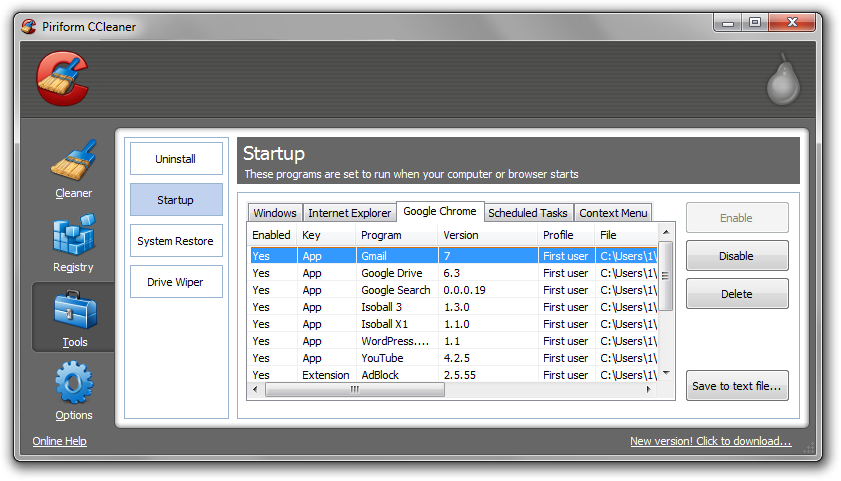
3. Next, navigate to Tools > Startup and search through each tab starting from windows, internet explorer, etc., all the way to Content Menu, for additional suspicious entries and click Disable and Delete once anything is found.
4. To automatically uninstall unwanted programs using CCleaner, navigate to the Uninstall tab and search for the program in the list of installed programs. Uninstall the unwanted software as selected by clicking the Run Uninstaller button.
- IDScan Data Breach May Expose 153 Million Driver’s Licenses
- Cloudflare Says Anthropic Mythos Can Chain Bugs Into Working Exploits
- DigiCert Revokes 60 Code Signing Certificates After Support Malware Incident
- cPanel Down Reports Were Linked to CVE-2026-41940 Emergency Patches
- cPanel Down for Some Users After Emergency Authentication Security Update

Related Posts






398 Comments
[…] 3: Sidan botcrawl.com förklarar här vad länkarna är för något (den engelska texten vi lagt in innehåller fem (5) […]
[…] do I get rid of this? | Firefox Support Forum | Mozilla Support I found this suggestion: How To Remove Text Enhance Malware – Text Enhance Virus Removal Instructions | Malware Removal – Sof… Make sure there are no add-ons in Firefox that you didn't put there or aren't sure what they do. […]
[…] بخونید ممکنه کمکتون بکنه: support.mozilla.org/en-US/questions/860638 http://botcrawl.com/how-to-remove-text-enhance/ ویرایش توسط sghd : امروز در ساعت 08:52 AM saeed0c and A1C1E like […]
Firefox Add On ‘Deal Spy’. Sherminated.
Thank you very much.
It started for me when I installed Adblock Plus on Firefox. It stopped when I removed Adblock Plus from Firefox. I figured that was how Adblock Plus was making money.?? I also cleared my cookies at the same time. Just disabling Adblock Plus did not work.
Correction. When I removed Adblock Plus are restarted Flashblock which is what stopped Text Enhance.
[…] How To Remove Text Enhance Malware – Text Enhance Virus Removal Instructions | Antivirus – Malware R… SIGNATURE…When I post info I assume you have already read this link How to Start Removing Viruses and Spyware from your Computer Computer Custom MS Windows 8 Pro 64-bit with WMC Intel Core i5 650 @ 3.20GHz X4 8.00 GB Dual-Channel DDR3 @ 665MHz Nvidia GeForce GTX 550TI Superclocked Reply With Quote […]
Thank you! This was very helpful. The Chrome extension “StartNow” was the culprit for me.
StartNow was the culprit for me as well.
smae here
[…] Re: oh flippin' Malware! this sort of thing How To Remove Text Enhance Spam And Malware/Adware Hover Text Links | Antivirus – Malware Removal Fo… […]
Add “SportHunter TV App” or “HD TV Sports” to the list
Thanks! My Addon was called Save Now
Key Download was what it was called on my system
Thank you! It worked perfectly on Google Chrome – I had the program “browse 2 save” installed – apparently
Thank you soo much. I thought that I was the only one having this problem. Just delete anything you make sure it’s off of your browser, not just disabled just for safety.
Thank you, great info. you saved my time and my mac :))
Ive discovered the extension AddLyrics on firefox also causes this problem as it has text enhance in it.
Coupon Companion is another Google Chrome extension that Text Enhance is embedded in, if anyone wants to add it to the list.
Thanks!
thank you soh much. this was annoying me for ages. wish i’d done it sooner
I found my pain in the butt for text enhance in the FireFox addons listed as Selectionlinks.
looks very harmless, but after diabling it and then removing it.. No More Text Enhance.
As did I. I took a chance and deleted before I came across this site. Seems to be resolved.
Still running a full malwarebytes scan system scan just to be sure.
I had absolutely no clue what I was doing but whatever it was you told me to do worked!!!!!!!!!!
Infinate thanks!!
Terrific! I was able to remove those pesky hover over ads in less than a minute. Thanks!
Hi Solved my problems – “savebyclick 1” was the problem on my PC – found in the FF Add On Extensions.
Great article thanks. Looks like there so much underhanded dealing built into so may programs that you can’t trust any of these folks!
[…] If you are experiencing odd text links in the pages you view, it could be a malware called textenhance or text-enhance. This is a spamming malware known as a browser hijacker. You will need to activete all of your default browsers defence mechanisms to help fight this fake program. it has numerous names which is typical of most adware, viruses and malware. To get a list of the names it uses go here. […]
Just ran across a case where a client’s infected browser inserted a script block in a WordPress page which called the Text-enhance JavaScript directly. So this has gone beyond just a browser hijack.
Thank you so much! All I had to do was clear my cache (Google Chrome) and end some extension called “Add Lyrics” which seems to have installed itself. It was affecting a couple of other sites for me but everything is back to normal now, thanks again.
This Text Enhancing has been bugging me for a while on Chrome and IE and I finally looked into what it is and how to get rid of it. Following your steps I found the SmartNow extension and deleted that sucker! Thanks for this great article!! However, I am having issues in Step 4 of Installing AdBlocker. I enter “Text-Enhance.com” or “textsrv.com” in the Domain text field, but it won’t let me click Block It! Am I missing a step somewhere…?
Another thing to add to the list of extensions is “onetab”.
Thanks Allan!
I found this on my computer today (1-14-13) and after removing the “SEND TO KINDLE” app from Amazon this went away. So anyone installing the SEND TO KINDLE app for Firefox be aware that Amazon installs this adware crap (text-enhance adware) without your knowledge. Nowhere is this addition prominently displayed in the download that this crap is installed along with the Amazon Firefox addon.
Thank you so much!!
[…] paste what you copied. Jackie, I was looking into your web browser problem and found this page: How To Remove Text Enhance Spam And Malware/Adware Hover Text Links | Antivirus – Malware Removal Fo… Option 2 looks very straightforward and has to be worth a try. Option 5 doesn't look to difficult […]
Had a similar thing called JUST PLUG IT, those bastards.
Zoomex is another name I found for it in Chrome.
^ correct and thanks
Thank you, we have further investigated your suggestion and added it to the list.
THANK YOU!!
Awesome! Thank you! I was absolutely panicking when I thought my own website was pirated and was lucky to find this website with absolutely perfect well presented instructions.
Thanks so much for such a thorough and explicit list of removal options for Enhanced Adware. All options are so detailed and clear. Quick suggestion? You might want to place Option ^ at the top of the list as Option 1. I was shocked to read that simply using system restore would actually remove imbedded adware–but I tried that first and it worked like a charm. Excellent work and much appreciated!
MD
Thanks for the help… this showed up today and I’m hoping you helped me get rid of it… thanks so much.
[…] I still had a bug, so googled "text highlighting adware" and it led me to this link: How To Remove Text Enhance Spam And Malware/Adware Hover Text Links | Botcrawl.com I am running Firefox, and followed the instructions to clean it. All I had to do was scroll down […]
Hi
I had CouponDropDown on my Safari under MacOS 10.6.8. and the extension that created it called “torrenthandler”.
Sorry to hear and thank you for the information.
Thank you for this information!
[…] EDIT: Solution found (THANKS) http://botcrawl.com/how-to-remove-text-enhance/ […]
Great article…it has infected all of my browsers, yet when I look in the extensions folder, I find nothing.
Does anybody have any details on who or what company is behind Text Enhance? Where are they based? What is their address? I haven’t been able to find much so far. Their Web site is extremely unhelpful — they clearly don’t want to be found. Let’s track these bastards down!
I found my in an extension call ‘selectionlinks’
Seems to have worked. It was infecting Firefox only and I didn’t see any unusual extensions or addons. I deleted all cookies and ran Malwarebytes. Added the two websites as exceptions in the cookie list. Restarted Firefox. So far so good.
I agree, totally awesome and I thank you so much for posting this. Kudos for your help!
AWESOME. Thank you so much!
There’s a new name for the text enhance extension, discovered it in my Chrome browser: Privacy SafeGuard 1.1
This one is even more invasive than before, because it will randomly open a new tab in your browser, and FORCE you to view, even if you’re using another program. The original url always starts with ssl.privacysafeguard (I can’t remember the rest), but quickly changes to a random spam website (The most common of which seems to be adultfriendfinder.).
Thanks Espinoth.
FYI – Found as add-on extension in firefox under the name startnow toolbar
This was really helpful, thanks!!
Hi. There’s also an add-on called “Browse22Save” on Firefox.
Mine was called “Browwse2Saavei” on Firefox. Once disabled and removed, all was good with the world again. Thanks botcrawl!!!
[…] Below is a link with info on eliminating in-line text ads. How To Remove Text Enhance Spam And Malware/Adware Hover Text Links | Botcrawl.com Thought I might get my hand slapped when mentioning AdBlock on a site that sells ads. It is rare […]