

What is Text Enhance?
Text Enhance (Text-Enhance) is cross-browser adware and an advertising platform that uses multiple programs, browser extensions, and files to attach to internet browsers and gather personal data without user consent. Text Enhance is used by multiple third-parties in order to monetize freeware and other programs. This adware serves pop-up and targeted advertisements it feels users are most likely to click on across Chrome, Firefox, and Internet Explorer based off of the information it gathers.

Victims of Text Enhance adware usually notice they are infected with this adware when the content found on random webpages have links that display spam advertisements once they are hovered over. These types of advertisements are called in-text advertisements. *Hovering over the words racing teams opens up a small window showing a spam advertisement relative to racing teams (image).
Video example of a Text Enhance infection
Users who wish to install freeware may be given a “custom installation” option to accept or decline an offer to install Text Enhance adware and similar products during the installation; However, the user request to decline the adware from installing can be ignored by the program or presented in a confusing manner.
In some cases, Text Enhance and other unwanted programs are deceptively promoted through questionable advertisements. These advertisements may be dishonest, misleading, and cause the program to automatically download and install once clicked on.
How to remove Text Enhance (Removal Guide)
Botcrawl may earn a commission from purchases made through links in this article.
- Step 1: Remove unwanted add-ons and extensions
- Step 2: Uninstall Text Enhance
- Step 3: Remove Text Enhance malware with Malwarebytes Anti-Malware
- Step 4: Cleanup and repair settings with CCleaner by Piriform
Step 1: Remove Text Enhance add-ons and extensions
Google Chrome
1. Click the Customize and control Google Chrome icon on the top menu and navigate to More tools > Extensions.
2. Search for suspicious extensions in the list. Remove unwanted browser extensions individually by clicking the trashcan icon next to each one.
Mozilla Firefox
1. Type Ctrl+Shift+A.
2. Search for suspicious add-ons on the Extensions and Plugin tab. Highlight each one individually and click remove.
Step 2: Uninstall Text Enhance
1. Open Windows Start Menu and go to the Control Panel.
2. On Windows Control Panel, click Uninstall a program or Add and remove a program in the Programs section.
3. Search for Text Enhance and other unwanted programs in the list of installed programs. Once an unwanted program is located, double click the item or select it with your mouse and click the Uninstall button.
4. Restart your computer.
Step 3: Remove Text Enhance malware with Malwarebytes
1. Download and install the free or full version of Malwarebytes Anti-Malware. The full version enables real-time protection to block malware and unwanted programs from infecting your computer, while the free version is just a free scan and removal tool.


2. Open the Malwarebytes Anti-Malware.

3. Click the large Scan Now button or visit the “Scan” tab to manually run a scan.

4. Once the malware scan is complete, click the Remove Selected button and reboot your computer.
Step 4: Cleanup and repair settings with CCleaner
1. Download and install the free or full version of CCleaner by Piriform.

2. Once installed, open the program and navigate to Cleaner > Windows/Applications and click the Analyze button. Afterwards, click the Run Cleaner button on the bottom right of the program interface.
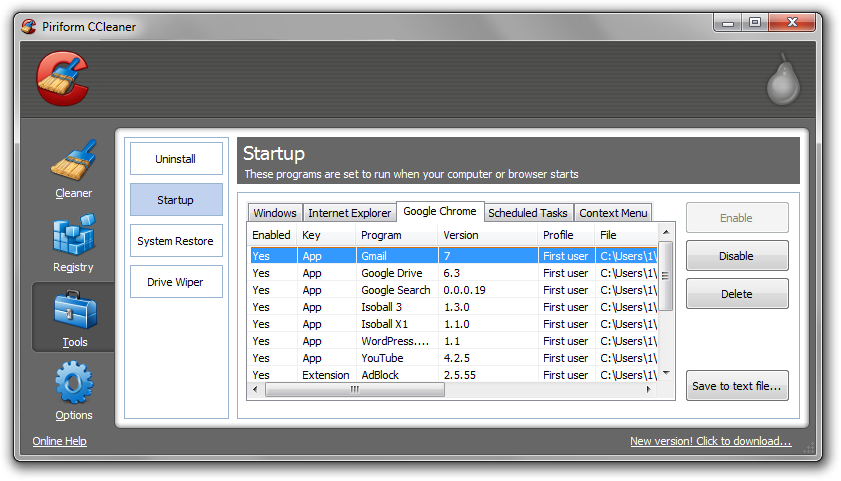
3. Next, navigate to Tools > Startup and search through each tab starting from windows, internet explorer, etc., all the way to Content Menu, for additional suspicious entries and click Disable and Delete once anything is found.
4. To automatically uninstall unwanted programs using CCleaner, navigate to the Uninstall tab and search for the program in the list of installed programs. Uninstall the unwanted software as selected by clicking the Run Uninstaller button.
- IDScan Data Breach May Expose 153 Million Driver’s Licenses
- Cloudflare Says Anthropic Mythos Can Chain Bugs Into Working Exploits
- DigiCert Revokes 60 Code Signing Certificates After Support Malware Incident
- cPanel Down Reports Were Linked to CVE-2026-41940 Emergency Patches
- cPanel Down for Some Users After Emergency Authentication Security Update

Related Posts






398 Comments
Thank you for sharing this information.
thanks for shearing nice information
OMG thank you so much!!!
Thank you so much for this article and instructions, it totally works! I also ran spybot which picked up a lot of garbage associated with this problem.
Thanks, your walk through helpen get rid of an annoying one. It was an extension in Firefox called ‘Save As’.
You are BRILLIANT!!!! Simple clear instructions on how to get rid of my text enhancer brought to me courtesy of Bcool 1.0 in Firefox. I spent ages scanning my computer with no affect. Thanks again.
Thank you so much!!!
Thanks so much
Quiero eliminar DownloadNsave!! cómo lo elimino? por favor
Thanks so much. It was really easy to fix. I went into Firefox tools menu, then Add-ons, and found “OneClickDownloader” that I didn’t put there. I deleted it. And everything is fixed. Thanks again.
Note it was called “1Click Downloader” on my Chrome extensions. Turning it off and uninstalling it took care of the problem.
Thanks! I had that extension on my computer too. That took car of it!
[…] Adware: How To Remove Text Enhance – Bot CrawlApr 3, 2012 … Text Enhance is a form of flash adware categorized as a browser hijacker that attaches to … It was BeCool for me which was NOT COOL. Reply … Get the RSS Feed November 4, 2012 at 9:24 am by admin | Category: Uncategorized | […]
well, it seems to work (for now) with the shockwave, regedit and IE textsrv.com removals and stuff. I siil think it was shockwave which installed it last month…..
[…] the folks from Botcrawl.com highlight – they offer detailed removal steps for each browser –, there are numerous ways to get rid of unsolicited ads. The easiest one is to […]
[…] un articolo davvero completo disponibile all’indirizzo botcrawl.com/how-to-remove-text-enhance, che spiega il da farsi su ciascun browser precedentemente citato. La lingua utilizzata è […]
Oh goodness, you saved my life. Thanks so much!
Thanks so much for taking the time to post this. I’m using fire-fox and the plug in was called ‘shopping assistant’ which you may want to add to your list.
[…] on how to remove it, but this article describes something close to what you're experiencing: How To Remove Text Enhance Spam And Malware/Adware Hover Text Links | Originally Posted by TVG_Frey Hi, This sounds like some sort of malware or virus on […]
[…] specific browser removal instructions, visit Bot Crawl for more […]
think i got vis-saver when i accidentally downloaded google chrome. my laptop was crashing so i uninstalled it, and was left with vid-saver. i thought it was adobe flash so i uninstalled that too 🙁 Thank so much, i wonder how many other things might have got binned has i not google this. thank you soooo much 🙂
Thanks man, it really helped me..
Thank You! I haven’t found the right plugin to remove yet, but by the help of AdBlocker I’ve stopped it. But the url used on my Chrome was trkjmp . com – Found the adress by using the “Inspect element” function (right-click the link) in Crome. No other browser was infected on my PC (Opera, IE9, Safari, Firefox)
Thank you, Thank you Thank you Sean! I download the wrong ID3 tag for my podcasts and ended up with text-enhance on my website. I appreciate you taking the time to write such a detailed article and commenting on the WP forum! You made it so simple even for a non-techy like me. Many blessings!
Thank you! It worked!!!
I have Firefox with ABP and still got this one. I uninstalled an add-on called “PlayBryte 1.1” and the hyperlink ads went away. Thank you for helping me find the source of this annoying bit of adware.
yay finaly no more text enhance 😀 you sir are my hero of the day ^^
[…] text – wtf or normal or? Just noticed it says by text enhance. so have a google of that. How To Remove Text Enhance Spam And Malware/Adware Hover Text Links | |̲RPMs Dont̲ Kill Engines I Do̲.̲.̲.̲.̲.̲.̲.̲.̲.̲| The Wheel Wizard […]
Brilliant! Many thanks.
Excellent, thanks for your help.
Adware: How To Remove Text Enhance حل مشكلة الإعلانات المزعجة التي تظهر في متصفحات الانترنت #tech #تقنية #انترنت #حلول http://t.co/wk2cyJjv
It worked!! Thank you so much!
Thanks!
Thanks so much for this excellent article. It was BeCool for me which was NOT COOL.
[…] http://botcrawl.com/how-to-remove-text-enhance/ […]
Seems to have worked. Been putting up with this nuisance for months. Thanks!
THANK YOU
Just made a wrong comment about Local Player. Please do not publish it
It was false alarm. Indeed the culprit is the flash player (both the external and the one embedded in).
Thanks again for your great information.
Wanderlei
Brazil
here it was inside “Local Player” chrome extension, an extension to play mp3 files inside chrome 🙁
thanks for your detailed explanation!
Thanks for all the detailed explanation. For me, it only took uninstalling a program (I think it was called Big Deals) which had an install date about the time I started having problems.
[…] Posted by HandK Its called text enhance!! and I hate it!! Oh, well in that case. How To Remove Text Enhance Spam And Malware/Adware Hover Text Links | __________________ […]
how to get rid of the most annoying on the internet… text-enhance.
http://botcrawl.com/how-to-remove-text-enhance/
This is a damn annoying bit of adware/malware……my particular version came under the name “CouponDropDown”, but as someone commented below, I simply removed the “CouponDropDown” program in Add/Remove Programs and it remove the Firefox/Chrome extensions automatically!
Thank you very much Sean Doyle
Thanks for the help! I deleted all my cookies, temp. internet files, history, etc. and that took care of the problem.
Are any of you getting strange popups when you move your mouse over certain UNDERLINED words in an article only to find out you’re being redirected to a spam site?
If so, you have had TEXT-ENHANCE installed in your web browser without your permission.
Try this, it’s easy and it will disable and delete the TEXT-ENHANCE spam-bot, sometimes also known as SAVINGS-SIDEKICK.
http://botcrawl.com/how-to-remove-text-enhance/
Thanks for the helpful article. I found “I want that” on my mom’s computer’s list of installed programs so I uninstalled it and it automatically deleted the extension and everything to do with Text Enhance, it was way easier than doing it all manually.
Oh my god, I thank the FUCK outa you!
Thank you so much!!
And it was also in my list of installed programs too!
Just removed my Text Enhance malware – you can add to the list of possible names ‘Deals Plugin’. One has to wonder why the anti-virus software I spent good money on didn’t pick it up…..I have a feeling my PC got infected after I purchased a cheap mouse when my normal one broke. Thanks for the removal procedure, was of great assistance.
Thank you. Many of the apps and clients Text Enhance bundles with are considered “legitimate” freeware, which is possibly why it was not detected.
Thanks Sean, well done!