

The CPUID compromise turned the official download path for CPU-Z and HWMonitor into a malware delivery channel for roughly six hours between April 9 and April 10, creating the kind of incident that belongs on any serious data breaches and software security desk. No giant leaked dataset or ransom demand was needed to make this a major event. The problem was simpler and more immediate. Users who went to the real CPUID site for trusted hardware tools could be served malicious files through the same path they normally use for legitimate downloads.
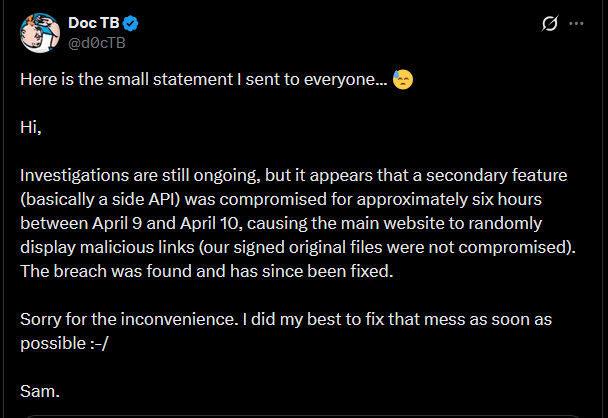
CPUID later said a secondary website feature, described publicly as a side API, had been compromised and caused the main site to display malicious links during that window. The company also said its original signed files were not themselves compromised. That detail helps explain how the compromise worked, but it does not change the practical risk for anyone who clicked the download button during the affected period. The official source stopped being safe, and that is enough to make the event serious.
There is no public indication that every historical installation of CPU-Z or HWMonitor was affected. The immediate concern is narrower than that and more useful. Users who downloaded or updated CPU-Z, HWMonitor, HWMonitor Pro, or PerfMonitor through the official CPUID site during the active compromise window should treat those downloads as suspicious until their systems have been checked properly.
Background on CPUID
CPUID is the company behind CPU-Z and HWMonitor, two long-running Windows utilities that have been staples for years on enthusiast systems, gaming desktops, repair benches, and workstations. CPU-Z is widely used to inspect processors, memory, motherboards, and general system details. HWMonitor is a common tool for temperatures, voltages, fan speeds, and other sensor data. These are not fringe downloads. They are the kind of utilities people keep around because they are practical, familiar, and usually safe.
That familiarity is a real part of the security story.
Attackers did not need to build a fake brand from scratch or lure users into a typo domain dressed up to look credible. They only needed to get in front of a real vendor that already had years of trust behind it. When a site like CPUID is compromised at the point of download, the trust users place in the brand does part of the attacker’s work for them.
That is why official software sites remain attractive targets. A vendor’s reputation, domain, and normal update flow can do more for an attacker than a sloppy phishing page ever could. The safer the site looks, the less resistance the user brings to the click.
How the CPUID Compromise Worked
The shape of the incident is now clear enough to state plainly. CPUID’s website-side delivery path was compromised. The company’s explanation pointed to a secondary site feature rather than to direct tampering with the underlying signed program files. That means the attack appears to have sat in front of the original binaries and interfered with what users were shown or sent when they tried to download software.
From a technical standpoint, that is narrower than a full build-system compromise. From a user standpoint, it is still a direct supply chain problem.
Publicly shared user experiences made the issue obvious early. People looking for HWMonitor updates through the official path described being served a file called HWiNFO_Monitor_Setup.exe instead of the installer they expected. The package reportedly opened with Russian-language Inno Setup text and triggered Windows Defender alerts. At least some direct clean download URLs remained live, which suggests the original hosted binaries may still have existed in parallel while the visible download path or redirect logic was sending some users elsewhere.
That kind of architecture matters. If the signed file is clean but the route to the file is poisoned, users are still exposed. The download button is part of the product whether vendors treat it that way or not.
Public technical analysis published after the incident described the compromise in more detail. Malicious URLs were swapped into the official download flow for software hosted on cpuid.com. The affected software list included CPU-Z 2.19, HWMonitor 1.63, HWMonitor Pro 1.57, and PerfMonitor 2.04. The trojanized archives reportedly bundled a legitimate executable alongside a malicious CRYPTBASE.dll used for DLL sideloading, which then helped pull down and launch follow-on payloads. The same analysis tied the infection chain to STX RAT and described behavior consistent with browser credential theft and in-memory execution.
That raises the severity of the event beyond a simple bad installer or a crude repackaged Trojan.
A user who downloaded during the bad window was not just dealing with a mislabeled file. The attack path appears to have been built to establish execution, evade easy detection, and move deeper into the system. That changes how seriously affected users need to take any download from the compromised period.
Scope and Composition of the Affected Downloads
The public discussion around the compromise focused most heavily on CPU-Z and HWMonitor because those are the best-known utilities on the site, but the attack appears to have touched more than those two tools. The broader affected set described in post-incident analysis included:
- CPU-Z 2.19
- HWMonitor 1.63
- HWMonitor Pro 1.57
- PerfMonitor 2.04
That does not mean every request for those files was malicious in every context. It means those products sat inside the compromised delivery path and were within the attack window.
The file name confusion also deserves a clear note. HWiNFO is a separate hardware-monitoring product from a different developer. The malicious package used the name HWiNFO_Monitor_Setup.exe even though the compromised distribution path belonged to CPUID. That created predictable confusion in the first round of public reactions. The important point is simple. The compromise centered on CPUID’s site and download logic, not on HWiNFO’s official site or vendor.
For users, the practical question is not “Was every CPUID file on earth infected?” The practical question is narrower and more useful: “Did I download one of the affected tools from cpuid.com during the compromised window?” If the answer might be yes, the file should be treated as suspect until the machine has been examined.
Risks to Users and the Public
A compromised utility download is not just a bad file problem. It is a trust problem, a credential problem, and a follow-on abuse problem.
The first risk is obvious. If the malicious installer ran, the attacker may have gained code execution on the system. The public technical details around this incident point to DLL sideloading, additional payload delivery, and browser credential theft behavior. That moves the event beyond nuisance malware and into account security, stored credentials, and persistence.
The second risk is broader. Many users keep tools like CPU-Z and HWMonitor on systems that are valuable for reasons far beyond hardware monitoring. Workstations often hold saved browser logins, internal dashboards, email sessions, cloud storage access, messaging apps, VPN credentials, and development tools. A small diagnostic utility does not stay small once it becomes the first stage of a credential theft or remote access chain.
The third risk is timing. A six-hour window is short compared with larger software supply chain compromises, but that does not make it harmless. A trusted site does not need to stay poisoned for days to create damage. It needs enough time for users to do what they always do: check for updates, click the official button, and move on. Familiarity compresses suspicion. That is part of why this kind of incident works.
The fourth risk is false reassurance after cleanup. Once the site is fixed, users who clicked during the window can easily assume the danger is gone because the page looks normal again. It is not gone if the malicious file was already downloaded, extracted, or executed. The site returning to normal does not roll back what happened on the endpoint.
Recommended Actions for Affected Individuals
Anyone who downloaded CPU-Z, HWMonitor, HWMonitor Pro, or PerfMonitor from cpuid.com during the affected period should take the situation seriously.
Useful steps include:
- Delete the downloaded archive or installer if it is still present.
- Uninstall any copy installed during the compromise window.
- Run a full security scan on the system.
- Review browser-saved credentials and assume stored passwords may have been exposed if the malicious package ran.
- Change passwords for email, work accounts, cloud services, financial services, and any other sensitive accounts used on that machine.
- Check for unusual sign-ins, password reset emails, or new login prompts tied to accounts used on the affected system.
- Be especially cautious if the affected machine was used for work, browser-stored credentials, development access, or financial activity.
For users who want an additional scan beyond Microsoft Defender, a trusted tool such as Malwarebytes can help check the system for malware and unsafe files:
https://www.dpbolvw.net/click-5976450-13801426
If the compromised installer was launched on a work machine, the right move is not quiet cleanup. It is escalation. Security staff need to know the system may have been exposed so they can determine whether credentials, browser data, tokens, or connected services were put at risk.
Recommended Actions for CPUID
CPUID’s first response appears to have been fast, and that likely reduced the total number of affected users. The company still has a broader set of responsibilities beyond removing bad links and restoring the normal download flow.
Immediate priorities should include:
- Completing a full forensic review of the compromised site component and every dependency connected to the download path.
- Identifying exactly which products, URLs, redirect paths, and storage locations were exposed during the active window.
- Reviewing whether the compromise touched analytics, CDN rules, link generation logic, or backend infrastructure beyond the side API described publicly.
- Publishing clear guidance for users on which files, versions, and time windows should be treated as suspicious.
- Reviewing the separation between signed binaries, download presentation logic, and external redirect or storage mechanisms.
- Adding stronger integrity checks and alerting around download-path changes so a malicious link swap cannot sit quietly in front of clean binaries.
There is also a communication issue. When a trusted download path is compromised, ambiguity helps nobody. Users need plain guidance on what was affected, how long the exposure lasted, what indicators are known, and what steps are necessary now. A short statement that the site has been fixed is not enough on its own once malware has already been delivered.
Broader Implications for Software Distribution
The CPUID compromise is a reminder that software distribution is not just about the file sitting at rest on a server. It is the entire path.
That path includes the website, the API that generates or serves links, the redirect logic, the storage backend, the visible file name, the update prompt, and every trust signal that tells the user the download is legitimate. An attacker does not need to compromise every piece of the product if one exposed piece can sit in front of the user and swap in the wrong payload at the right moment.
This is one reason “download from the official site” remains good advice while also being incomplete advice. Users still should prefer official sources over mirrors, reposts, and random download aggregators. But the CPUID compromise shows the limit of that rule. A trusted site is only trustworthy for as long as its own delivery chain remains under control.
That is a harder lesson than most software vendors like to admit. It means the website and delivery logic are not just marketing infrastructure. They are part of the security perimeter. If they are treated like secondary systems, they become an obvious place for attackers to work around stronger controls deeper in the stack.
The most important fact here is not that the compromise was short or that the original signed files may have remained intact. The important fact is that users followed the normal safe path and still faced malware because the official distribution layer was compromised. That is the kind of failure that deserves blunt language, careful remediation, and a much wider review of how trusted software sites protect the path between the download button and the actual file.
For continued coverage of major data breaches and broader cybersecurity developments, the bigger lesson is straightforward. Official sources still matter, but official sources are not magic. The trust path has to be defended with the same seriousness as the code itself.
- ServiceNow Data Breach Exposes Customer Tenants to Unrestricted API Access
- GitHub Data Breach Confirmed After Poisoned VS Code Extension Exfiltrates Internal Repositories
- Vodafone Data Breach Claim Follows LAPSUS$ Data Leak
- Udemy Data Breach Resurfaces as 1.4M Records Circulate on Forum
- ClickUp Data Leak Shows $4B Came Before Customer Security for Over a Year

Related Posts