OneDrive Email Scam: How It Works, Warning Signs, and How to Stay Protected
A OneDrive email scam is a phishing attack in which scammers impersonate Microsoft OneDrive to deceive recipients into revealing login credentials or interacting with malicious links. These emails may claim that a document has been shared, that suspicious sign-in activity was detected, or that account verification is required. The embedded links typically redirect to fake OneDrive login pages designed to capture passwords and other sensitive information (pictured below). Although the wording, branding, and domains change frequently, the objective remains the same: obtain unauthorized access to the victim’s Microsoft account or deliver malware.

OneDrive Email Scam
A OneDrive email scam is a form of phishing in which attackers impersonate Microsoft OneDrive in order to deceive recipients into compromising sensitive information. The scam relies on brand impersonation and social engineering rather than technical exploitation. By mimicking legitimate OneDrive communications, attackers create a sense of familiarity and trust that lowers suspicion.
These scams are delivered primarily through email, but the deception extends beyond the message itself. The email typically directs the recipient to a fraudulent website that imitates the official Microsoft OneDrive login page. This counterfeit page is designed to capture credentials such as email addresses and passwords. In some variants, the attack may also attempt to distribute malware or prompt the victim to authorize malicious applications.
While many campaigns use shared document notifications as the lure, the OneDrive email scam is not limited to file-sharing themes. Attackers frequently adapt their messaging to include security alerts, account verification requests, subscription notices, and warnings about suspicious activity. The underlying objective remains consistent: persuade the recipient to interact with a malicious link and surrender control of their account.
Because Microsoft accounts are commonly used for email, cloud storage, collaboration, and business operations, they are high-value targets. A successful compromise can allow attackers to access stored files, send fraudulent messages, reset passwords for other services, or conduct financial and identity-related fraud.
OneDrive Email Scam Examples
OneDrive email scams appear in many different forms, but they all rely on impersonating legitimate Microsoft OneDrive communications. The wording, formatting, and subject lines change frequently in order to evade spam filters and security detection systems. Despite these variations, the underlying structure remains recognizable.
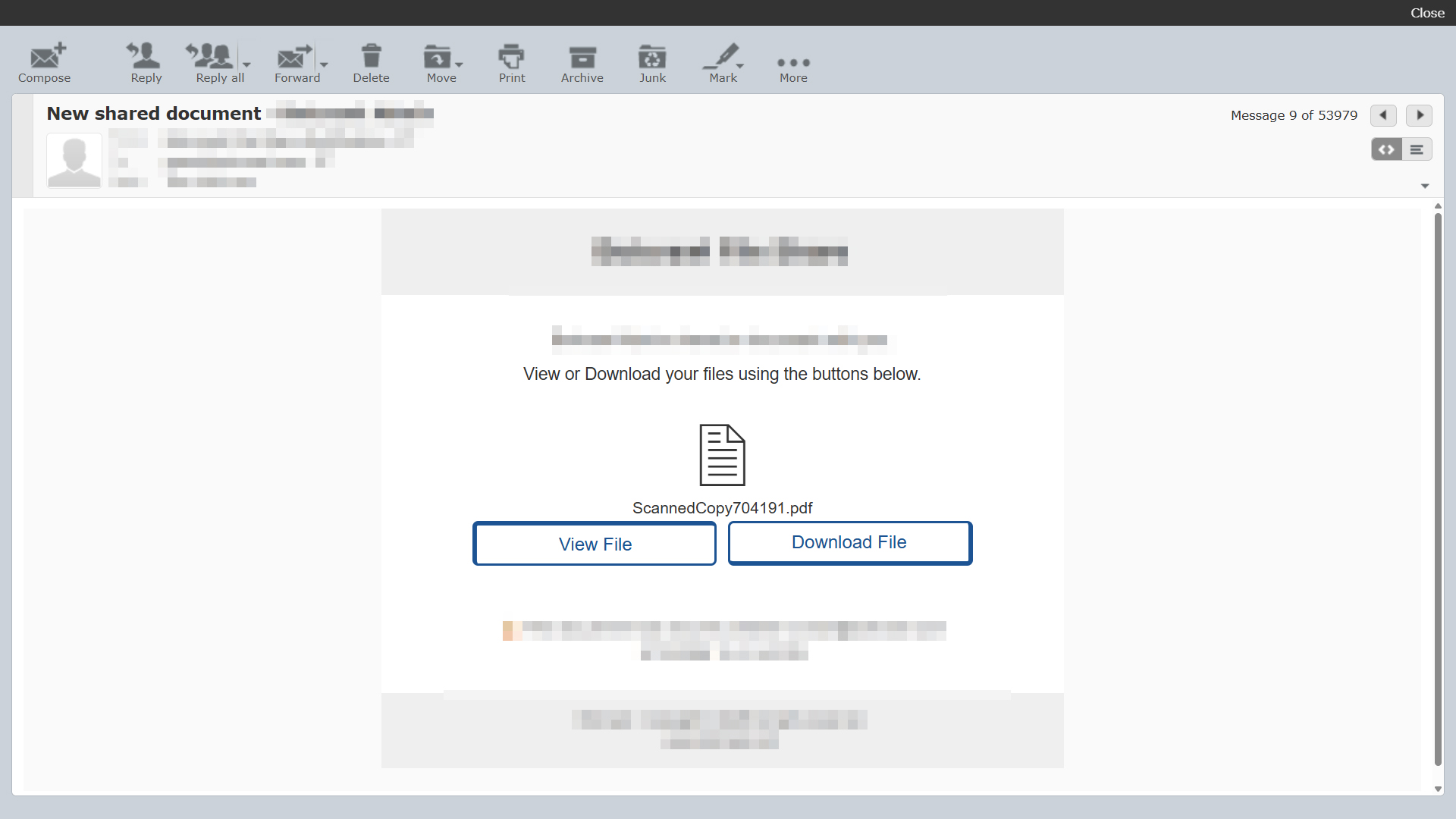
A very common variant of a OneDrive email scam is the fake file-sharing notification email that typically claims a document has been shared with the recipient and include clickable buttons in the email message such as “View File” or “Download File.” The email may display a generic file name such as ScannedCopy704191.pdf, Invoice_0028.pdf, or similar randomly generated document titles. The goal is to trigger curiosity or urgency and prompt the recipient to click.
Other common OneDrive email scam variants include:
- Security alerts claiming suspicious sign-in activity
- Account verification requests warning of suspension or lockout
- Subscription or storage expiration notices
- Billing update prompts requesting payment confirmation
- Messages stating that a file has been encrypted or secured
In many campaigns, the email incorporates Microsoft branding elements such as logos, color schemes, and layout styling that closely resemble legitimate OneDrive notifications. Some versions automatically display the recipient’s email address within the message to increase credibility. The links embedded in these emails often route through unrelated third-party domains before redirecting to a fraudulent login page designed to capture credentials.
Attackers frequently rotate domain names and hosting infrastructure. A single server may host hundreds or even thousands of unrelated domains, allowing scammers to quickly abandon and replace malicious sites once they are reported or blocked. This constant infrastructure turnover makes the scam resilient and difficult to eradicate entirely.
How the OneDrive Email Scam Works
The OneDrive email scam follows a predictable but highly effective sequence. It begins with impersonation and ends with credential theft or system compromise. Each stage is designed to reduce suspicion and increase the likelihood that the victim will comply.
The first stage is delivery of the phishing email. The message is crafted to resemble an authentic OneDrive notification, often using familiar formatting, minimal text, and prominent action buttons. Because file sharing and account alerts are common in both personal and business environments, the email does not immediately appear abnormal.
When the recipient clicks the embedded link, the destination is rarely the final malicious page. Instead, the user is commonly routed through one or more intermediary domains. These redirect chains may contain encoded parameters, tracking identifiers, or the victim’s email address embedded in the URL. This layered routing helps attackers obscure the final destination and bypass basic filtering mechanisms.
The redirect ultimately leads to a counterfeit OneDrive login page. The page is designed to closely replicate Microsoft’s official sign-in interface. In some cases, the victim’s email address is automatically pre-filled to reinforce authenticity. The page then prompts for a password or additional verification information.
Once credentials are entered, they are transmitted directly to the attacker. More advanced phishing kits may validate the credentials in real time by attempting authentication against Microsoft’s services. If the password is correct, the attacker gains immediate access to the account.
After gaining access, attackers may search for financial information, send fraudulent emails to contacts, create mailbox rules to conceal activity, reset passwords for other services, or use the compromised account as a launching point for additional phishing campaigns. In business environments, this can escalate into invoice fraud, data theft, or broader network compromise.
What to Do If You Fell for a OneDrive Email Scam
If you entered your password on a fraudulent OneDrive login page or interacted with a suspicious link, immediate action is essential. Email accounts are often connected to cloud storage, financial services, and password recovery systems. A compromised Microsoft account can quickly lead to additional account takeovers if not secured promptly.
Take the following steps as soon as possible:
Botcrawl may earn a commission from purchases made through links in this article.
- Change your Microsoft account password immediately.
- Sign out of all active sessions and revoke existing login tokens if available.
- Enable two-factor authentication if it is not already active.
- Review account security settings and recent sign-in activity.
- Check for unfamiliar mailbox rules or automatic forwarding settings.
- Remove any unknown connected applications or devices.
- Scan your device with Malwarebytes if you suspect an infection.
If the compromised account is associated with a business or organization, notify your IT or security team without delay. Business email compromise can escalate quickly, particularly if attackers attempt to impersonate executives or redirect financial transactions. Early notification reduces potential damage.
If you downloaded a file or suspect malware installation, run a full system scan using reputable security software and monitor your device for unusual behavior. Even if credentials were changed quickly, continue watching the account for unauthorized activity in the days that follow. Attackers may attempt additional login attempts or leverage password reuse on other services.
How to Protect Yourself From OneDrive Email Scams
Protecting yourself from a OneDrive email scam requires both awareness and layered security. These attacks rely on impersonation and urgency, so slowing down and verifying messages is the first line of defense.
When reviewing a OneDrive-related email, watch for the following warning signs:
- Sender addresses that do not originate from official Microsoft domains
- Links that redirect through unrelated or unfamiliar websites
- Requests to log in directly through an email link
- Urgent warnings about account suspension or suspicious activity
- Generic file names attached to unexpected sharing notifications
If an email appears suspicious, do not click its links. Instead, open a new browser window and navigate directly to the official Microsoft website using a trusted bookmark. Log in there to verify whether any legitimate alerts exist.
Additional protective measures significantly reduce risk:
- Enable two-factor authentication on your Microsoft account
- Use strong, unique passwords that are not reused across services
- Regularly review account activity and connected applications
- Keep your operating system and browser updated
Layered technical protection adds another barrier against phishing attempts. Real-time security software can block known malicious domains, phishing pages, and redirect chains before credentials are entered. Using reputable protection such as Malwarebytes with real-time protection enabled helps prevent access to fraudulent login pages and other malicious websites commonly used in OneDrive email scams.
Combining cautious behavior with real-time threat detection provides the strongest defense against evolving phishing campaigns.