Bot Traffic from China Is Spamming the Web
In November, Google Analytics data for websites I own started showing traffic spikes that at first glance looked like a fresh wave of a new referrer spam campaign. The pattern, however, did not fully match the typical referrer spam playbook. A single page would jump to dozens of active users, sometimes more than 100 at once, and then fall back to normal within minutes, while search impressions stayed flat, referral sources did not move, and AdSense revenue did not budge.
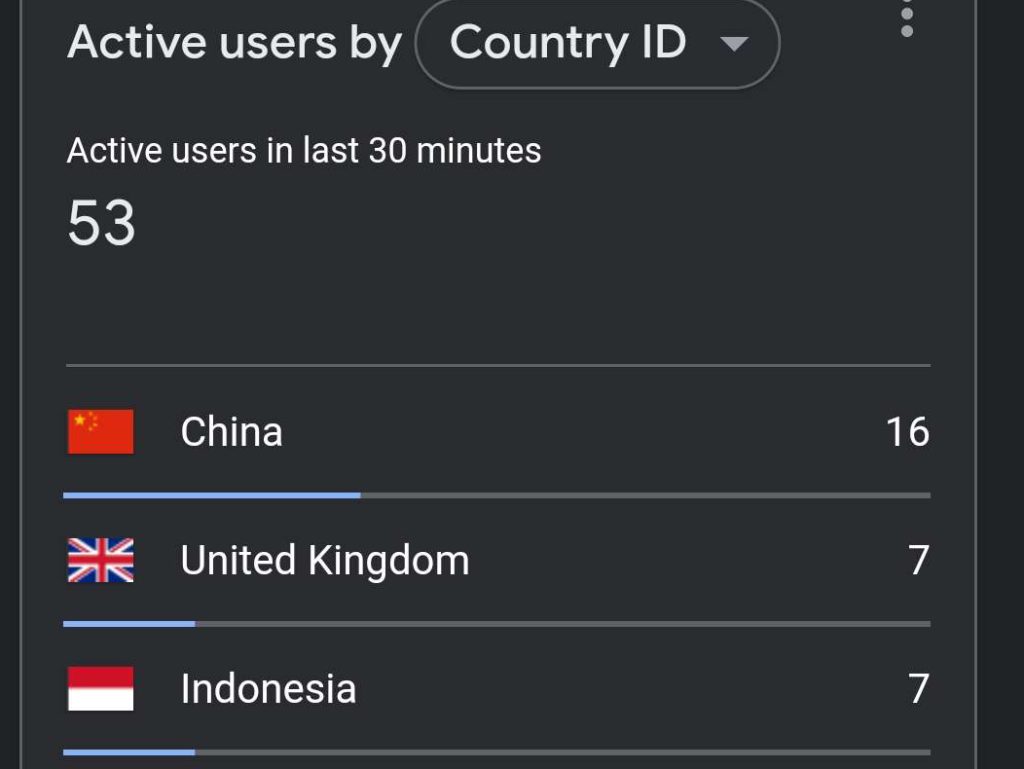
The sessions themselves did not look real. Engagement was basically zero, the bounce behavior was strange, and the geography made no sense for my audience. A lot of the activity clustered in China and Singapore, and the spikes rotated across different URLs over time instead of behaving like a normal situation where one page goes viral and drags the rest of the site with it.
I recognized it as automated traffic immediately, not because I was trying to tell a story, but because real readers do not arrive like that. They do not appear in synchronized bursts on a single URL and then disappear without leaving behind anything that resembles time on page, clicks, scrolling, or follow on activity. What I needed to figure out was what I was actually dealing with and where the numbers were coming from. Was this traffic truly hitting the site and consuming resources, or was it showing up inside tracking in a way that made the dashboard look busy without matching real load and without producing any ad activity.
So I treated it like an operations problem. I compared the spike windows in Analytics against server logs and caching behavior. I reviewed recent code changes and plugin updates. I looked for anything that could be inviting automated requests, and I tightened what I could at the origin because I wanted to understand the behavior, not hide it behind a third party gate and hope it went away. Sometimes it would appear to stop for a while, which creates the usual false hope that comes with troubleshooting. Then the same pattern would come back on a different URL and the loop would start again. After enough cycles, it stopped feeling like something unique to my setup and started looking like a wave that other site owners were dealing with too.
Why Lanzhou Keeps Showing Up
One detail that keeps appearing in reports is that a large portion of the traffic originates from Lanzhou, a city in northwestern China.
The important part is that “Lanzhou” in an analytics dashboard is usually not a literal statement about where a person is sitting. It is a location label generated from IP geolocation. Analytics platforms take an IP address, look it up in a geolocation database, and display the city or region that database associates with that block of IP space. That mapping is often good enough for marketing and audience reporting, but it is not a forensic tool, and it is not built to answer the question of who is behind a suspicious wave of automated sessions.
When traffic is coming from large scale automation, the IPs often belong to data centers, proxy networks, or cloud platforms rather than random residential connections. Data center IP ranges are allocated in blocks, reused heavily, and sometimes mapped in ways that can make a single city label appear across many unrelated websites at the same time. If a large slice of the infrastructure being used happens to sit inside IP ranges that geolocate to Lanzhou, then Lanzhou becomes the city that keeps appearing in dashboards, even if the operators are elsewhere and even if the routing path is more complicated than the city label implies. Singapore showing up alongside it fits the same general idea, because high volume automation commonly routes through regional hubs and hosting regions depending on how the proxying is set up.
The Network Pattern Behind the City Label
City labels are useful for spotting the trend, but they are not the most useful layer for blocking it. The more actionable view is the network the IPs belong to. That is where Autonomous System Numbers come in. An ASN is the routing identifier for a network that announces IP ranges on the internet. It does not tell you who wrote the bot, but it does tell you which network space the traffic is coming from, which is often enough to rate limit it, challenge it, or block it when the same networks keep repeating.
Across public discussion, the recurring theme has been that a lot of the traffic appears to run through large cloud and hosting networks rather than typical consumer ISPs. Several of the networks that keep getting mentioned are tied to major Chinese cloud ecosystems that include providers commonly associated with Tencent, Alibaba, and Huawei. That does not mean those companies are “the bots.” Cloud infrastructure is rented by everyone, including legitimate customers, scrapers, and abusive automation. The value of this detail is practical. If your logs show that the same network ranges are repeatedly involved in the bursts, you can stop treating it like random noise and start filtering it as a repeatable source.
What This Traffic Might Be
There is no single clean explanation that fits every site, but the incentives behind this kind of activity are not hard to understand. The web is being scraped at an aggressive scale for AI training, AI search indexing, competitive intelligence, content aggregation, and basic data harvesting. Some crawlers identify themselves clearly and behave predictably. Some do not. What makes this wave stand out is that it often tries to blend in as normal browsing instead of behaving like a straightforward crawler, while still producing the kind of empty, zero engagement sessions that are useless as an “audience.”
That mix is part of why it causes so much confusion. The traffic can look like real users in the one place that publishers check first, then it fails every common sense test everywhere else. It does not lift search impressions. It does not create referrals that make sense. It does not create revenue. It does not produce the kind of engagement that even low quality social traffic usually produces. Whether it is scraping, data collection, or something adjacent, the result for site owners is the same. Your analytics become polluted and your operational costs can rise if the requests are truly hitting your origin.
Why It Matters Even When It Is Not a Breach
This is not primarily an intrusion story. It is an integrity and operations story. First, it breaks measurement. Your location reports become unreliable, engagement rates collapse, and real time dashboards become noise. Second, it can become a stability issue if it is actually hitting the origin. Bandwidth, CPU, and memory are not free, and even “harmless” bots can cause slowdowns that look like a code problem.
Then there is monetization. Ad platforms filter invalid traffic aggressively to protect advertisers. If your site looks like it is being flooded with junk sessions, you can see reduced ad serving and weaker revenue signals even when you did nothing wrong. From the publisher side, it feels like getting punished for a problem you did not create. From the ad platform side, it looks like risk, and risk gets throttled.
How to Block or Reduce China Bot Traffic
The fastest way to make progress is to separate the two scenarios that look identical inside Analytics. One is real automated requests hitting the site. The other is tracking noise that inflates Analytics without matching server activity. The steps below work either way, but they help you identify which situation you are in before you start blocking aggressively.
- Confirm whether the requests are real in your logs. Pull server logs for the exact spike window and compare them to what Analytics claims. If the log volume is not there, treat it as measurement pollution and focus on filtering, not firewalling.
- Rate limit burst behavior. The most reliable tell is the burst itself. If the same URL is getting hammered in seconds, clamp it down at the web server or host level so your application never has to process the flood.
- Block or challenge repeating network ranges. If the same IP ranges and networks keep showing up in logs, block or challenge them at the network layer. It is more effective than chasing single IPs and it avoids endless whack a mole.
- Protect the endpoints automation loves. Search pages, feeds, and any URL pattern that generates unlimited variations get abused first. Make sure these areas are cacheable where appropriate, restrict what does not need to be public, and disable XML-RPC if you do not use it.
- Filter your reporting so you can still trust your data. Even after blocking, assume some noise gets through. Build segments and views that exclude the suspicious geography and the zero engagement sessions so your real audience reporting stays usable.
- Use a plugin as a second layer, not the first. A plugin can help you block by behavior signals, user agents, and repeat offenders, and you can absolutely have one built. Just do not rely on it as your only defense. If the requests are hitting your server, you want the first line of defense to be upstream where it is cheap to drop traffic.
If you want to build a dedicated plugin for this, it can be done in a clean, controlled way. The core idea would be a lightweight rule engine that can block or challenge requests based on request rate, suspicious user agent patterns, repeated hits to the same URL, known referrer spam signatures, and optional allowlists so real bots and real users are not collateral damage. The plugin should also log every block decision with a reason code, because the only thing worse than bot traffic is blocking real readers without knowing why.
The goal is not to “beat bots.” The goal is to keep analytics honest, keep the site stable, and avoid letting phantom traffic distort decisions or revenue while the web gets noisier.