Invoice Phishing Scam Uses Fake Invoice Review Emails To Steal Email Credentials
A new invoice phishing scam is circulating that uses fake “Invoice Review” emails to lure recipients into a malicious document viewer and, in many cases, trick them into entering their email passwords on a fraudulent login page. The campaign is built around a plain, automated looking message and a fake online document view hosted on a domain controlled by the attacker. Instead of relying on complex language or heavy branding, the scam leans on the fact that invoice notifications are common and most people are used to opening them without much thought.
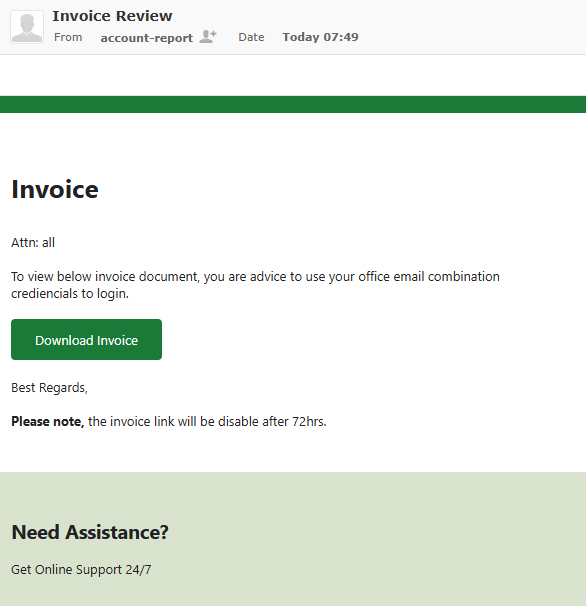
The phishing email is sent from a label such as “account-report” and contains very little text, instructing the recipient to review an invoice document and sign in with their office email credentials. The message reads:
Invoice
Attn: allTo view below invoice document, you are advice to use your office email combination crediencials to login.
Download Invoice
Best Regards,
Please note, the invoice link will be disable after 72hrs.
Need Assistance?
Get Online Support 24/7
The lack of personalization, the “Attn: all” greeting, and the generic wording are all deliberate choices. The email is designed to look like an automated internal notice from a billing or document system rather than a targeted phishing attempt. The claim that the link will be disabled after 72 hours adds artificial urgency, making recipients more likely to click quickly instead of confirming whether the message is legitimate.
Other Variants of the Invoice Phishing Scam
Invoice themed phishing campaigns rarely use a single template. The “Invoice Review” email is only one example of a broader pattern of scams that impersonate billing and payment notifications. Attackers regularly rotate through different layouts, wording, and visual styles so that the same campaign can continue to reach new victims without being blocked or easily recognized.
Some versions attempt to look polished and professional, with forged company logos, invoice headers, and formatted tables that mimic real accounting software. Others are intentionally simple, using plain text so the message appears to come from an automated billing process. Subject lines often include phrases such as “Invoice Attached,” “Overdue Invoice,” “Outstanding Balance,” “Updated Statement,” or “Payment Notice.” More aggressive variants threaten service interruptions, account holds, or late fees if the recipient does not review the attached document or link.
The body text also varies. Certain emails reference specific invoice numbers or amounts to create a stronger sense of authenticity, even though the details are fabricated. Some attach files named “invoice.pdf,” “statement.docx,” or similar names that contain links instead of actual documents. Others use embedded images that resemble PDF thumbnails, which lead to credential harvesting pages when clicked. In some campaigns, the link leads to a fake login page branded as generic webmail or another cloud service, and in others it delivers malware or prompts the user to enable malicious macros.
Despite these differences in presentation, the underlying goal is identical across most variants: convince the recipient that a financial document needs attention and steer them toward a fraudulent site where their credentials or data can be captured.
Redirect to a Fake Document Login Page

Clicking the “Download Invoice” button in the example above does not open a legitimate document. Instead, the victim is redirected to a phishing site hosted on a domain controlled by the attacker and presented with what looks like an online Excel workbook titled “Doc0902881.xlsx.” The page displays a blurred spreadsheet in the background and a prompt asking the user to “Continue With Email Password To View Document,” with the email address field prefilled.
In this observed case, the page is styled to resemble Microsoft Excel for the web. In other campaigns, attackers may copy the look and feel of different platforms, such as generic webmail portals or other cloud document services. Regardless of branding, the mechanism is the same: once the victim submits their password, the credentials are sent directly to the attacker. The site may then show an error, refresh the page, or redirect to a harmless file to keep the victim from realizing immediately that anything is wrong.
What Attackers Can Do With Stolen Credentials
When attackers obtain a victim’s email credentials through an invoice phishing scam, they gain full access to the mailbox and everything it connects to. A compromised inbox often contains financial records, internal documents, contract details, and ongoing conversations that can be used to launch further attacks or commit fraud.
With that level of access, attackers can:
- Search for invoices, payment confirmations, and banking information
- Impersonate the victim in email threads to request wire transfers or sensitive data
- Send additional phishing emails that appear to come from a trusted address
- Reset passwords for services that use the compromised email address as a login or recovery point
- Create forwarding or filtering rules to quietly monitor future messages
If the victim reuses the same password across multiple services, the impact can spread well beyond the email account. Attackers often test stolen credentials against cloud storage platforms, collaboration tools, social media accounts, and business applications in an attempt to expand their access.
Why the Invoice Phishing Scam Is Effective
The invoice phishing scam is effective because it takes advantage of normal behavior. People expect to receive invoices, payment notices, and document review requests, and many of these messages are brief and automated. A generic looking email that mentions an invoice and includes a deadline does not immediately stand out as suspicious.
The fake document viewer and login page reinforce this sense of normalcy. Users are accustomed to being prompted to sign in again when opening shared files in Microsoft 365, Google Workspace, and other cloud services. Seeing an authentication screen after clicking a document link feels routine, which makes it less likely that recipients will inspect the address bar or question the legitimacy of the page.
By combining an ordinary invoice email with a familiar looking online document view, attackers create a scenario where victims feel they are simply following standard workflow, when in reality they are handing over their account credentials or interacting with a malicious site.
How to Avoid the Invoice Phishing Scam
Users can reduce the risk of falling victim to invoice phishing campaigns by slowing down and checking key details before interacting with unexpected messages. Helpful practices include:
- Verifying the sender’s email address and domain, not just the display name
- Hovering over buttons and links to see the actual URL before clicking
- Avoiding entering credentials on sites reached through unsolicited email links
- Accessing invoices and billing documents through known portals or bookmarks instead of from email links
- Contacting the purported sender through a trusted channel if an invoice email seems unusual or out of context
Any message that pressures the recipient to act quickly to avoid a penalty or expiration should be approached with extra caution, especially if the email was not expected or does not reference a specific account or transaction.
What to Do If You Entered Your Password
Anyone who entered their email password on a site reached through a fake Invoice Review email should treat their account as compromised and act immediately. Recommended steps include:
- Changing the email password right away, using a strong and unique replacement
- Enabling multifactor authentication if it is available for the account
- Reviewing recent login activity and sign-in alerts for unfamiliar locations or devices
- Checking for new forwarding rules, filters, or mailbox permissions created without consent
- Updating passwords on other services where the same or similar credentials were used
If the compromised account is used for work or handles sensitive data, the incident should be reported to the appropriate security or IT team so they can investigate further. Quick action can limit the damage caused by invoice phishing scams and reduce the chances of attackers using stolen credentials to move deeper into personal or organizational systems.