Skip to content
Monitor live humans, bots, and datacenters Botcrawl Edge Try Edge Free

Category

Search Engine Optimization

Coverage of search engine optimization, analytics abuse, referrer spam, website security issues, and technical SEO threats. Articles focus on identifying and mitigating traffic manipulation, analytics poisoning, crawler abuse, malicious referrers, and platform misconfigurations affecting search visibility. Content also includes practical guidance for WordPress security, indexing issues, and site integrity rather than growth hacks or ranking tricks.

Search Engine Optimization 3 min read

Email Phishing Scam: jConnect fax message email spam used to spread malware

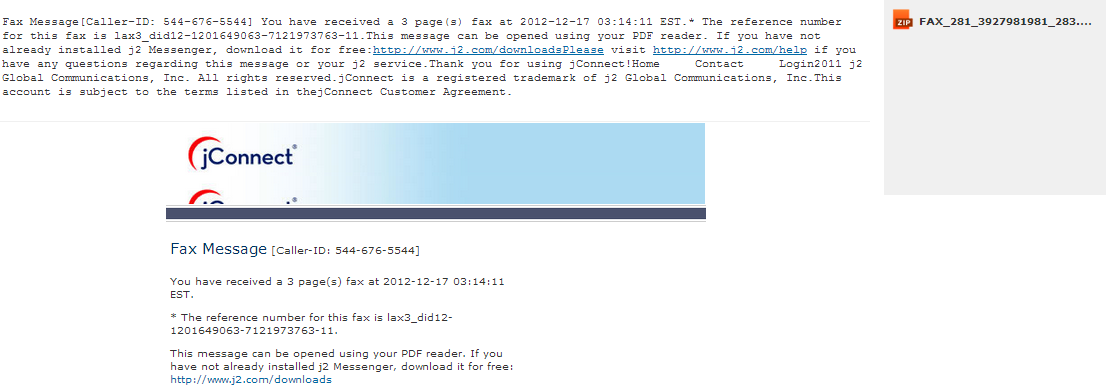
There are many email/phishing scams concerning fake fax services such as the eFax scam, but the latest one is concerning jConnect premiere fax services (j2). This latest fake jConnect email scam also known as the j2 email scam affects all internet users and seems to be more realistic than previous "fax message" email scams essentially used to infect a computer system with a malicious payloads, because the fake jConnect email sent by scam artists may contain real-clickable links that direct to legitimate and safe websites and non-clickable text fabricated to appear as a link that will not display a suspicious and contradicting URL if hovered over.

Read article
Search Engine Optimization 3 min read

Email Scam: HP Scan – HP Digital Device – HP Digital Sending device (email spam)

One of the latest email scams is the HP Scan scam, otherwise known as the HP Digital Device, fake HP email, and HP Digital Sending device scam. The HP Scan scam is a fake email sent from a fraudulent email address usually associated or linked to the recipient's email address, such as fakename@yourdomain.com, HP_Printer@yourdomain.com, HP_Printer@gmail.com and others masked as HP Digital Device or HP Support. The fake HP Scan email engages in social engineering by pretending to be a legitimate source, in this case Hewlett Packard, or the Hewlett Packard Digital Sending services, and attempts to persuade victims to download an attached file such as a zip file titled HP_Scan_06292013_398.zip, in order to infect the victims computer with dangerous computer viruses and malware.

Read article
Search Engine Optimization 2 min read

How to add iframe busters to your website’s server (List of all iframe buster files)

Iframe busters or stub files are commonly utilized by third-party vendors in conjunction with<strong> Flash</strong> creatives such as <strong>media rich</strong> advertisements that are served within an ad slot implemented in an iframe. You may have noticed visitors to your website visit a page on your website that does not exist ending in /eyeblaster/addineyev2.html, /doubleclick/DARTIframe.html, /atlas/atlas_rm.htm, and many others. These pages often results in a 404 error. <img class="size-full wp-image-41081 " alt=" /eyeblaster/addineyev2.html" src="http://botcrawl.com/wp-content/uploads/2013/06/eyeblaster-addineyev2-html.png" width="328" height="25" /> If this is the case, you may need to upload an "iframe buster" into the root of your website's server at the following location: www.example.com/vendorname. Iframe busters or stub files are provided by 3rd-party ad servers and media creative vendors.

Read article
Search Engine Optimization 3 min read

Email Phishing Scam: Fake PayPal Receipt for your PayPal payment email spam posing as Service@paypal.com

Be on the alert for fake emails posing as PayPal from sender: service@paypal.com with the subject line similar to Receipt for your PayPal payment to Luiz Mariotto. These fake PayPal receipt emails are a sent by cyber criminals, not PayPal, and clicking links contained in the fake PayPal receipt email may install malware to the computer system, in particular spyware used in severe forms of cyber crime such as credit theft, extortion, and identity theft.

Read article
Search Engine Optimization 2 min read

Facebook Scam: “I saw this product on the Dr. Oz show” Comment Spam

You may have noticed a lot of spam comments on Facebook concerning a product someone saw on the Dr. Oz show. The comments suggesting this fake Dr. Oz product may also contain links that may impersonate a Facebook page or suggest that the Dr. Oz comment is linked to a legitimate Facebook page even though the link is not. Clicking the link in the fake Dr. Oz comments is very dangerous and may cause a Facebook account to become hijacked, in which the account is then used to spread additional spam comments, or install malware to a computer system. "I saw this product on the Dr. Oz show a few days ago and was amazed at the results. Today is my 8th day being on the program and I am 11lbs down!!:) I just want others to know when something works. Good luck to you all! "

Read article
Search Engine Optimization 3 min read

Email Phishing Alert: Fake AT&T Customer Care “Your AT&T wireless bill is ready to view” email spam

Be on the look out for fraudulent emails sent by cyber criminals, attempting to disguise as AT&T in order to persuade unsuspecting victims to click links contained in the fake AT&T Customer Care email. The dangerous email contains links that initiate the installment of malware, including spyware and Trojans, or direct the victim of the phishing attack to unwanted websites that may contain additional malware, or promote the victim click-through links in order to generate an unethical revenue stream via third party platforms and programs.

Read article
Search Engine Optimization 5 min read

Malware Phishing Alert: Fake “Payment Confirmation” Email Spam

Cyber criminals behind the fake Payment Confirmation email utilize malicious black hat tactics including email phishing, in which the attackers send fraudulent email messages to their victims in attempt to persuade them to click malicious links or download malicious files in order to infect a computer system with malware, such as spyware and Trojans that are used to collect sensitive information, including credit card numbers and identification information, and minuscule data such as browser activity and browser history (in order to accommodate a potentially undetected adware campaign).

Read article
Search Engine Optimization 3 min read

Fake “Join My Network On LinkedIn” Email Spam Leads To Malware

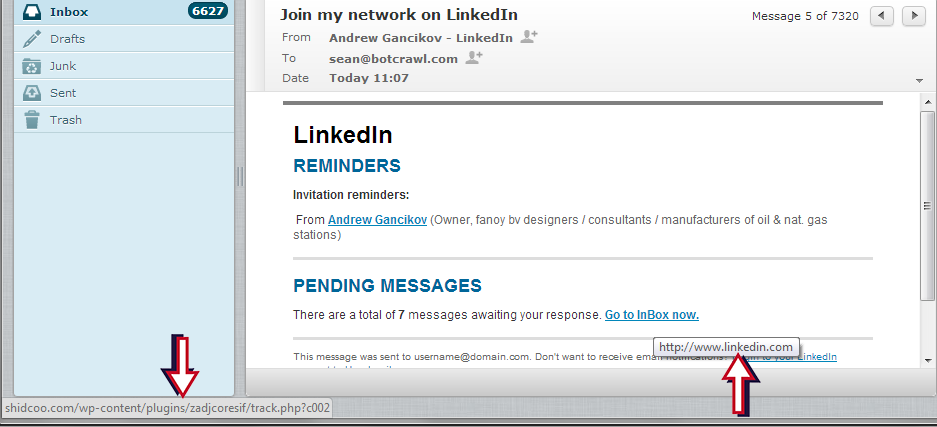
Fake LinkedIn emails are not out of the ordinary, but a new series of dangerous emails disguised as LinkedIn have been making rounds to unsuspecting LinkedIn users. The emails seem very real, as the subject line is "Join my network on LinkedIn" alike legitimate LinkedIn emails notifying users of new or pending invitations. The fake LinkedIn email contains an invitation to join a fake person's network on LinkedIn, as well as displays fake pending messages, and links to login to your LinkeIn account or Unsubscribe to email updates.

Read article
Search Engine Optimization 1 min read

How To Customize The Font Color Of Text In The WordPress Jetpack Plugin Infinite Scroll Footer (Theme Name, Credits)

How to change the color of text in Jetpack's Infinite Scroll footer. By default the Infinite Scroll footer displays text such as the WordPress website's credits, theme, and title in black. This can be changed in the WordPress Jetpack plugin editor's css file for the Infinite Scroll option but is much easier and more so suggested to do so using simple custom CSS.

Read article
Search Engine Optimization 21 min read

How To Add A Scroll To The Top Of The Page Link On The Jetpack Infinite Scroll Footer (WordPress Jetpack Plugin)

Give your WordPress website visitors the option to scroll back to the top of the page via Infinite Scroll footer link. As stated in a previous article about removing the credits from the Infinite Scroll footer, as of November 10th, we use the new Jetpack 2.0 Infinite Scroll feature and give our website visitors the option to scroll to the top of the page via a simple text link with an arrow (↑) . Here's how to DIY.

Read article
Search Engine Optimization 20 min read

How to remove Infinite Scroll credits on Jetpack

Remove "Proudly powered by WordPress" and your theme name credits in the Infinite Scroll Jetpack Plugin feature. Locate the jetpack/modules/infinite-scroll/infinity.php file and remove footer credits. Infinite scroll takes away the “next page” or “older posts” links in category and tag page feeds allowing website visitors to infinitely scroll and load new posts via scrolling down the page.

Read article