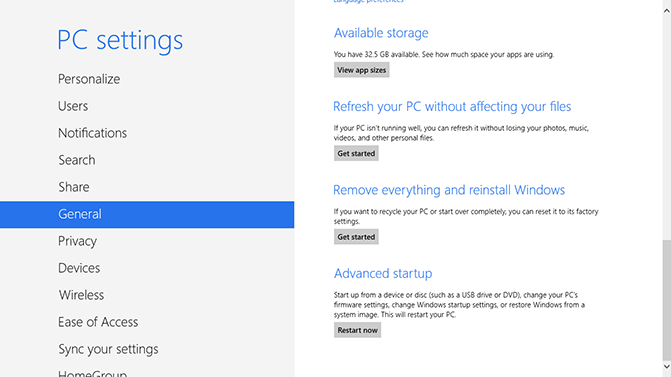
Windows 10 refresh and reset options allow you to restore your computer to factory settings with or without existing personal files. Refreshing Windows 10 will allow you to remove programs that were introduced to your computer without affecting your personal files and resetting Windows 10 will allow you to remove everything and reinstall Windows 10; essentially resetting everything to factory settings.
Windows 10 is very similar to Windows 8.1 so when it comes to refreshing or resetting so there is not much difference if you are used to Windows 8.1. A simple way to refresh or reset Windows 10 is to search for the terms “refresh” or “reset” on the start screen or search feature.
How to refresh or reset Windows 10
1. Click the Windows icon on the bottom left of the tray menu and go to settings > Update & Security > Recovery
2. Find the “Reset this PC” section and click Get Started
- Windows 11 and Microsoft Edge Hacked at Pwn2Own Berlin 2026 Using Chained Zero-Day Exploits
- Microsoft Warns of Exchange Zero-day Flaw Exploited in Attacks
- How to Remove the “Drop Here to Share, Move, or Do More” Popup in Windows 11
- Microsoft Confirms Windows 11 Shutdown Bug After January Update
- Manus AI Is the First Agent That Can Read Your Files Through Windows’ New Agent Connector
WordPress Bot Protection
Bot Blocker for WordPress
Monitor bot traffic, review live activity, and control AI crawlers, scrapers, scanners, spam bots, and fake trusted bots from one clean WordPress dashboard.
Sean Doyle
Sean is a tech author and security researcher with more than 20 years of experience in cybersecurity, privacy, malware analysis, analytics, and online marketing. He focuses on clear reporting, deep technical investigation, and practical guidance that helps readers stay safe in a fast-moving digital landscape. His work continues to appear in respected publications, including articles written for Private Internet Access. Through Botcrawl and his ongoing cybersecurity coverage, Sean provides trusted insights on data breaches, malware threats, and online safety for individuals and businesses worldwide.


2 Comments
My Toshiba laptop will not let me do anything, it is just showing a C0000022 error and just keeps trying to turn on or boot up.
You can usually enter in safe mode to check for issues or perform a reset or recovery: http://botcrawl.com/fatal-error-c0000022/