Antiviral Factory 2013
The Antiviral Factory 2013 virus is a term used to describe malware categorized as scareware in the Rogue.WinWebSec family. Antiviral Factory 2013 is essentially a fraudulent Microsoft Windows Antivirus/Antispyware program that performs fake systems scans, displays fake scan results and security alert messages, and causes many problems for computer users. Antiviral Factory 2013 is rogue software that is primarily spread via Trojan horses. This fake program may terminate legitimate software used to eradicate it.

Once Antiviral Factory 2013 is installed the fake Antivirus program will start when a user logs into Windows. It will begin to perform a fake system scan that will result in numerous infections and system issues. The total amount of infections may be in the hundreds. The results displayed are not accurate and is done in order to scare victims to purchase the full version of Antiviral Factory 2013. ANTIVIRAL FACTORY 2013 IS FAKE. DO NOT PURCHASE. Do not give your purchase information to cyber criminals. Antiviral Factory 2013 may claim to remove malicious (but fake) scan results and will attempt to persuade victims of the infection get full real-time protection with Antiviral Factory 2013 by purchasing an extended license or updating the product.
Fake warnings displayed by Antiviral Factory 2013 malware are detailed below and should be ignored:
Warning: Your computer is infected
Detected spyware infection!
Click this message to install the last update of security software...

Security Monitor: WARNING!
Attention! System detected a potential hazard (TrojanSPM/LX) on your computer that may infect executable files. Your private information and PC safety is at risk.
To get rid of unwanted spyware and keep your computer safe your need to update your current security software.
If Antiviral Factory 2013 is installed on your computer remove the infection using our free Antiviral Factory 2013 removal steps further below. If you have purchased the fake software, please contact your credit card company or the correct institution to dispute the charge and go over other safety precautions.
Cyber crimes relating to Antiviral Factory 2013 and similar software include credit theft, extortion, and identity theft.
How does Antiviral Factory 2013 malware infect a computer?
Antiviral Factory 2013 primarily installs to a computer system without consent, often via Trojan horses and exploit kits. The Antiviral Factory 2013 virus may be contracted from compromised (hacked) websites, websites that hosts malware, by clicking malicious links contained in advertisements, email spam, and social media content, and more.
Antiviral Factory 2013 malware can also intrude a computer system alongside third-party downloadable content such as freeware, shareware, media codecs, and even torrent downloads.
 How to remove Antiviral Factory 2013
- Automatically remove Antiviral Factory 2013 – Scan for and automatically remove Antiviral Factory 2013 malware
- Manually remove Antiviral Factory 2013 – Remove/Uninstall Antiviral Factory 2013 and third-party malware if allowed
1. Automatic Antiviral Factory 2013 removal
Use the instructions below to automatically remove Antiviral Factory 2013 scareware and third-party malware.
Malwarebytes Anti-Malware
The free and full versions of Malwarebytes will detect and remove Antiviral Factory 2013 malware.
Botcrawl may earn a commission from purchases made through links in this article.
1. Install the free or paid version of Malwarebytes Anti-Malware.


2. Once Malwarebytes is installed, run the program. If you are using the free version of Malwarebytes you will be prompted to update the database, make sure to do so.
3. On the first tab labeled “Scanner” select the Perform full scan option and click the Scan button to perform a full system scan. Malwarebytes will automatically detect Antiviral Factory 2013 and third-party malware infecting the computer system.

4. Once the malware scan is complete, Malwarebytes may prompt a notice stating malicious objects were detected. Select the malicious objects and click the Remove Selected button to completely remove the malicious files from your computer (the image below shows a file that is NOT selected) or click the Delete button to remove quarantined files.

CCleaner
CCleaner can be used to automatically repair internet browser settings startup up settings, and uninstall stubborn Antiviral Factory 2013 software.
1. Install the free or paid version of CCleaner by Piriform.

2. Once installed, open the program and navigate to Cleaner > Windows/Applications and click the Analyze button. Afterwards, click the Run Cleaner button on the bottom right of the program interface.
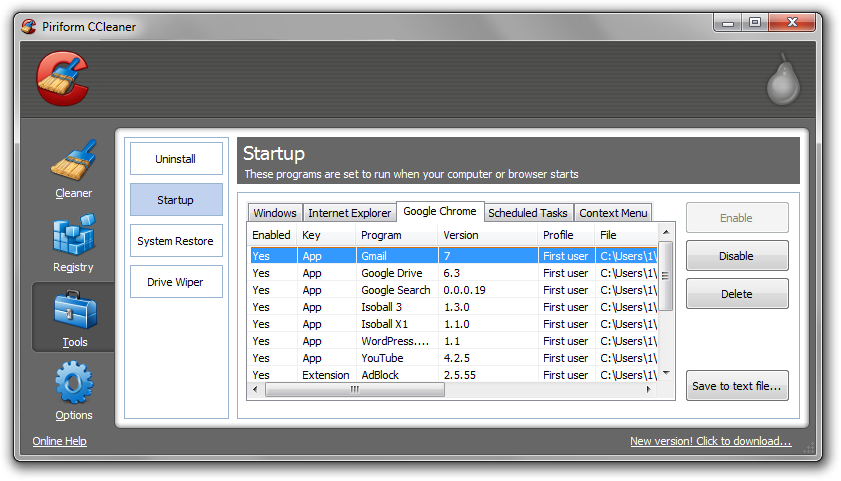
3. Next, navigate to Tools > Startup and search through each tab starting from windows, internet explorer, etc., all the way to Content Menu, for additional suspicious entries and click Disable and Delete once anything is found. Something to look for might include the title “Antiviral.”
4. To automatically uninstall Antiviral Factory 2013 and unwanted programs, navigate to the Uninstall tab and located Antiviral Factory 2013 software in the list of installed programs. Uninstall the programs as selected.
2. Manual Antiviral Factory 2013 removal
Use the instructions below to manually uninstall Antiviral Factory 2013 using generic removal procedures, as well as third-party malware that may have installed alongside rogue Antiviral Factory 2013 software.
How to uninstall Antiviral Factory 2013 (Win.Rogue)
1. Access Windows Start Menu and navigate to the Control Panel.

2. Click Uninstall a program or Add and remove a program.
3. In the list of installed programs, search for Antiviral Factory 2013 and other potentially unwanted software. Once located, double click the unwanted programs or highlight them in the list and click the Uninstall button.
Related Articles
- How to remove System Doctor 2014 (Scareware)
- How to uninstall software using CCleaner by Piriform (Troubleshoot)
- How to restore Microsoft Windows Operating Systems (XP, Vista, 7)
- How to refresh/reset Microsoft Windows 8 Operating Systems
- IDScan Data Breach May Expose 153 Million Driver’s Licenses
- Cloudflare Says Anthropic Mythos Can Chain Bugs Into Working Exploits
- DigiCert Revokes 60 Code Signing Certificates After Support Malware Incident
- cPanel Down Reports Were Linked to CVE-2026-41940 Emergency Patches
- cPanel Down for Some Users After Emergency Authentication Security Update

Related Posts