Flash Flood Warnings
How to turn off Flash Flood Warnings on an Android device.
A Flash Flood Warning is a Severe Alert that is sent to your phone at whenever an alert is necessary.

Although this can save your life, some people might want to turn off Flash Flood Warnings on their Android devices. For example, someone might have more than 1 Android device and the Flash Flood Warnings might be overwhelming at times.
Turn Flash Flood Warnings off or on
1. Go to Messages (In newer Android devices you can swipe down to pull up the App screen. On later devices you can go to Apps.).
2. Tap the 3 dots icon in the top right.

3. Tap Settings and go to Emergency alert settings.
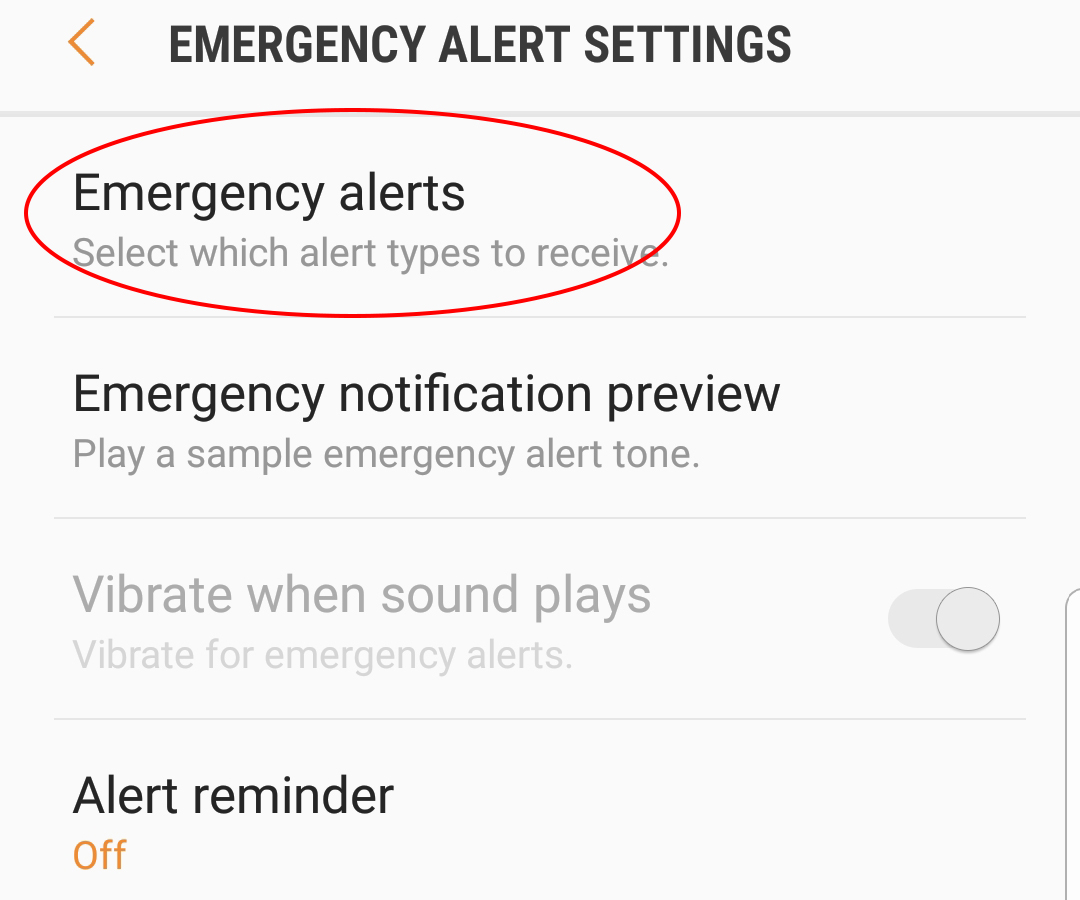
4. Tap Emergency alerts to enter the EMERGENCY ALERTS menu.

5. Clear the check box for Severe Alert to turn Flash Flood Warnings off.
To turn Flash Flood Warnings back on use the same instructions.
- UK Government Wants to Restrict Phones Unless Adults Prove Their Age
- Google Health Shows Where Big Tech Wants Wellness to Go
- Foldable iPhone Design and Release Details Leak Online
- Kimwolf Android Botnet Exploits Residential Proxies to Breach Internal Networks
- DroidLock Malware Locks Android Phones and Demands Ransom

Related Posts