cPanel Scam Emails Target Website Owners After CVE-2026-41940 Emergency Patches
cPanel scams have been on the rise following cPanel down reports in late April that were tied to security work around CVE-2026-41940, a critical cPanel and WHM authentication issue that reportedly left over 40,000 servers compromised.
Around April 28, 2026, cPanel experienced problems related to the security issue and provided security updates throughout the process, urging administrators to update immediately. Server owners were told to run the cPanel update script and confirm the installed version afterward by using the /scripts/upcp --force command. Customers on shared hosting servers were not required to update cPanel themselves because the hosting provider usually controls that process.
Some servers were patched too late, leaving them exposed. After the emergency patch cycle, fake cPanel emails started appearing more aggressively, targeting website owners, administrators, and users who may have recently seen cPanel outage messages or heard about cPanel security issues.
Following the cPanel incident, scammers began sending fake cPanel email messages that claim action is required. These messages may appear to come from cPanel, a hosting provider, a server administrator, or even an email address on the victim’s own domain.
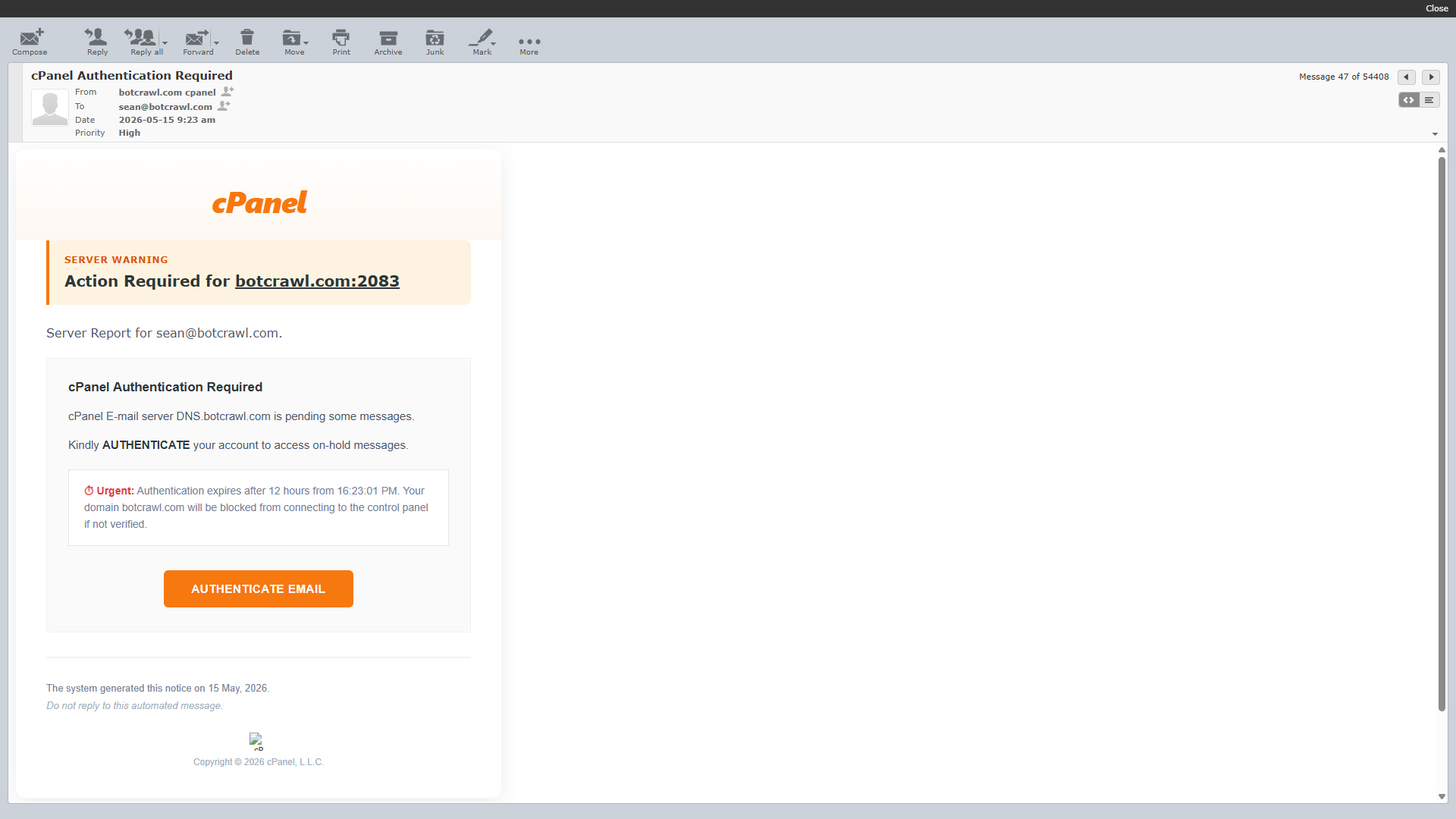
In one fake cPanel email sent to me, the scammers claimed to be cpanel@botcrawl.com. That email address does not exist. I own botcrawl.com, and no legitimate cPanel account or system message was sent from that address.
This is a spoofing tactic. The email is made to appear as if it was sent from cPanel or from the recipient’s own domain, such as cpanel@example.com. For website owners, that can make the message look believable at first glance, especially if they are already familiar with cPanel, WHM, Webmail, or hosting account alerts.
Although these emails may appear to come from a legitimate source, they are not legitimate cPanel messages. They are scams designed to scare users into clicking malicious links and entering login credentials on fake websites.
How The cPanel Scam Works
The fake cPanel email messages usually claim that immediate action is required. The goal is to make the target click a link before they stop and inspect the message properly.
In most cases, the links lead to phishing websites designed to steal cPanel login credentials, email account passwords, Webmail access, hosting account information, or other personal data. Some links may also lead to malware, fake file downloads, survey scams, or pages that try to collect contact and payment information.
Fake cPanel email messages may use different subjects, but most of them rely on the same basic scare tactics. They usually claim that an account is blocked, messages are pending, disk space is full, or verification is required.
- You received an encrypted message and need to verify your account before you can view it.
- Critical disk usage is high and access to the “Email Disk Usage” tool is required to prevent account suspension.
- A new sign-in or account access attempt from an unrecognized location needs to be reviewed.
- IT needs to verify your email address to avoid account suspension.
- Your email password is set to expire on a certain date and you will not be able to send email.
- The cPanel email server for your domain is holding pending messages and you must authenticate your email account.
Here is a full example of a fake cPanel email message I received many times:
Subject: cPanel Authentication Required
From: botcrawl.com cpanel

cPanel

Server Warning

Action Required for botcrawl.com:2083
Server Report for sean@botcrawl.com.

cPanel Authentication Required
cPanel E-mail server DNS.botcrawl.com is pending some messages.

Kindly AUTHENTICATE your account to access on-hold messages.

⏱ Urgent: Authentication expires after 12 hours from 17:44:52 PM. Your domain botcrawl.com will be blocked from connecting to the control panel if not verified.

Authenticate Email

The system generated this notice on 16 May, 2026.

Do not reply to this automated message.

cP
Copyright © 2026 cPanel, L.L.C.

Open
Download
This message claimed to be sent from cpanel@botcrawl.com, but that email address does not exist. This email message and others like it are confirmed scams. If you receive one, ignore it, report it, and do not click the links because the last thing you want is a scammer with access to your email account, hosting account, or cPanel login.
The next fake cPanel email example targets website administrators who manage email accounts through cPanel. It uses a fake disk usage warning and claims that account suspension is possible if the user does not click the link.
Subject: [SPAM] Security Patch: Identity Verification Required for sean@botcrawl.com| Alert ID: U54SYR9
From: cPanel Network Security

CPANELSystem Emеrgency: SMTP Relay Blocked — U54SYR9 "sean@botcrawl.com ".

The hosting disk quota for "sean@botcrawl.com" has reached its ϲritical limit. vv6a0dbu

Critical Disk Usage: 91.84% (459.20 MB/500 MB) used. Access to the 'Email Disk Usage' tool is required to prevent account suspension. Reference ID: U54SYR9ekFvo

Secure My Hosting Account
Your system administrator can also expand your mailbox allocation if needed.HUjUZpdV

Copyright © 2026 cPanel, L.L.C. & WHM. System Node: U54SYR9.YG0DY

To turn off these notices, update your settings in cPanel: Manage Alert PreferencesvYzoP

Replies to this address are not dеlivered. Use your control panel for support.

&nbsρ;
Copyright © 2026 cPanel, L.L.C. All rights reserved.
In the email example above, the subject contains “[SPAM],” which likely appeared because the message was detected as spam by the mail system. In some versions, the “[SPAM]” text does not appear in the subject line.
The message uses fake urgency, strange spacing, random strings, and suspicious wording to make the alert look automated. It also includes a call to action that tries to push the recipient toward a malicious link.
There is a wide range of fake cPanel email messages circulating globally, and many use different scare tactics to manipulate website owners and administrators.
The timing is important. After the cPanel outage reports and CVE-2026-41940 emergency patching, more website owners became aware of cPanel security problems. Scammers appear to be capitalizing on that moment by sending messages that reference account access, authentication, server warnings, disk usage, pending messages, and control panel access.
Website owners, developers, and hosting customers should be especially careful when opening emails related to cPanel, WHM, Webmail, disk usage, mailbox storage, password expiration, account suspension, or server authentication. A fake message may look routine, but one stolen cPanel login can give attackers access to website files, email accounts, databases, redirects, DNS tools, and other hosting features.
If you submitted your information to a fake cPanel login form, act quickly. The goal is to lock scammers out before they can use the stolen credentials.
Botcrawl may earn a commission from purchases made through links in this article.
- Change your cPanel password immediately. Log in by typing your hosting provider’s official website into your browser, not by clicking a link in the email. If you cannot find the password option, contact your hosting provider and ask them to reset your cPanel password.
- Change the password for the email account that received the fake message, especially if you entered that email address or password on the phishing page.
- Change passwords for other email accounts managed through cPanel if you believe the hosting account may have been exposed.
- Change FTP, SFTP, SSH, database, and CMS administrator passwords if the same password was reused or if the attacker may have accessed your hosting account.
- Enable two-factor authentication for cPanel, WHM, Webmail, your hosting account, and your email account if available.
- Review cPanel email accounts, forwarders, filters, FTP users, redirects, cron jobs, and file manager activity for anything unfamiliar.
- Check your website files for new unknown files, modified files, injected code, suspicious redirects, or unfamiliar administrator accounts.
- Scan your device with Malwarebytes to locate and remove malware that may have been downloaded after clicking the fake link.
- Contact your hosting provider and tell them you may have entered credentials into a fake cPanel phishing page. Ask them to review recent login activity and suspicious changes.
- Report the phishing email as spam or phishing in your email client, and forward it to your hosting provider if they ask for examples.