Epic Scale
Epic Scale (also found as EpicScale) is a cryptocurrency miner that can cause catastrophic issues for computer users. Epic Scale uses CPU cycles to mine cryptocurrency such as Bitcoins and can cause computer blowouts and other damages, such as overheating due to intensive use of graphics cards or chips, or any slowing of your processing speed.

Epic Scale malware is commonly contracted while installing freeware such as uTorrent. Users may be given the choice to accept or decline an offer to install Epic Scale and other program during the setup process of third-party freeware; However, many claim that Epic Scale is silently installed without consent or knowledge.
Epic Scale is often referred to as the Epic Scale virus, but this item is not technically defined as a computer virus. It does share many of the same characteristics as common computer viruses, for example, it can not be easily uninstalled using manual procedures. It doesn’t show up in the list of installed programs.
Many analysts and users claim that Epic Scale can be used to steal money and observe personal data.
Furthermore, if Epic Scale is on your computer or if you recently installed software such as uTorrent, it is likely that there are additional potentially unwanted program, malware, and malicious threats on your computer as well. In order to remove Epic Scale and stop all unwanted activities it may be necessary to uninstall multiple programs and remove multiple browser attachments.
How to remove Epic Scale
- Step 1: Remove unwanted add-ons and extensions
- Step 2: Uninstall unwanted software
- Step 3: Scan your computer for Epic Scale malware
- Step 4: Cleanup and repair settings
- For Tech Support Call: 1-866-521-2427
Step 1: Remove unwanted add-ons and extensions
Google Chrome
1. Click on the Customize icon on the menu and navigate to More tools > Extensions.
2. Search for unwanted extensions in the list. Remove unwanted browser extensions individually by clicking the trashcan icon next to each one.
Mozilla Firefox
1. Type Ctrl+Shift+A.
2. On the Extensions and Plugin search for unwanted add-ons and remove them if located.
Step 2: Uninstall unwanted software
1. Access Windows Start Menu and navigate to the Control Panel.
2. On Windows Control Panel, click Uninstall a program or Add and remove a program in the Programs section.

3. In the list of installed programs, search for unwanted programs. Once an unwanted program is located, double click the unwanted program or select it with your mouse and click the Uninstall button.
4. Restart your computer.
Step 3: Scan your computer for Epic Scale malware
1. Download and install the free or full version of Malwarebytes Anti-Malware. The full version enables real-time protection to block malware and unwanted programs from infecting your computer, while the free version is just a free scan and removal tool.


2. Open the Malwarebytes Anti-Malware.

3. Click the large Scan Now button or visit the “Scan” tab to manually run a scan.
4. Once the malware scan is complete, click the Quarantine All button and reboot your computer.
Step 4: Cleanup and repair settings
1. Download and install the free or full version of CCleaner by Piriform.

2. Once installed, open the program and navigate to Cleaner > Windows/Applications and click the Analyze button. Afterwards, click the Run Cleaner button on the bottom right of the program interface.
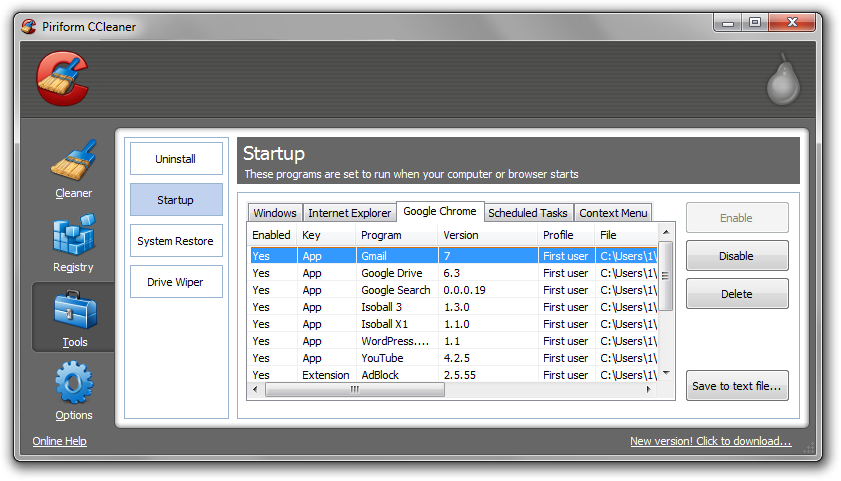
3. Next, navigate to Tools > Startup and search through each tab starting from windows, internet explorer, etc., all the way to Content Menu, for additional suspicious entries and click Disable and Delete once anything is found.
4. To automatically uninstall unwanted programs using CCleaner, navigate to the Uninstall tab and search for the program in the list of installed programs. Uninstall the unwanted software as selected by clicking the Run Uninstaller button.
- Cloudflare Says Anthropic Mythos Can Chain Bugs Into Working Exploits
- DigiCert Revokes 60 Code Signing Certificates After Support Malware Incident
- ClickUp Data Leak Shows $4B Came Before Customer Security for Over a Year
- Fast16 Malware Targeted Microsoft Windows Engineering Software Before Stuxnet
- eBay DDoS Claim Follows Marketplace Outage Reported by Users

Related Posts