Writers, bloggers, and students who use ChatGPT often run into the same frustrating issue: the system will not stop inserting em dashes into text. Even if you clearly instruct it to avoid them, it will follow the command for a short time and then eventually return to its default habit of overusing them. This pattern has become one of the most recognizable signals that a piece of content was written with AI, and for many people it has turned into a serious problem that wastes time and affects credibility.
Em dashes are not part of standard human writing. They do not exist as a key on the keyboard, they are rarely used in everyday journalism or blogging, and most writers choose commas, periods, or parentheses instead. Because of this, heavy reliance on em dashes stands out immediately. Readers notice when text feels unnatural, and editors, search engines, and academic reviewers often see it as an indicator of AI-generated content. For professionals, students, and creators who depend on polished writing, this habit can ruin hours of work and even trigger penalties on platforms such as Google or YouTube.
This article explores why ChatGPT overuses em dashes, why it refuses to stop even after repeated instructions, and why the problem matters for anyone creating content. It will also cover how the behavior can hurt SEO, credibility, and academic trust, and what steps users can take to reduce the damage, demand better control from OpenAI, or even request a refund if the tool consistently fails to meet expectations.
Table of Contents
- What Are Em Dashes?
- Why ChatGPT Overuses Em Dashes
- How Em Dashes Create Problems for Users
- SEO and Platform Risks
- Why Students and Academic Writers Are Affected
- Evidence and User Complaints
- How to Fix or Work Around the Problem
- Refunds and OpenAI Accountability
- Key Takeaways
What Are Em Dashes?
The em dash (—) is a punctuation mark that is different from both the hyphen and the en dash. A hyphen (-) is used to connect words such as “real-time,” “well-known,” or “long-term.” The en dash (–) is often used to show ranges, for example “2010–2015” or “pages 10–20.” The em dash, by contrast, does not appear on a standard keyboard and is almost never used in everyday writing.

Typing one requires shortcuts. On Windows you must press Alt + 0151 on the numeric keypad. On a Mac the command is Option + Shift + Hyphen. Some programs convert two typed hyphens into an em dash, but that is a formatting feature rather than something people actually choose to do. Commas, parentheses, and periods handle the same work more naturally, which is why they are what people rely on.
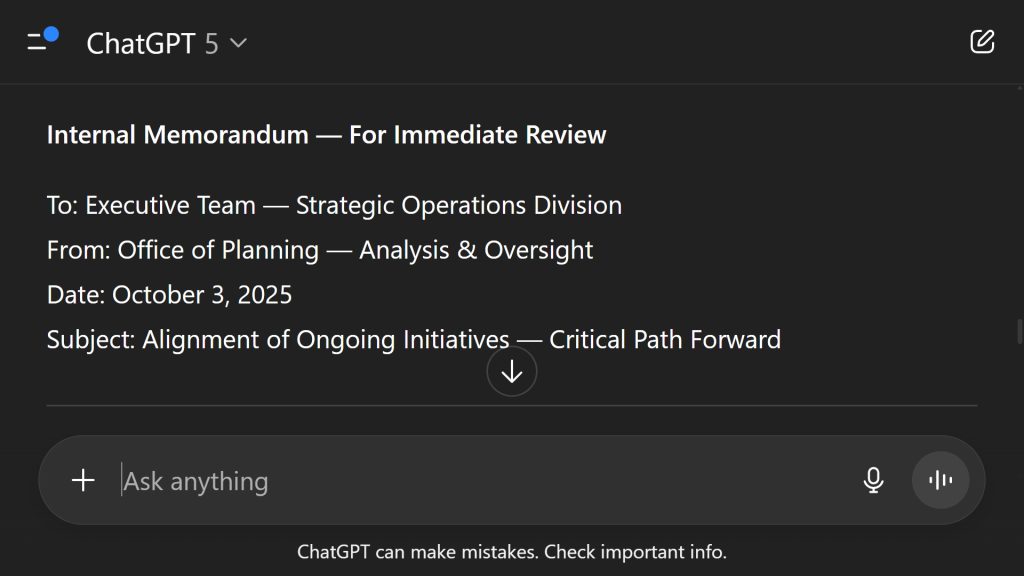
When it does appear, the em dash is usually used to set off additional information in a sentence or to replace other punctuation. For example: “The results—which were unexpected—changed everything.” In fiction it can also be used to mark an interruption in dialogue, as in: “I was going to tell you, but—” before the line cuts off. These are niche uses tied to style guides, not the way people normally write.

This is exactly why ChatGPT’s reliance on the em dash is such an issue. Human writers rarely use it, yet the system inserts it constantly. When you see em dashes scattered throughout an article, essay, or blog post, it becomes a clear sign that the content was generated by AI and not by a person typing naturally.
Why ChatGPT Overuses Em Dashes
One of the most frustrating habits of ChatGPT is that it uses em dashes constantly, even after being told not to. Users can give direct instructions to avoid them, and the system may follow for a short time, but eventually the em dashes creep back in. This happens so consistently that it has become one of the most reliable markers of AI-generated content.
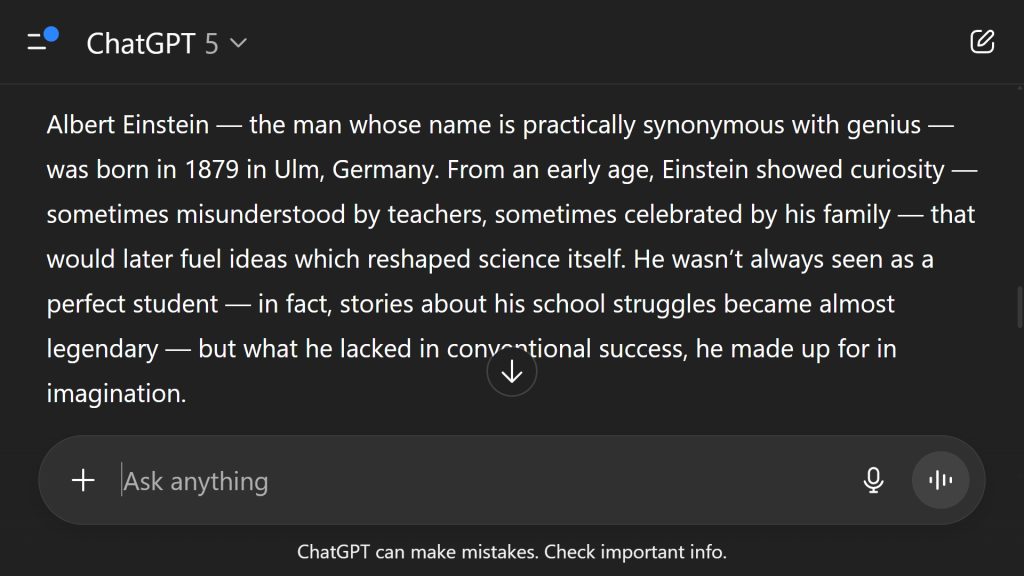
The reason lies in how ChatGPT was trained. The model was built on a massive collection of text from books, articles, websites, and academic papers. In those sources, em dashes appear more often than in real-world everyday writing, because style guides and edited publications sometimes allow or even encourage them. The AI learned that this punctuation was common, and now it reproduces the habit automatically, even though the average person rarely uses it.
Another reason is that ChatGPT treats the em dash as a shortcut for sentence variety. Instead of choosing commas, colons, or parentheses, it inserts an em dash to break up the rhythm. To the model, this looks polished. To readers, however, it feels unnatural. The overuse signals immediately that the text was not written by a human who typed it out, but by a system trained to mimic style without understanding how people actually write.
This is why em dashes have become such a problem for users. You can waste hours cleaning them out of a draft, only to have new ones appear in the next section. For students, journalists, bloggers, or professionals, that means extra editing time, frustration, and in some cases financial loss if deadlines are missed or if the content is flagged as AI-generated.
Most importantly, the obsession with em dashes is not a bug that can be fixed with a subscription or an upgrade. Paying for ChatGPT Plus does not make the system use them less. It is a core behavior baked into how the model was trained, and it continues to frustrate anyone who needs authentic-looking text. That is why so many users see em dashes not just as punctuation, but as proof that their work was written by AI.
How Em Dashes Create Problems for Users
For many people who rely on ChatGPT, the constant use of em dashes is more than a style annoyance. It creates problems that waste time, damage credibility, and in some cases cost money. Writers, bloggers, journalists, students, and professionals all run into the same issue: no matter how clearly you instruct ChatGPT to avoid them, the system eventually slips back into inserting em dashes. Cleaning them out of drafts becomes a repetitive chore that should not exist in the first place.
The most immediate problem is wasted time. Instead of focusing on editing content for quality, tone, and accuracy, users often find themselves searching for em dashes and replacing them with commas, periods, or parentheses. A large article may contain dozens of them, which turns quick cleanup into hours of unnecessary work. For users paying for ChatGPT with the expectation of saving time, this undermines the value of the tool completely.
Another issue is credibility. Readers and editors notice when writing feels unnatural. A blog post or article filled with em dashes does not look like something typed by a person on a keyboard. It looks automated. Once an editor, teacher, or reviewer sees the pattern, they are likely to suspect AI involvement even if the content itself is well written. For students and professionals, that suspicion can cause real harm.
The habit also disrupts workflow. Content creators who use ChatGPT for drafts or outlines often find that the writing looks stiff and requires heavy rewriting before it can be used. Instead of improving efficiency, the AI creates extra friction in the process, making deadlines harder to meet. For freelancers, marketers, and journalists, that can directly affect income and trust with clients.
There is also the problem of frustration. Many users describe feeling like they are fighting against the tool instead of working with it. They give clear instructions, see temporary compliance, and then watch the system fall back into the same habit. That cycle makes people question why they are paying for a subscription if they have to spend hours rewriting large parts of the text anyway.
These problems show why the overuse of em dashes is not a minor complaint. It is an obstacle that affects productivity, professionalism, and trust. For most users, the punctuation itself is not the issue. The real problem is the wasted time, the lost credibility, and the extra work required to make AI-generated text look like it came from a real person.
SEO and Platform Risks
The way ChatGPT uses em dashes can also create problems for anyone who relies on search engines or publishing platforms for visibility. Search algorithms are designed to reward natural, human-like writing. When text is filled with unusual punctuation that real writers rarely use, it stands out. Overuse of em dashes has become one of the clearest signs that content was produced by AI, and that can hurt rankings, reach, and even monetization opportunities.
For bloggers and website owners, this directly affects SEO performance. Google’s systems look for patterns that suggest quality and authenticity. Articles overloaded with em dashes look robotic and can be flagged as low-quality or machine-written, even if the ideas are original. This can mean lower placement in search results, fewer clicks, and reduced ad revenue. For sites that depend on traffic, that is a serious cost.
On YouTube and similar platforms, the risk shows up in descriptions, titles, and metadata. A video description that includes em dashes throughout can look unnatural and spammy. Since YouTube measures viewer trust and engagement when deciding how to promote videos, anything that signals automation can reduce reach. This is especially important for creators who rely on search optimization in their titles and descriptions to attract an audience.
Even social platforms are affected. Posts or captions that read unnaturally are less likely to be shared, liked, or trusted. Users scroll past when something feels “off,” and frequent em dash usage creates exactly that reaction. The content may be correct, but if it looks like AI text, readers treat it with skepticism.
These risks make it clear that the problem is not just about style. For anyone working online, credibility and discoverability matter. The more em dashes appear in your content, the higher the chance that search engines, platforms, or even human reviewers will treat it as automated writing rather than real human work.
Why Students and Academic Writers Are Affected
Students and academic writers face a unique set of problems with ChatGPT’s overuse of em dashes. In education, style patterns matter almost as much as the ideas themselves. Professors, graders, and review boards have become familiar with the habits of AI-generated text, and one of the easiest signals to spot is the constant appearance of em dashes. This means that a paper that might otherwise read well can be flagged as suspicious simply because of its punctuation.
In schools, colleges, and universities, academic integrity is taken seriously. If a professor notices unusual writing patterns, they may run the work through AI detection software. Em dashes make that process easier because they appear far more often in ChatGPT writing than in human writing. Once suspicion is raised, students can face lower grades, academic warnings, or even disciplinary action. The content itself may not be the problem, but the style gives it away.
For graduate students and researchers, the risk is even higher. Published papers are held to strict editorial standards. A draft filled with em dashes will not pass review easily and may even hurt a writer’s reputation. In fields where credibility is everything, looking like you relied on AI to do your work can be career damaging.
Even students who are using ChatGPT only as a helper, not as a replacement for their own writing, end up facing the same challenge. Cleaning out dozens of em dashes before submitting an essay or research paper takes time and creates stress. Instead of being able to focus on arguments and citations, they are stuck fixing punctuation that should not be there in the first place.
For this reason, academic environments are some of the hardest hit by ChatGPT’s em dash problem. A single style habit can turn into evidence of AI use, which means wasted effort, lost credibility, and potential academic penalties for students who simply wanted a tool to save time.
Evidence and User Complaints
The issue of ChatGPT overusing em dashes is not just a personal annoyance. It has become a common complaint across forums, blogs, and user communities. People from different backgrounds, including students, journalists, marketers, and casual writers, all describe the same experience: no matter how many times they tell ChatGPT to avoid em dashes, the system goes back to using them again. The repetition makes it clear that this is a built-in behavior, not a mistake.
On discussion boards and Q&A sites, users often share screenshots of their conversations with ChatGPT where they gave explicit instructions such as “do not use em dashes.” The tool might comply for a few paragraphs, but eventually em dashes return. This inconsistency frustrates users who are trying to produce clean, human-like writing. Many note that it ruins the flow of their work, since they have to spend extra time editing every draft to remove dozens of unnecessary dashes.
Bloggers and content creators have also voiced their frustration. Some describe losing hours of work because their drafts had to be rewritten to avoid looking AI-generated. Others point out that repeated editing lowers productivity and makes the tool feel unreliable. Paying subscribers in particular express anger, since they expect premium access to mean fewer problems, not more editing work.
Students are among the loudest voices in these complaints. In academic forums, many warn each other that professors and plagiarism checkers are starting to look for em dashes as a signal of AI use. Stories circulate of students being questioned or penalized, even when their ideas were original, simply because the writing style matched ChatGPT’s habits.
Across all of these complaints, one theme stands out: ChatGPT does not listen when told to stop using em dashes. This makes users feel powerless, as if they are fighting against the tool instead of working with it. For people who depend on clean, trustworthy writing, that behavior is unacceptable and has turned into one of the most recognizable flaws of the system.
How to Fix or Work Around the Problem
Because ChatGPT’s reliance on em dashes is baked into the way the model was trained, there is currently no way to switch it off completely. For users, this creates a frustrating cycle of extra editing and wasted time. Fortunately, there are several workarounds that can help clean up drafts and reduce the impact on your workflow. None of them are perfect, and each has trade-offs, but together they give writers practical ways to turn problematic, AI-styled text into something that looks more human and natural.
1. Use string replacement tools.
One of the fastest fixes is to use a string replacement tool to remove em dashes in bulk. There are free tools online where you paste your text and the tool automatically strips or replaces unusual characters. This can save significant time if you are working with long articles. Some desktop text editors also support regular expressions, which let you search for the em dash character (—) and replace it with a hyphen, comma, or nothing at all. For example, in JavaScript you can use:
text = text.replace(/\u2014/g, ",");
This will convert all em dashes into commas. The challenge is that not every em dash works well as a comma replacement, so the text may still need careful review to make sure it flows naturally.
2. Use Ctrl+F for manual cleanup.
If you are editing in Word, Google Docs, or most blog platforms, you can press Ctrl+F (or Command+F on Mac) to search for the em dash character and replace it one by one. This gives you more control than bulk replacement, since you can choose the punctuation that makes the most sense in context. The downside is that if your draft is long and has dozens of em dashes, this process can feel tedious and eat into valuable editing time.
3. Ask ChatGPT to rewrite without them.
Another option is to paste your draft back into ChatGPT and explicitly ask it to remove all em dashes and rewrite the text with commas, parentheses, or periods instead. While this sometimes works, it is inconsistent. ChatGPT may listen for a while, then slip back into using them again in later drafts. Still, it can save time if you only need a quick cleanup.
4. Use plain text editors.
Copying your draft into a plain text editor like Notepad (Windows) or TextEdit in plain text mode (Mac) strips formatting and makes it easier to see em dashes. From there, you can manually replace or rewrite them before pasting back into your publishing platform.
5. Disable automatic dash substitution.
Some operating systems and word processors convert two hyphens into an em dash automatically. If this setting is on, you may be adding even more em dashes without realizing it. On macOS, you can disable “smart quotes and dashes” in the Keyboard settings. In Word or Google Docs, you can turn off auto-formatting for dashes under preferences. This prevents new ones from being introduced on top of ChatGPT’s existing habits.
6. Try other AI tools.
If the issue becomes unmanageable, you may want to experiment with other AI chatbots that have different style quirks. Alternatives like Claude, Gemini, Copilot, or smaller open-source tools sometimes produce fewer em dashes. None are perfect, but if you are losing hours to cleanup, switching models may reduce the problem.
7. Always do a final review.
Even after cleaning with tools or replacements, it is important to read through the draft yourself. Automatic fixes may make sentences grammatically correct but still awkward. A quick manual polish ensures the text flows naturally and avoids giving away that AI was involved in the process.
These solutions are not elegant, but they are practical. Until OpenAI builds an option to disable em dashes completely, users will need to rely on replacements, workarounds, and manual review to keep their writing professional, natural, and trustworthy.
Refunds and OpenAI Accountability
For many paying users, the em dash problem feels like more than just a style quirk. It becomes a question of value and accountability. If you are spending money on ChatGPT Plus or enterprise-level access, the expectation is that the tool will save time, not create extra work. When users spend hours cleaning up punctuation that should not be there in the first place, it undermines the entire point of the subscription.
Some frustrated users have gone as far as requesting refunds from OpenAI, pointing out that the service does not consistently follow instructions and produces content that requires heavy rework. While refund policies vary, this highlights a larger issue: customers are paying for a product that has a known flaw, and there is little transparency about when or if it will be fixed.
Accountability also matters in terms of communication. OpenAI has been made aware of complaints about overusing em dashes, yet the behavior persists across updates. This creates the impression that user feedback is not being prioritized. For writers, bloggers, students, and professionals who rely on the tool, that lack of response feels dismissive and makes them question the reliability of the service long term.
Another concern is that upgrading to a paid plan does not reduce the issue. Users who subscribe to ChatGPT Plus often expect improvements in accuracy and control, but the habit of inserting em dashes remains unchanged. This shows that the problem is not tied to subscription tiers, but to the way the model itself was trained. Until OpenAI acknowledges and corrects the behavior, users will continue to pay for a product that introduces unnecessary obstacles into their workflow.
For those who feel that the issue has cost them significant time or money, pursuing a refund or filing a formal complaint may be a reasonable step. At the very least, it sends a signal that customers are not satisfied with paying for a service that repeatedly ignores explicit instructions. In the long run, collective pressure from users may be the only way to push OpenAI toward giving writers more control over how punctuation is handled.
Key Takeaways
Em dashes have become one of the easiest ways to spot AI writing, and ChatGPT is the main reason why. Human writers almost never use them, but ChatGPT leans on them constantly. Even if you tell it to stop, the habit comes back, and it makes any article or essay look artificial.
This creates real problems. Instead of saving time, users are stuck cleaning up drafts, replacing punctuation, and rewriting sections just to make them look natural. For students, professionals, and anyone publishing online, the overuse of em dashes hurts credibility. Teachers, editors, and platforms recognize the pattern immediately, and once they do, the content is flagged as AI-generated.
The most frustrating part is that OpenAI has not fixed it. The issue has been there for years, and nothing has changed. Correcting it would likely mean retraining the model, which takes effort the company has not shown any interest in. Until that happens, the em dash remains a clear fingerprint of ChatGPT output, and the burden stays on the user to clean it up.