What is ‘HDCP unauthorised. Content disabled’ and how to fix it? (Roku)
If you own a Roku streaming media player, including the Roku LT, Roku 2, and Roku 3 you may have experienced issues when attempting to actually make a connection to a video stream.
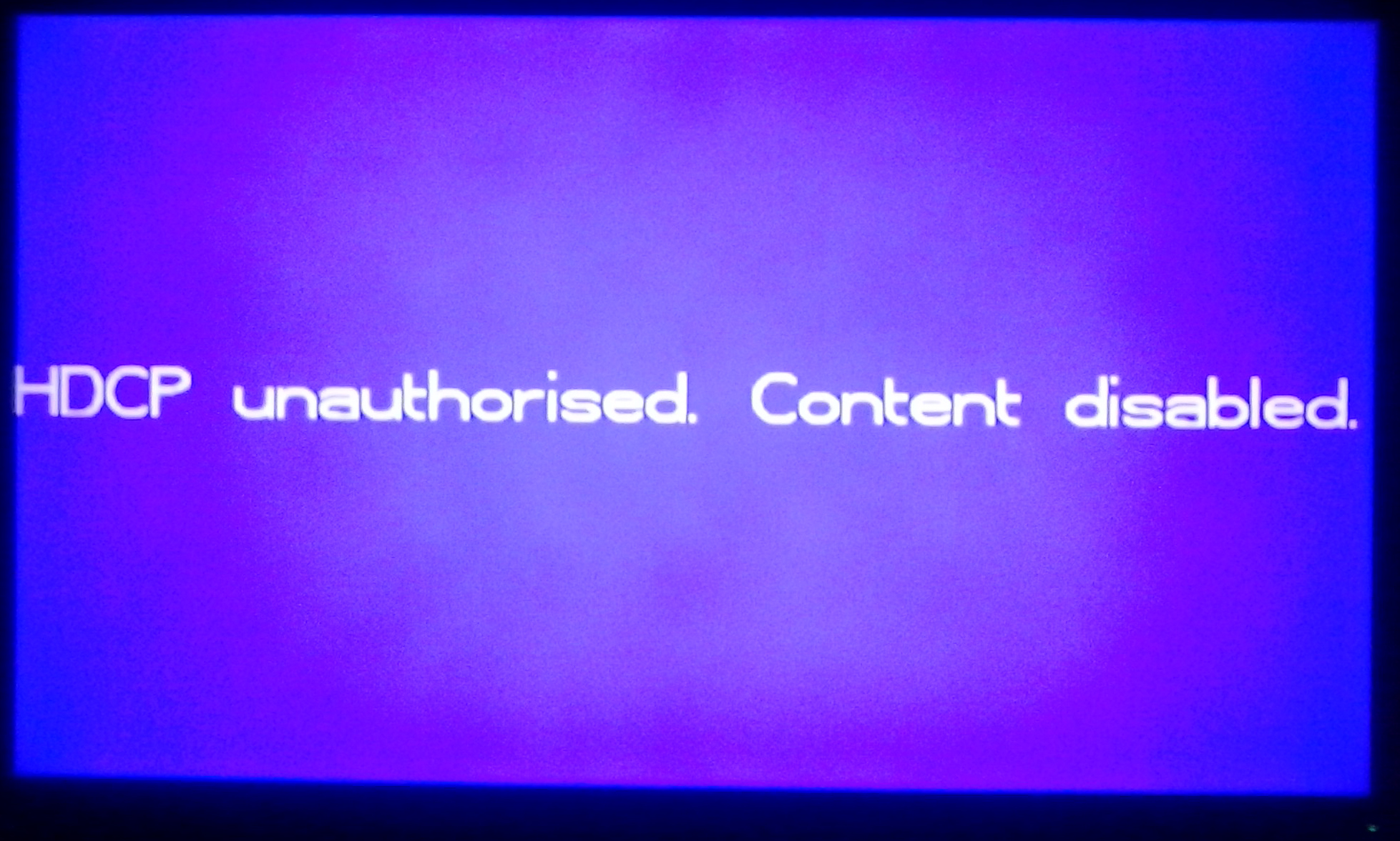
HDCP unauthorised. Content disabled
If you own a Roku streaming media player including Roku Ultra, Roku Express, Roku Premiere, Roku Streaming Stick, Roku LT, Roku 2, and Roku 3 you might have experienced issues when attempting to make a connection to a video stream and been shown a screen that says “HDCP unauthorised“.
Recently, a friend of mine plugged in his Roku 3, set up his NBA League Pass account, and attempted to view a live NBA game. However, when he tried to view the live media stream of the NBA game on the NBA Game Time channel for his Roku 3 he was not able to view the video and received an error that said “HDCP unauthorised. Content disabled.”
He was still able to hear the audio from the NBA game, but could not view the video. The video was unconventionally blocked by a purple screen that insisted that the Roku 3’s content is disabled.
My friend who regularly uses NBA League Pass suddenly became confused. He had the rights to view this content, he paid $200 to view this content, why can’t he view it?
He contacted me after a few moments and after a quick Google search I noticed that this HDCP unauthorized Roku error was not significant to NBA Game Time or NBA League Pass. Many Roku 3 users have had the same error appear when attempting to view videos on Netflix, Crackle, Amazon video, and others. The HDCP error even occurred for many users who simply want to view the Roku interface.
Once my friend contacted me about this issue I instructed him to send me a picture on his phone (above) of the Roku 3 error and check his HDMI connection. Upon inspection of his HDMI cable he discovered that it was slightly broken from his TV previously having fallen while the HDMI cable was plugged in.
He replaced the slightly damaged HDMI cable with a new one, and what do you know? The Roku 3 HDCP unauthorised – Content disabled error was complexly fixed. He was able to view content on his Roku 3 without error including the NBA Game Time app and all of the games on his NBA League Pass account.
The HDMI cable my friend was previously using was only slightly damaged. You could barely tell unless you held it right under your nose, but this cable/chord is what caused the issue and replacing it fixed this Roku error.
In other cases, the television is the issue, especially a TV with multiple HDMI ports and devices plugged into them. Some people are able to fix this issue by turning off their TVs, unplugging them, and plugging them back in to reset the signal.
It should be noted that this error is not directly related to the actual Roku Player itself.
How to fix the HDCP unauthorised Roku error
These are different solutions you can try out to fix the ‘HDCP unauthorised’ error.
- Restart your Roku by completely unplugging the machine for over 10 seconds. Remove power and unplug the HDMI cable from your screen and device.
- The issue might be with your TV and how it receives the signal from your Roku. Turn your TV off, unplug the TV, and plug it back in.
- If the above methods do not fix the error you might need to replace the HDMI cable to one that is not damaged.
I hope this helps. If you have any questions or concerns check out the comments section.


Thank you it worked immediately after I plugged it back in. thanks your the best
Thank you, Sean! We did find we had to unhook the HDMI cord from our HDMI switcher and connect it directly to the TV, then it worked fine
One more win for the good guys! Unplugged my roku, waited ten seconds and BAM, fixed. My roku is an XD and four or five years old now. Thought this wouldnt fix it up with it being an older model but its working great. THANK YOU!!
Thank you very much! I unplugged my Roku 2 and swapped out the HDMI cable just as suggested. It worked like a charm. Great and clear instructions. Thanks!
Thanks for the advice. Got it running!
I have no clue why this technically would work but it does so I’m good to go thank you
Thank you. That worked. Just replacing the HDMI did not.
I reversed the HMDI cable connections and that did the trick.
I am good now. It took 5 tries but I unplugged the cable from the use piet on the stick and waited 30 seconds then plugged it back up and it worked. Wahooooooooo we are in business.
Eureka!!!! Youre my hero
Thank you very much it really works
thank you
Thanks so mch x
Thank you so much!
I’ve been battling this for a good while. Eventually I remembered to check on line to see if it could be fixed. YOU ARE AWESOME!!!! GOD BLESS YOU!!!
So easy. Perfect.
Thanks 🙂
I just ran into this problem trying to play video from Amazon on my Roku 3. I unplugged the Roku, and plugged it back in. That solved the problem.
Thanks so much. Unplugged HDMI cable and power cord. Waited 10 seconds plugged back in and fixed it right up.
Just settled on the couch for a movie and got the error. Unplugging roku 2 power and hdmi cable did not work. Then turned off tv unplugged everything. After turning on tv and reconnecting roku, all works. Thank you
Definitely worked. Even though my Roku was a SD Roku. I just took it out of the slot and reinserted it. Thanks so much!
Thanks you guys
Have you tried turning it off and then on again?
WOW! And here I thought it was my internet service. Thank you for the simple (I could understand it) fix
Thank you, it worked!!!
Thank you! This just happened to me on Roku/Amazon Prime.
Thank you so much! This happened with Amazon (& as a result I played on my laptop plugged in via hdmi to tv), but just happened with Roku and Jessica Jones so had to find a permanent solution! You gave it to me. Unplugged the roku power 10 seconds and voila! perfect again.
A quick search revealed your solution. Disconnected power, then retried. That was all I needed to do. We’re back in business, and the kid is happy. Thank you.
Worked, thanks!
It worked, thanks!
Thanks, this was very helpful!
Sean, thank you. Have owned the roku 2 for 4yrs. & never seen this message on my tv before this morning. Your quick fix instructions worked great.
thank you so much!!!!!!!!!!!!!!!!!!!!!!!!!!!
Mahalo a nui loa!!
Unplugged, waited 30 secs, plugged in, Voila! This seems to be an easy solution for a lot of electronics, dvr, wi-fi, phone, computer. Turn if off, wait a few, turn it back on. This reset seems to solve a lot of basic problems.
IT FIXED IT!!
Homes! you astound me. Unplugged everything and changed cable. Put back together and a miracle occurred. Moving pictures on a screen. What next? Telephones in every house. That will be the day.
Alton
Thank you very much! My HDMI cord was new. A total unplug, wait, and reconnect worked. I appreciate your excellent help.
Thanks for this quick tip! Saved me lot of trouble
Thanks — this blog post saved me a lot of time and frustration. Rock on!
All I did was switch the hdmi side of the cable and everything went smooth but it wasn’t broke so that’s weird
thank you so much this helped BACK TO SUPERNATURAL
nnnnn
Thank you!!
I unplugged cable and power;
Waited 1 minute; plugged it;
Problem solved!!
Again, thank you!!!
Tnx
Tried this option first, my power plug was connected to a crappy extension saw some small burn marks on the extension cord. Plugged it into a new surge protector. Just like new! Thnx!
Thank you so much!!!
hey..thanks a lot.. My hdmi cable was just a little loose.. Its fixed now.
Unplugging the Roku has fixed the probem for me, but the problem occurred again the next time I tried to stream a movie from Amazon. I have only used my Roku twice and had problems both times and restarting fixed it both times. I would hope that Roku Engineers can solve this problem if they care enough. Users should not have to unplug and restart the Roku if their technology is ready for prime time.
It fixed Ti!!
I had the same problem with two different HDMI cords that worked fine with other devices. Restarting my Roku several times did the trick. Thank you so much!
Thanks you!
Great advise. We just need to restart in order to get it running! Thanks!