What is ‘HDCP unauthorised. Content disabled’ and how to fix it? (Roku)
If you own a Roku streaming media player, including the Roku LT, Roku 2, and Roku 3 you may have experienced issues when attempting to actually make a connection to a video stream.
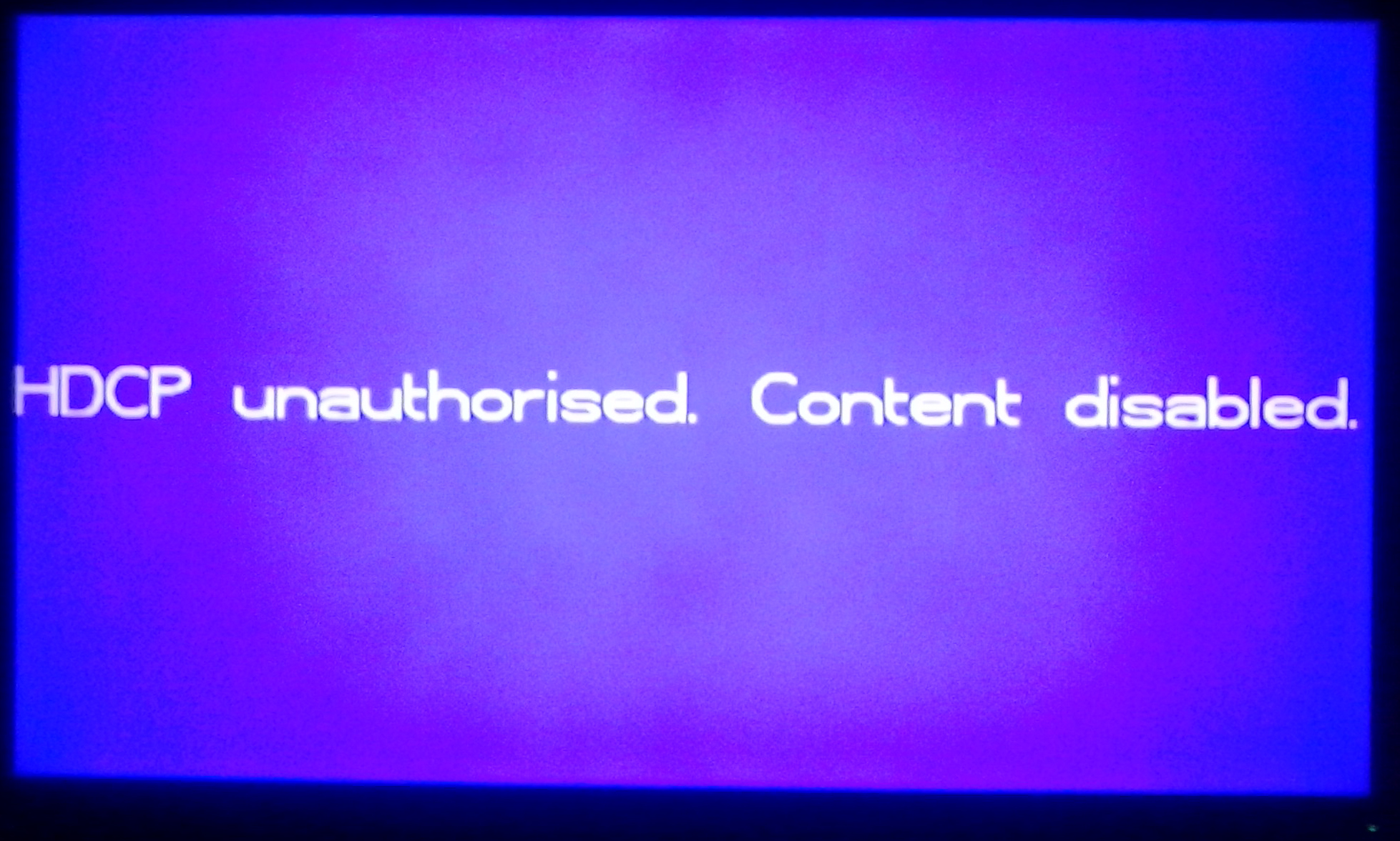
HDCP unauthorised. Content disabled
If you own a Roku streaming media player including Roku Ultra, Roku Express, Roku Premiere, Roku Streaming Stick, Roku LT, Roku 2, and Roku 3 you might have experienced issues when attempting to make a connection to a video stream and been shown a screen that says “HDCP unauthorised“.
Recently, a friend of mine plugged in his Roku 3, set up his NBA League Pass account, and attempted to view a live NBA game. However, when he tried to view the live media stream of the NBA game on the NBA Game Time channel for his Roku 3 he was not able to view the video and received an error that said “HDCP unauthorised. Content disabled.”
He was still able to hear the audio from the NBA game, but could not view the video. The video was unconventionally blocked by a purple screen that insisted that the Roku 3’s content is disabled.
My friend who regularly uses NBA League Pass suddenly became confused. He had the rights to view this content, he paid $200 to view this content, why can’t he view it?
He contacted me after a few moments and after a quick Google search I noticed that this HDCP unauthorized Roku error was not significant to NBA Game Time or NBA League Pass. Many Roku 3 users have had the same error appear when attempting to view videos on Netflix, Crackle, Amazon video, and others. The HDCP error even occurred for many users who simply want to view the Roku interface.
Once my friend contacted me about this issue I instructed him to send me a picture on his phone (above) of the Roku 3 error and check his HDMI connection. Upon inspection of his HDMI cable he discovered that it was slightly broken from his TV previously having fallen while the HDMI cable was plugged in.
He replaced the slightly damaged HDMI cable with a new one, and what do you know? The Roku 3 HDCP unauthorised – Content disabled error was complexly fixed. He was able to view content on his Roku 3 without error including the NBA Game Time app and all of the games on his NBA League Pass account.
The HDMI cable my friend was previously using was only slightly damaged. You could barely tell unless you held it right under your nose, but this cable/chord is what caused the issue and replacing it fixed this Roku error.
In other cases, the television is the issue, especially a TV with multiple HDMI ports and devices plugged into them. Some people are able to fix this issue by turning off their TVs, unplugging them, and plugging them back in to reset the signal.
It should be noted that this error is not directly related to the actual Roku Player itself.
How to fix the HDCP unauthorised Roku error
These are different solutions you can try out to fix the ‘HDCP unauthorised’ error.
- Restart your Roku by completely unplugging the machine for over 10 seconds. Remove power and unplug the HDMI cable from your screen and device.
- The issue might be with your TV and how it receives the signal from your Roku. Turn your TV off, unplug the TV, and plug it back in.
- If the above methods do not fix the error you might need to replace the HDMI cable to one that is not damaged.
I hope this helps. If you have any questions or concerns check out the comments section.


Thank you. I just switched the hdmi from 1 to 2 and it worked like a charm.
THANK YOU SO MUCH! It was a bad HDMI cable and we struggled with this for days until I found your site. So glad could leave you a note of appreciation. Really. Big thank you, Sean!!!
It happens to me about once every two weeks. We just get up off the couch, unplug the Roku, wait 10 seconds, plug it back in. This process has not failed us over several years. Cabling doesn’t seem to be the issue, no particular channel is the issue (Netflix, Amazon Prime, Hulu all do it). Annoying as hell, but simple to “fix”…until the next time it decides to err.
Thank you this worked.
This was the first time I have had this error. I did a search and came up with this site. I unplugged the hdmi, roku, opened the remote and reset battery, put it all back together and it worked.
Thank you to everyone for the info.
Mine turned out to be the tv. I remembered that back in my cable days, sometimes the tv would show only a blank screen on any channel. Unplugging and re-plugging the tv would fix it. I tried all your suggestions and after they didn’t work, I remembered that issue with my tv. Which worked. All your solutions and this indicates that it is a problem with the HDMI interface one way or the other. I really appreciate your web site with all these suggestions. I thought you might like to know another one.
Thank you! All sorted.
RUKU is a piece of SHi**
I tried everything listed and worked for short time, sometimes. What fixed it was using a different remote. The remote that worked did Not have volume control on it.
Thanks Sean, for your solution to the “HDCP Unauthorized Content disabled” -purple screen error issue. I experienced it tonight and found your answer. I have several cats and sometimes they play in back of the TV or on the video device shelves and may have disturbed the HDMI plugs. I simply unplugged the HDMI cable at both ends and re-plugged it in again. Everything works OK now.
Ive unplugged and replugged in. Was watching it fine last night…now this morning I get that error? something isn’t right. I never touch the Roku or switch the HDMI ports with other devices. This one is brand new haven’t even had it 6 months.
Ive unplugged and replugged in. Was watching it fine last night…now this morning I get that error? something isn’t right. I never touch the Roku or switch the HDMI ports with other devices. This one is brand new haven’t even had it 6 months.
Thank you so much. I spent hours trying to solve this. Followed your advice and within minutes my picture was back This has been invaluable to me
Thank you so much. I spent hours trying to solve this. Followed your advice and within minutes my picture was back This has been invaluable to me
I’ve had this happen several times and found out it happens more often when you have several HDMI inputs on your TV. If you have been using one of the HDMI inputs, lets say for your video game console and then switch to, Roko box, there will be some conflict. What worked for me was, leave Roku box on, unplug TV for several seconds and plug it back on and turn TV back on. This resets TV and the HDMI input thats receiving the signal will be selected, problem resolved. So, before running and buying a new HDMI cable, try this.
OMG I tried everything and nothing would work. I tried your tip! Boom! Im enjoying Roku now.
Thank you Rafael Crespo. Tried everything and nothing worked until I found your post.
kinda crazy how this happen to all of us at the same time after the first of the year… humm……thank you though it did fix it!
I have the thumb drive roku does that mean the hdmi ports all 3 of them are broken ?
I have the thumb drive roku does that mean the hdmi ports all 3 of them are broken ? On my tv I mean
Tried this a million times prior to reading this post, also called Roku to no avail. I will try the advice about buying a splitter, otherwise its back to Best Buy’s shelf. I have two Roku 2’s that never gave me a problem. Used to use one of them on this very tv. I decided to buy a Roku Premiere Plus for my 4k tv and this purple screen is preventing us from watching tv for any length of time. Can’t even watch a single program without unplugging several times and eventually the purple screen just stays and can’t finish watching. I’m so sick of it. I bought a brand new 4k hdmi cable to go with it. Also switched back to my hdmi cable I had used with the previous Roku. Tried three more hdmi cords that were new in my cabinet and same problem with all so doubt it is the cord and definitely not my tv since it worked fine with the Roku 2. I think this was put out for sale before the kinks were worked out. That really leaves a bad taste in my mouth! I loved Roku before this nightmare!
I am glad I am not the only one. Everything you said is exactly what is happening with mine. It is just two days old and it is starting this BS of the purple screen when it was fine at the beginning. Purchased it from Amazon so it is going back.
i didint think that it wud wrck
Get a splitter from Amazon that supports the HDCP error removal. I replaced cables, roku (2, 3, ultra, etc.) and only when I put a splitter between roku and the TV did the error go away forever.
Unplugging and reconnecting worked for me. Thanks!
BAM! It worked! Big thanks!
Thank you. This did the trick quickly!
This did the trick! Thanks 🙂
Thanks, went to unplug the cable and POP just started working with a little wiggle :}
Thank you! All I did was unplug, wait 10 sec, plug in, and voila. I didn’t even touch the HDMI cable. I’m usually unlucky with the simplest solution, but got lucky this time.
Thanks for your advice on this!!! It worked for mine.
reboot and reseeded HDMI cable and it worked!! thanks
Had same error shut off Roku and unplugged hdmi cable everything works after reboot. Wish I read this a week ago thought there was something wrong with my parents international channel lineup. I fixed the problem after I checked the Roku out and every other channel had the same problem.
I also had the same problem with my Roku 3 – tried all the above – nothing worked. I replugged, unplugged, new cable, switched cables – nada. I was told by customer service to buy a new roku! Mine is only 1 1/2 yrs old. 12/1/16
Reboot worked for me
Thanks, reboot worked. Confusing though.
My Roku is not working, I have tried everything. It was working until grand boy wanted to watch YouTube. I’m sure I entered things correctly! Now I have a purple screen that says “HDCP’unauthorised content”; how do I get to see the picture again. I did see it for a few seconds, then it went purple again!
It worked. Thanx
Change of HDMI cable did it for me.
Problem fixed. HDMI cable had come loose on the back of the TV. I was binge watching a show on HULU and my screen showed this error on HULU, Nexflix and TWC TV. I had audio but this screen. I unplugged the TV, HULU – unplugged all connecting cables and re-plugged, unplugged the TWC cable box, router and re-plugged. The final step was when I read this article that said check the HDMI cable on the HULU.
Did anyone else notice this error had “unauthorised” not the correct “unauthorized” in the message?
My roku did this, I used bing, here i am. While I was using Bing I also reset the roku with the reset button. It worked! Anytime you plug your roku remote in to a new TV make sure to press the reset button. 🙂
I have a Roku stick that does this. Here is my solution. plug the usb power cord into the usb port on the tv not the wall socket. Roku power cycles every time you turn on tv. Also if you change feeds and it does this then simply turn off tv and restart without having to unplug stuff.
Went to settings and restarted Roku the problem was fixed
When I Originally installed ROKU 3 everything worked fine. Didn’t use for awhile. Now I get the blue screen and sound. Contacted ROKU support did everything they suggested bought new cables powered on off connected disconnected.Help
I get same error message. I tried other HDMI cords in all HDMI ports. Same error continues. All cords work on other TVs. Roku works fine on other TVs. I’m told my HDMI ports are bad on my TV.
Before you get a new tv or have that one repaired, if you can, try another device. It’s only one of my roku’s that doesn’t work on my living room tv. My other roku works on it. All my roku’s work on all other tv’s .
Riddle me this! I have one roku 3 that won’t work (Blue Screen as described above) on my living room tv. I changed the hdmi cable and the ports. No good. I took this roku to a different tv (bedroom) and it works fine. I then took the bedroom roku 3 back to the problem tv in living room and it works fine there. So I switched them and the problem is solved. Not so easy for me. I want to know. I took that roku (originally from living room, back to the living room and it won’t work there. I don’t get it. It seems this roku does not get along with my living room tv only. The other roku does. Let’s see someone crack this one.
Mine happens if the TV is turned off or source is changed then changed back. It fixes when I power cycle the Roku stick, but if the before conditions are repeated, same error and same fix. Kinda annoying.
Thanks man!
Awesome feedback! Thank you so much for your insight😊 I now have a happy husband!
Simple answer and easy fix that worked. Thanks.
Thank you. This solution worked for me.
Thanks! Glad it was such an easy fix!
Worked like a charm
Hey, Thanks for your great advice Sean. It was such an easy fix, too. I thought the problem was because I downgraded my cable service. Comcast sent me to Roku. Their rep said I needed windows for them to fix problem–I use a chromebook and thought I was out of luck. So, you are my hero today.
Barbara
It worked! Thank you so much!
Thanks for your suggestion. All I had to do to fix my reception was reattach my HDMI cable. Apparently when I turned the TV slightly I caused the HDMI cable to lose it’s connection. Simply reconnecting both ends of the cable fixed it.