
What are my USB ports?
You might want to know what kind of USB ports your computer has. Are your USB ports 1.1, 2.0, 3.0, or all of the above. This guide will quickly help you answer the question “What are my USB ports?”
A lot of computer manufacturers make it easy to determine what kind of USB ports your computer has. Most of the time if the port is blue it is a USB 3.0 port. However, that is not always the case and it is actually easy to find what kind of USB ports your computer has no matter which version of Windows Operating System your machine runs.

- Open the Device Manager. In Windows 8 and 10, right click the Start menu on the bottom right and select Device Manager in the list.
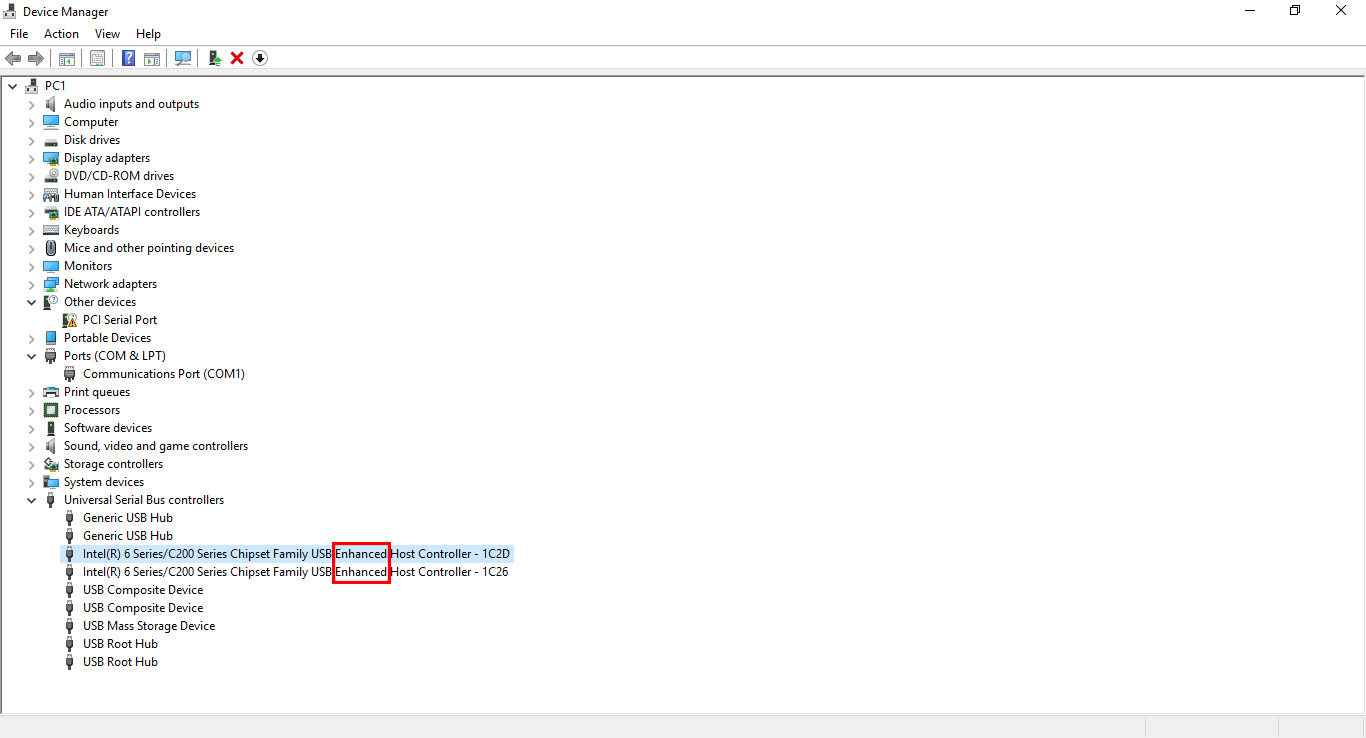
- In the Device Manager window, click the > (arrow or plus) sign next to Universal Serial Bus controllers. Here you can see a list of USB ports installed on your computer.
- If you see “Universal Host” in one of the items listed, your USB port is version 1.1.
- If you see both “Universal Host” and “Enhanced Host” in one of the items listed, your USB port is version 2.0.
- If you see “USB 3.0” without “Enhanced” in the name of an item, your USB port is version 3.0.