
DroidLock is a newly identified Android malware family designed to lock users out of their own devices and threaten irreversible data loss unless a ransom is paid. Unlike traditional ransomware, DroidLock does not rely on file encryption or recovery keys. Instead, it asserts control at the operating system level. Once active, an attacker can lock the screen, change PINs or unlock patterns, disable biometric authentication, block all user interaction through persistent full-screen overlays, monitor device activity in real time, and wipe the device entirely on command.
Campaigns distributing DroidLock rely on phishing infrastructure crafted to convincingly impersonate trusted services, including telecom providers, account verification portals, and system-related notifications. Victims are directed to install a malicious application presented as mandatory for service continuity, billing validation, or device security. While early activity has been observed primarily in Spanish-speaking regions, the malware contains no language checks, geofencing, or technical constraints that would limit deployment to a specific geography.
DroidLock is not passive surveillance malware or a background monetization tool. It is engineered for overt control, intimidation, and coercion. The objective is not stealth, but to seize control of the device, deny user access, and apply immediate pressure through enforced lockouts and credible threats of irreversible data loss unless a ransom is paid.
How DroidLock Is Installed and Takes Control
DroidLock infections rely on social engineering rather than software exploits. Victims are redirected to phishing pages designed to closely resemble legitimate Android services, including telecom provider portals, account verification pages, and system-related notifications. These pages typically warn of billing problems, suspended service, or required security updates and instruct the user to install an application to resolve the issue.
The application delivered through these pages is often not the final payload. In many cases it functions as a dropper, whose primary purpose is to guide the user through a sequence of permission requests and deploy the secondary-stage malware. Installation usually requires enabling app installs from unknown sources, a step framed as temporary, routine, or necessary for compatibility with the device.
Once launched, DroidLock prioritizes gaining access to Accessibility Services. The request is presented as a required setup step or a verification process needed to complete installation. Granting this permission marks the point at which the malware gains effective control over the user interface.
Accessibility Services allow applications to observe interface events, detect foreground activity, and simulate taps and gestures. DroidLock abuses these capabilities to automatically approve additional permission prompts without further user involvement. This includes access to notifications, SMS messages, call logs, contacts, and audio input. From this stage forward, the malware can expand its privileges silently.
In parallel, DroidLock requests Device Administrator privileges. This framework allows applications to enforce lockscreen policies, disable biometric authentication, reset PINs or passwords, and initiate destructive actions such as factory resets. When combined with Accessibility access, these permissions give DroidLock persistent and authoritative control over the device, allowing attackers to deny access, monitor activity, and execute lock or wipe commands on demand.
Lock Enforcement, Overlays, and Psychological Pressure
Once DroidLock has established control, the device can be locked immediately or held in a controlled state while awaiting instructions from the attacker’s command infrastructure. Lock enforcement is handled through Device Administrator APIs, which allow the malware to change the device PIN or pattern, disable biometric authentication, and prevent the user from regaining access through normal means.
To apply pressure and communicate the ransom demand, DroidLock deploys a full-screen overlay rendered using a WebView component. This overlay is designed to sit above all other applications and system interfaces, effectively blocking user interaction. Attempts to switch apps, access settings, or return to the home screen are intercepted and overridden.
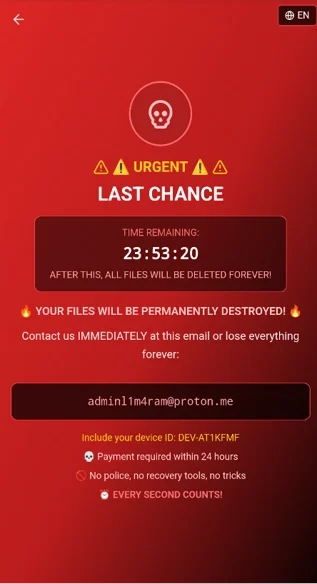
The message presented to victims follows a consistent structure intended to create urgency and fear, warning of permanent data loss unless contact is made within a fixed time window:
Urgent Last chance Time remaining: 24 hours After this, all files will be deleted forever Contact us immediately and include your device ID
The threat is not symbolic. With Device Administrator privileges already granted, DroidLock has the technical ability to initiate a factory reset at any point. This would permanently erase locally stored data, making recovery impossible without external backups. From the victim’s perspective, the device is already compromised, inaccessible, and at immediate risk of total data loss.
In addition to lock enforcement, DroidLock deploys deceptive system update overlays intended to suppress user intervention. These screens closely mimic legitimate Android update interfaces and instruct victims not to power off or restart their devices. The goal is to discourage actions that might interrupt the malware’s operation, delay command execution, or allow temporary recovery.
By controlling the screen, blocking input, and discouraging reboots, DroidLock maintains dominance over the device while remote commands continue to execute in the background.
Live Credential Harvesting and Remote Device Control
Beyond locking the user out, DroidLock actively exploits its control of the Android interface to harvest credentials and monitor device activity in real time. Once Accessibility Services are abused, the malware continuously tracks foreground application changes and reacts immediately when targeted apps are opened.
When a protected application or system screen appears, DroidLock injects an overlay designed to closely resemble the legitimate interface. One implementation uses a locally stored lock pattern screen that mimics the Android unlock UI. Victims are prompted to redraw their pattern under the assumption that authentication has failed or needs verification. The pattern is captured and transmitted directly to the attacker.
A second overlay technique relies on WebView-rendered HTML content stored in a local database. Each targeted application is mapped to a corresponding phishing layout. When the application launches, DroidLock queries the database and displays the matching overlay, capturing usernames, passwords, and other authentication data entered by the user.
Credential theft is further reinforced through abuse of NotificationListenerService. This allows the malware to intercept one-time passwords, authentication prompts, and sensitive notifications as they arrive. Clipboard contents, keystrokes, and visible interface elements can also be collected, enabling attackers to bypass multi-factor authentication and session-based protections.
At the same time, DroidLock maintains continuous communication with its command infrastructure. Initial device registration occurs over HTTP, where basic system identifiers and environment details are transmitted. After registration, the malware establishes a persistent WebSocket connection that supports bidirectional, real-time command execution.
Through this channel, attackers can issue instructions to lock the screen, change credentials, deploy overlays, uninstall applications, activate the camera, capture the screen, manipulate audio settings, or wipe the device entirely. Remote interaction is supported through Virtual Network Computing, allowing the attacker to operate the device as if it were physically in hand.
Screen monitoring functionality uses MediaProjection and VirtualDisplay APIs to capture on-screen activity continuously. Captured frames are transmitted back to the control server, exposing authentication flows, private communications, financial activity, and enterprise data displayed on the device.
Indicators of Compromise and Campaign-Level Analysis
The DroidLock campaign is accompanied by a clearly defined and unusually complete set of indicators that point to sustained development rather than a single opportunistic malware drop. The publicly documented indicators associated with this activity include a consolidated list of malicious APK hashes that represent multiple builds of the same malware family.
Rather than signaling unrelated samples, the volume and consistency of these hashes indicate repeated compilation and repackaging of a shared codebase. This is characteristic of Android malware operations that rely on phishing delivery and must continually evade static detection, certificate-based blocking, and reputation scoring by mobile security platforms.
The following APK hashes have been attributed to DroidLock activity:
- 6f7d9fd737972e1c2bae2d6d397baa518c30f57b09b21dc8927309d2ee34471a
- 96e14d1236e901fea165c9a20db553d9cd3143d9d74fb04fd8317747b6db0e73
- d1695caea9435aef9938651acaaa99685d478005672ace47d9ddac6adddb5e19
- eac650ac04c893b5ac54ddcdeca1ca2270bc605447c966bead18bf1b0df0467a
- 9c93b2439611c3974af81f23b5f21285b6f04bcb6069e0402b3417c5afabef7b
- 26ae26ba05457989aa53549052e6e93e52f7f60d5592b6ab16f9ca5e729ca8b5
- e5389bf9be2483332ea2041d7525ab7df17874947313c3863b1de89003e7f0d2
- 8cecf18ad253d15489d62eff824a2bec83a4d20f36ada95800d554b405c1baa1
- 0280fd7da2973e37e577caf2b2fcf06bc77cbcda47004fff6bad0ab77b89f5d9
- 5cd943349961421933482368f57e862c5943b0cce0137eecf415721ae77a6bea
- 18b3e4d83054d6c5469a726aabf2abbb87eb5a839f82c0a39fd7b6e3232c0b6c
- 192b8b563d3ed8b4956769ee40d5f2f091873591962cdab8a9f084aef425cd47
- ec9d70f3fd5fe2d20e44ba57797b3ea0d91cec6a2ae3a493adf50fbe878cd754
- a81c6c0e2b2ae49fe454d541a723aca78410a3561189597391b79f407533f06a
- 03cc07c193092e60f5ca7fb9877af260a3267fa77a522a837a0a4fce3962fb62
- a0c3fe9f2e7d53c67f2bd8291ad3b54094dcecd57c4ea1c3cc611ff0b53d2601
- ce5a416c73da67668996deee6839de2fca218d667830d0996bb8dfda70fdc123
- 2c34ab65cea6f1a43758197ca59ec3c845278b87f1233c56bc642e6c4c2d613d
- 764c4ce4845869f14e2a5144e94fc15707caa3dedc2b7a555438b908bfaa4061
- aca1521aac6c02131bfcb7b923811e63220d0bd05a6795f04021fa471066a49a
From an incident response perspective, the presence of twenty distinct hashes tied to the same behavioral profile is significant. This pattern strongly suggests an operator workflow where the malware is rebuilt and redistributed in short cycles, likely in response to detection events, domain takedowns, or certificate revocations.
For defenders, this reinforces an important point. Hash-based blocking alone is insufficient against DroidLock. Any control strategy that does not account for permission abuse, Accessibility misuse, Device Administrator activation, overlay injection, and persistent command channels will fail as soon as a new build is deployed.
These indicators are best used as retrospective confirmation or enrichment during investigations rather than as the primary detection mechanism. Behavioral correlation across samples provides far more durable coverage than chasing individual APK signatures.
As the campaign continues to evolve, additional hashes and infrastructure are expected to appear. Tracking changes across these samples will remain critical for understanding how DroidLock adapts, which features are being refined, and whether the operators expand beyond ransom-driven coercion into broader mobile espionage or enterprise targeting.
DroidLock Removal and Recovery
DroidLock must be treated as a full device compromise, not a removable nuisance app. Once it is granted Accessibility Services and Device Administrator privileges, the malware operates at a level that allows it to override normal user control, suppress interaction, and enforce lockscreen policies at will. At that point, the attacker effectively controls the operating system.
Whether recovery is possible without data loss depends entirely on how early the infection is detected.
If the device is still responsive and has not yet been forcibly locked, immediate containment can sometimes prevent escalation. DroidLock relies on live communication with its command infrastructure to issue lock, wipe, and overlay commands. Interrupting that communication can buy critical time.
If partial access remains, the following actions should be taken in order and without delay:
- Disable all network connectivity. Turn off Wi-Fi and mobile data immediately. This prevents the malware from receiving new commands and can stop lock enforcement before it is triggered.
- Review Device Administrator permissions. DroidLock requires admin privileges to change PINs, disable biometrics, and initiate factory resets. Any unfamiliar application listed as a device administrator should have its privileges revoked before attempting removal.
- Remove Accessibility Services access. Accessibility abuse is the backbone of DroidLock’s control model. Removing this permission weakens the malware’s ability to inject overlays, approve permissions automatically, and interfere with system navigation.
- Perform a behavior-based security scan. DroidLock variants are frequently repackaged, making signature-only detection unreliable. Security tools capable of identifying accessibility abuse, overlay injection, remote control behavior, and ransomware-style lock enforcement, such as Malwarebytes for Android, can help detect and remove active components before control is reestablished.
If the device has already been locked and the PIN, password, or biometric configuration has been changed, recovery options become severely limited. DroidLock can block access to system settings, reapply overlays after reboot, and prevent normal interaction with the interface. In these cases, conventional removal methods are no longer viable.
When full lockout has occurred, a factory reset performed from recovery mode is often the only remaining option. This results in the loss of all locally stored data that has not been backed up. While DroidLock does not encrypt files, its ability to wipe the device on command makes the practical outcome the same.
Paying the ransom does not guarantee recovery. DroidLock does not rely on reversible encryption or verifiable decryption keys. Regaining access depends entirely on attacker cooperation, and there is no technical assurance that control will be returned after payment. In many cases, payment simply confirms that the device is valuable enough to abandon rather than unlock.
DroidLock highlights the risk of granting elevated permissions to untrusted applications. Accessibility Services and Device Administrator access are powerful tools intended for assistive use and enterprise management. When abused, they eliminate most of the protections Android provides to users. Once those trust boundaries are crossed, prevention becomes far more reliable than any recovery attempt.