Cloud Storage Email Scam – How to Recognize, Avoid, and Remove Threats
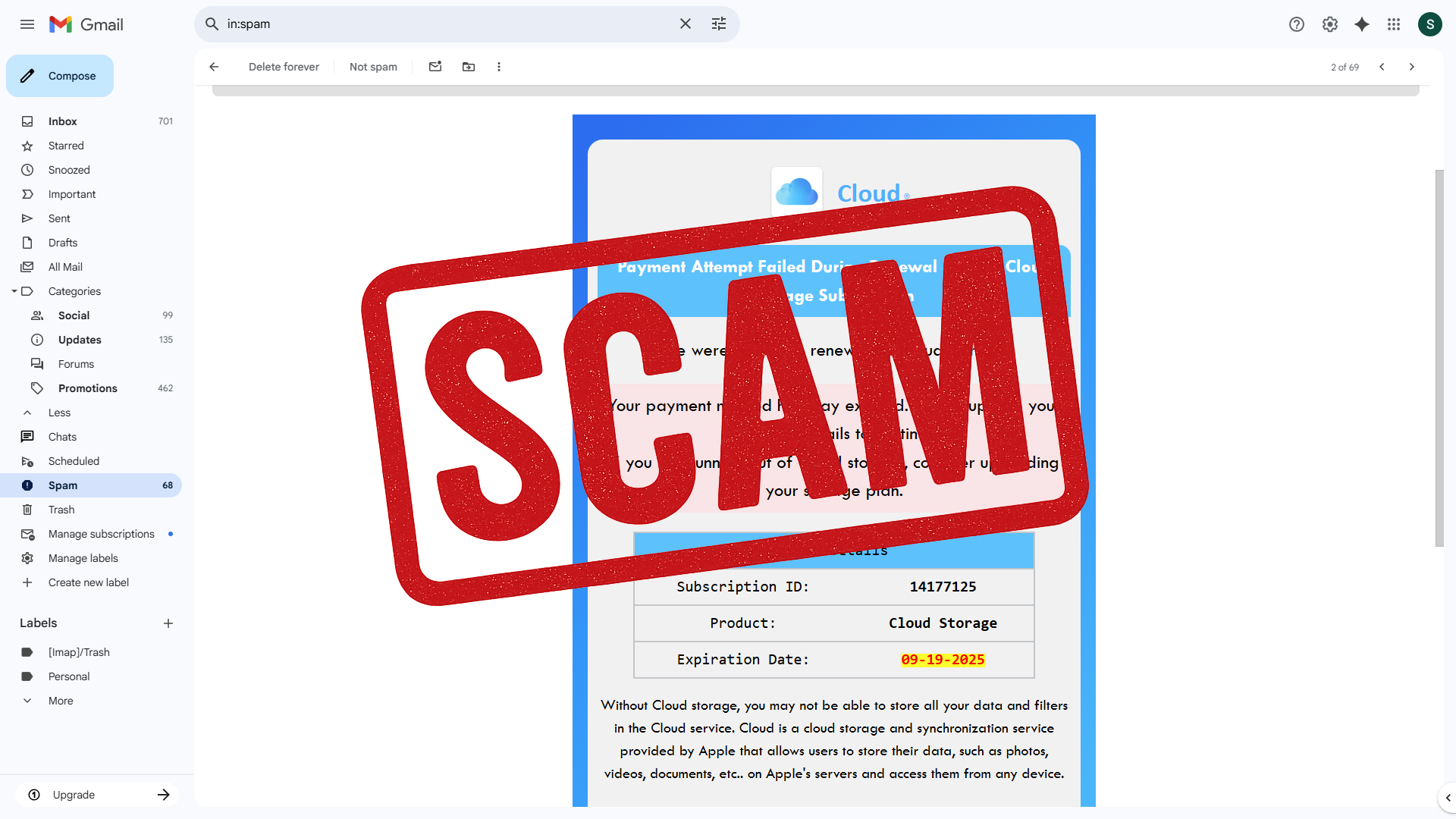
Cloud Storage Email Scam is the name we use for a phishing campaign that disguises itself as a storage alert. The message claims your account is blocked or your storage is full, and it warns that photos, videos, contacts, and files will be deleted unless you act immediately. The email never states which company it represents. It only uses the vague label Cloud. That choice is deliberate because many people will assume it refers to the brand they use already, such as iCloud, Google Drive, OneDrive, or Dropbox. The ambiguity creates false trust and pushes recipients to click without verifying anything.

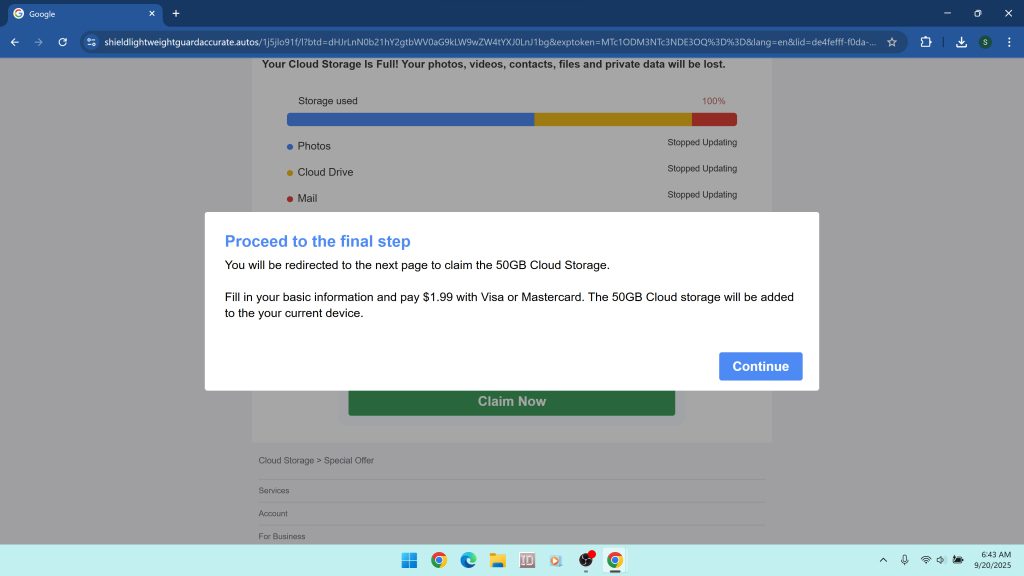
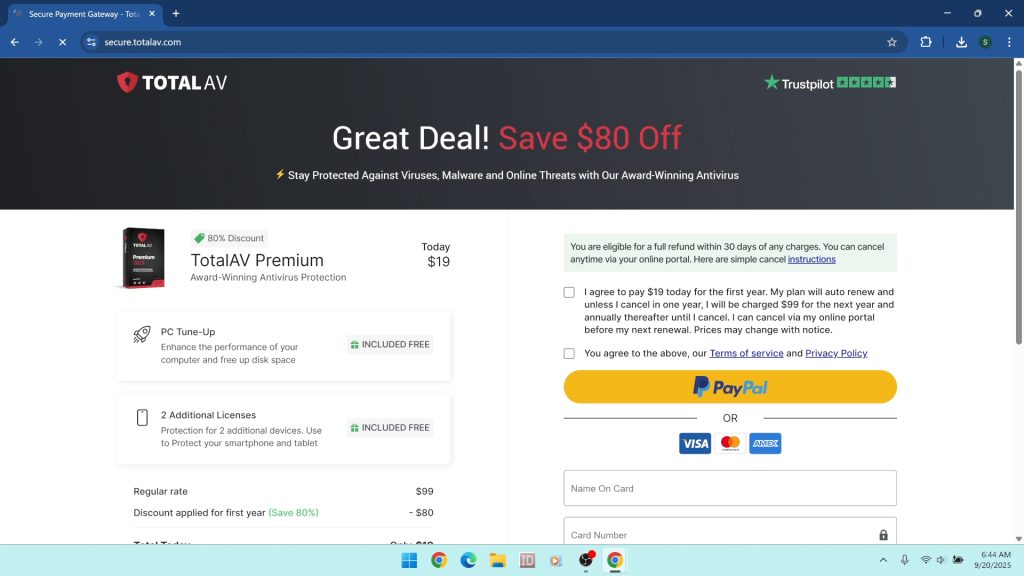
Inside the email you will find oversized call to action buttons that read Update My Payment Information or Continue. Clicking one of these buttons starts a staged sequence of pages that look official at first and then turn into scareware and sales funnels. In samples we analyzed, the first hop was hosted on a Google Cloud Storage URL, which can look credible to non technical users. The next page imitated a storage dashboard and displayed warnings like Your Cloud Storage Is Full. The final step redirected to a checkout on secure.totalav.com with a cart already filled for TotalAV Premium. At no point did the flow provide access to any real storage account. The entire sequence existed to capture payment details, push a low grade antivirus product, and in some cases expose visitors to adware or other malware.
- Subject lines: Variants commonly say, “We’ve blocked your account! Your photos and videos will be deleted on [date]. Take action!”. The phrasing is designed to create panic and force quick clicks.
- Sender details: The from line often uses generic labels such as Payment-Refusal or Cloud_Update, routed through random subdomains controlled by bulk mailers. This is a standard obfuscation tactic.
- Redirect chains: The button first opens a Google Cloud Storage link such as
https://storage.googleapis.com/21qd47fssfcsdjvftfcdf/sdfkjsdf10sdfsdf.html#...and then forwards to additional domains. Cloud hosting is used to borrow legitimacy. - Fake dashboards: Interstitial pages use pop ups like Your Cloud Storage Is Full and Proceed to the final step to simulate a scan. The design mimics account portals but never authenticates you.
- Final checkout: The funnel ends on secure.totalav.com with a preloaded cart that pressures you to pay immediately. Small “verification” charges can turn into recurring subscriptions.
- Primary risks: Stolen payment data, forced subscriptions that are hard to cancel, adware installations, additional phishing attempts, and exposure to more unsafe offers later.
How the Cloud Storage Email Scam message is composed
The Cloud Storage Email scam uses a strict template built around urgency, authority, and fear. It announces a failed payment or expired card and sets a looming deadline for deletion. It repeats that your photos, videos, and private data will be lost. Nothing in the wording proves who sent it. Instead of using an actual brand name like iCloud or Google Drive, it sticks to a generic logo and the word Cloud. That ambiguity is intentional. It allows the same template to target millions of people regardless of the storage service they use.
In the example provided, the sender field included a meaningless string, and the display line said (sent by Cloud_Update). The body listed a Subscription ID, a product named Cloud Storage, and an expiration date. It also contained a blue Update My Payment Information button that linked to a Google Cloud Storage URL. That first hop is a trick used by many scammers because security filters tend to trust Google domains. From there, the victim is pushed into the next part of the scheme.
Inside the redirect chain

After the first hop, the browser lands on a page built to impersonate a cloud dashboard. The layout looks familiar: a colored progress bar labeled Storage used and bullets such as Photos, Cloud Drive, and Mail. A modal pops up that says Warning! Your Cloud Storage Is Full and claims that backups have stopped across devices. A second pop-up follows, telling you to proceed to the final step, enter basic information, and pay $1.99 with Visa or Mastercard to unlock 50 GB of storage. None of this is real. There is no account to unlock and no storage to add.
The next click completes the funnel. The site forwards the session to secure.totalav.com where a checkout page is already prefilled with a TotalAV Premium subscription. At this point the scam has achieved its goal. The fake storage emergency has been converted into a pitch for unrelated software and a request for payment details. This is classic affiliate abuse. A third party builds a deceptive funnel to earn commissions on software sales and subscriptions.
Why Google Cloud Storage appears in the link
Many variants of this scam use a file or page hosted on Google Cloud Storage as the first visible link. Scammers do this for two reasons. First, it helps the email bypass security filters because the clickable domain looks reputable. Second, it offers a cheap way to host static pages that pretend to be part of a trusted platform. Once the victim clicks, the page can redirect anywhere. This trick does not mean the scam is endorsed by Google. It simply means attackers are abusing public hosting services to gain trust.
The TotalAV connection and why it matters
In our tests the final step of the funnel sent victims to a checkout on secure.totalav.com. TotalAV is a real antivirus vendor, but it has a long history of controversy on consumer forums due to aggressive marketing, confusing free trial wording, and auto renewal complaints. Security communities often describe it as a potentially unwanted program rather than a product they recommend. The fact that a cloud storage phishing email leads to a TotalAV purchase page raises hard questions about affiliate oversight. Even if the vendor does not operate the scam pages, a vendor is responsible for the conduct of partners who generate its sales. Victims who purchase under pressure from a fake emergency can be locked into recurring billing for a product they did not intend to buy.
That does not mean every TotalAV purchase is fraudulent. It means the path that took you there in this campaign is not honest. No legitimate cloud provider resolves billing problems by sending you to a third party antivirus checkout, and no honest antivirus vendor needs scareware funnels to sell licenses.
What happens if you click or pay
The outcome depends on how far you go in the funnel:
- If you only viewed the page you may still face notification spam or tracking. Some pages ask you to allow notifications that later deliver fake warnings and investment scams.
- If you entered card details you can be billed for a subscription immediately, and your card may be used for additional charges later. Some victims report smaller authorization holds followed by larger debits.
- If you downloaded anything you risk adware, browser hijackers that switch your search engine and homepage, and droppers that fetch more components later. These are common payloads in scareware campaigns.
How phishing convinces people to act
The Cloud Storage Email Scam uses three social engineering levers. First is urgency. Setting a deletion deadline pushes you to act before thinking. Second is authority. Most of us trust our storage providers because they hold years of photos and documents. Third is ambiguity. The message never names a brand. That lets your brain fill in the blank with whatever service you use. This combination is powerful. Even careful people click when they fear losing personal memories. Recognizing these levers helps you see through the script next time you encounter it.
How to check storage without being scammed
If you are worried, skip the email and open your storage provider directly:
- Apple iCloud: https://www.icloud.com/ or device Settings > your name > iCloud > Manage Storage
- Google Drive: https://drive.google.com/ or https://one.google.com/storage
- Microsoft OneDrive: https://onedrive.live.com/
- Dropbox: https://www.dropbox.com/
Real providers do not send generic Cloud emails with off brand links. They will identify themselves clearly and route you through their own domain.
If you entered card details
Move fast. Contact your bank or card issuer and explain that you were misled by a phishing flow that impersonated a cloud storage service and then routed you to an unrelated checkout. Ask for a card replacement and dispute the charge. If the checkout created a subscription, demand cancellation. Keep screenshots of the email, the Google Cloud Storage link, the fake dashboard domain, and the TotalAV cart page. These records help your bank and help investigators.
If your browser starts behaving strangely
Scam pages often request extra permissions that cause ongoing problems. Here is how to clean the most common changes.
Remove bad Chrome notifications
- Open Chrome and go to Settings > Privacy and security > Site settings > Notifications.
- Under Allowed remove any site you do not recognize.
- Open Settings > Reset settings > Restore settings to their original defaults if pop-ups continue.
Remove unwanted browser extensions
- In Chrome select the three dot menu > Extensions > Manage extensions.
- Remove anything you did not install on purpose, especially items added around the date of the email.
- Repeat similar steps in Firefox and Edge by opening their Add-ons or Extensions managers.
Reset search and homepage
- Chrome: Settings > Search engine and choose your preferred provider.
- Chrome: On startup and set New Tab or a homepage you trust.
- Clear browsing data for the last 7 days to remove cached redirects.
Uninstall suspicious programs on Windows
If a download slipped through, remove it at the system level.
- Right click the Start button and choose Installed apps on Windows 11 or Apps and Features on Windows 10.
- Sort by Install date and remove software you do not recognize, including “optimizers,” “updaters,” or anything installed on the day you clicked the email.
- If an entry refuses to uninstall, restart and try again, or use Control Panel > Programs and Features.
Deep cleaning with Malwarebytes
Manual steps help, but hidden components can linger in startup entries, scheduled tasks, and browser profiles. A thorough scan with a reputable tool will find what you might miss. We recommend Malwarebytes for adware, browser hijackers, trojans, and other potentially unwanted programs that ride along with phishing campaigns.
Download and install Malwarebytes using the trusted link below.
Botcrawl may earn a commission from purchases made through links in this article.
Step-by-step Malwarebytes guide
- Save the installer: After clicking the button, your browser saves a file such as
MBSetup.exe. Place it in your Downloads folder. - Run the installer: Double click the file. Approve the User Account Control prompt.
- Choose preferences: Accept the license. Default options are fine for most users.
- Let it update: On first launch Malwarebytes retrieves the latest detection rules. Allow this to finish.
- Start a scan: Click Scan. The Threat Scan checks memory, startup items, registry keys, and common malware locations. You can choose a Custom Scan to include all drives for maximum coverage.
- Review detections: Expand each category to see what was found. Typical items include adware, browser hijackers, notification spammers, and download managers.
- Quarantine and restart: Click Quarantine. Restart if prompted to complete removal.
- Scan again: A second scan should return clean. If not, quarantine remaining items and restart once more.
After cleanup, revisit your browser settings to make sure the search engine, new tab page, and notifications remain the way you want them. If any page continues to appear on its own, repeat the reset steps and check for leftover extensions.
How to report the Cloud Storage Email Scam
Reporting helps disrupt the infrastructure behind these phishing runs and helps banks identify patterns. Use these channels:
- Gmail: Open the message, select the three dot menu, and choose Report phishing.
- Outlook: Right click the message and select Mark as phishing.
- FTC: Submit at https://reportfraud.ftc.gov/.
- FBI IC3: If money was lost, file at https://www.ic3.gov/.
- Your bank or card issuer: Dispute the charge, cancel the card, and request a new number.
Frequently asked questions
Is the email from Apple or Google?
No. The message never uses a brand name on purpose. Real providers identify themselves clearly and route you through their own domains. Generic Cloud notices with third party links are a red flag.
Why does the link start at storage.googleapis.com?
Attackers host the first page on Google Cloud Storage to make the link look trustworthy and to bypass filters. It does not mean the campaign is legitimate. It is abuse of a public hosting service.
What if I already paid?
Contact your bank immediately. Ask for a card replacement and dispute the charge. If a subscription was created, insist on cancellation and a refund. Keep screenshots of the email, every page in the redirect chain, and the final checkout. These details help your bank and investigators.
Is TotalAV itself a scam?
TotalAV is a real antivirus vendor, but it has a poor reputation due to aggressive sales tactics and confusing renewals. In this case the product is being promoted through a deceptive funnel that impersonates a cloud service. Even when a product is real, the sales path can be unacceptable. If you were pushed into buying through a scare page, request a refund from the vendor and also dispute with your bank.
What if I clicked but did not type anything?
Clean your browser anyway. Remove unwanted notifications and extensions, clear cached data, and run a Malwarebytes scan. Some pages add permissions or drop scripts even if you never submit a form.
Why do these scams ask for $1.99?
Small payments reduce suspicion and increase conversion. They also validate that the card is active, which can lead to larger charges later. Treat tiny teaser payments as a warning sign, not a bargain.
How to protect yourself long term
Adopt habits and settings that make you harder to target:
- Never click billing links in unsolicited emails. Visit the provider directly from your bookmarks or by typing the address.
- Use a password manager and enable two factor authentication. This prevents account takeovers when credentials leak.
- Disable unnecessary browser notifications. Only allow notifications from sites you trust and need.
- Install reputable security software. Keep it updated and run regular scans. If you need a cleaner for adware and PUPs, use Malwarebytes.
- Stay informed. Our running list of scams and scam alerts helps you recognize patterns early.
A closer look at the sample links
For reference and analysis, here are the key artifacts from this campaign. Do not visit these addresses. They are listed for research only.
- Initial page hosted on Google Cloud Storage:
https://storage.googleapis.com/21qd47fssfcsdjvftfcdf/sdfkjsdf10sdfsdf.html#qgn69nnquk... - Fake dashboard and pop-ups:
https://shieldlightweightguardaccurate.autos/... - Final checkout destination:
https://secure.totalav.com/
The presence of a Google domain at the front does not legitimize the campaign, and the presence of a recognized antivirus at the end does not excuse the deception. The whole flow is built to mislead you into a purchase that has nothing to do with cloud storage.
What if your device now shows strange redirects
Some variants press notification permissions aggressively or drop browser hijackers that alter your search settings. If your searches start going through unfamiliar engines or if pop-ups return after each reboot, conduct a full reset:
- Remove rogue notifications and extensions as described above.
- Reset Chrome settings to defaults. In Edge, use Settings > Reset settings. In Firefox, use Help > More troubleshooting information > Refresh Firefox.
- Run a Malwarebytes Threat Scan, quarantine everything it finds, restart, and scan again.
- Check Installed apps for recently added items and remove anything you did not intend to install.
If the behavior continues, consider creating a new browser profile to eliminate corrupt settings or profile level persistence. In cases of deep infection, back up your files and use the operating system’s built in reset or recovery options.
The Cloud Storage Email Scam thrives on panic and imitation. The moment you slow down the interaction, it falls apart. Your provider’s real storage page will always be reachable by going directly to the service, not through a vague email. If you interacted with the scam, take the cleanup steps above, report it, and give your system a fresh scan with Malwarebytes. Staying calm and methodical is the best defense against these pressure based attacks.