What is PUP.Optional.BitsInstall and how do I remove it?
PUP.Optional.BitsInstall
Learn what PUP.Optional.BitsInstall is and how to remove it and other threats from your computer using Malwarebytes Anti-Malware software.
Botcrawl may earn a commission from purchases made through links in this article.
What is PUP.Optional.BitsInstall?
PUP.Optional.BitsInstall is a detection used by Malwarebytes Anti-Malware software including Malwarebytes 3.0 Premium and Malwarebytes Anti-Malware Free. The PUP.Optional.BitsInstall detection is used by Malwarebytes to identify a specific potentially unwanted program (PUP) and all files associated with the program.

If Malwarebytes has detected PUP.Optional.BitsInstall it means that your computer has become infected with the potentially unwanted program and other possible threats such as Zen PC and Wiseman. PUP.Optional.BitsInstall is known to bundle with other PUPs, adware, spyware, and malware. Performing a scan with Malwarebytes Anti-Malware software should remove the threat; However, it is recommended to use HitmanPro to remove remaining trace files and repair other issues.
How is it distributed?
The PUP.Optional.BitsInstall program is known to download and install without user consent. This is usually performed by a third-party download manager or trojan downloader that has initially infected the computer.
The PUP.Optional.BitsInstall program is also offered as a custom installation by freeware and other content such as codecs, media players, and updates; However, the installation process typically does not allow the user to reject PUP.Optional.BitsInstall from installing and the program will install anyways.
It is important to avoid installing free programs online that offer this program as an installation because they are not usually safe to download themselves.
How to remove PUP.Optional.BitsInstall
1. Download Malwarebytes Anti-Malware software to scan your computer and remove malicious files and potentially unwanted programs.
2. To install the program, click the file you just downloaded. It can usually be located in the Download folder.
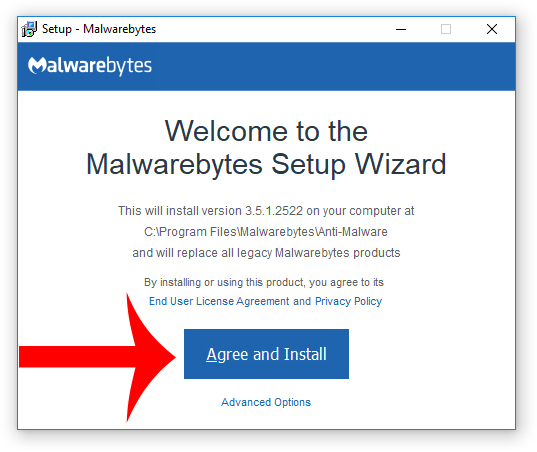
3. A window that says “Welcome to the Malwarebytes Setup Wizard” will appear. Click Agree and Install to begin the installation. Once complete, click Finish.

4. Now the Malwarebytes is installed, open the program and click the Scan Now button – or go to the Scan tab and click the Start Scan button.

5. When the scan is complete click the Quarantine Selected button.
6. If Malwarebytes says “All selected items have been removed successfully. A log file has been saved to the logs folder. Your computer needs to be restarted to complete the removal process. Would you like to restart now?” click the Yes button to restart your computer.
7. Next, Download HitmanPro to perform a second-opinion scan and remove any remaining malicious trace files.
8. Once installed, open HitmanPro and click Next to start scanning your computer. *If you are using the free version you may chose to create a copy or perform a one-time scan.
9. When the HitmanPro scan is complete click the Next button.
10. To activate the free version of HitmanPro: enter your email address twice and click the Activate button.
11. Click the Reboot button.
Your computer should now be free of potentially unwanted programs, malware, and other threats. If you have any issues please leave a comment in the comment section below.