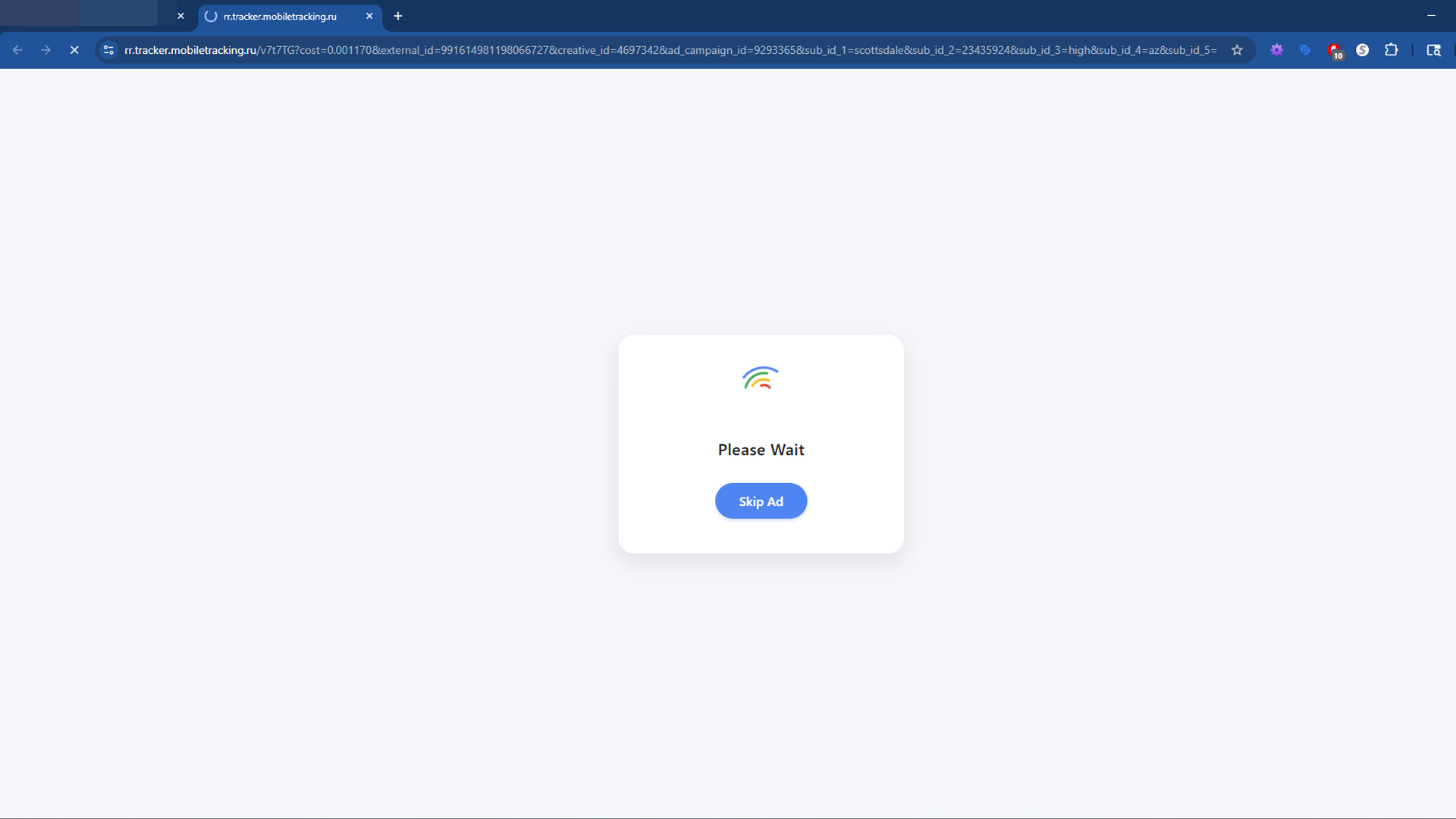

mobiletracking.ru is a suspicious redirect domain that has been reported to send users through full-page ads, deceptive landing pages, and chains of redirects that end on fraudulent offers or malware delivery sites. The domain is often linked to unsafe ad networks that specialize in monetizing risky traffic. When users attempt to stream videos, download files, or access free content online, they may suddenly be redirected to mobiletracking.ru, which then forwards them to another location. This creates a loop of unsafe browsing where ads and downloads appear without consent. Because of its behavior, many people refer to it as the mobiletracking.ru virus.

Visitors often see messages that resemble “Please wait” or “Skip Ad” pages, but instead of harmless interstitial ads, the site funnels traffic into schemes that may promote scams, force subscriptions, or install unwanted software. Security researchers flag the domain as a recurring element in malvertising campaigns. While mobiletracking.ru itself is only a redirect service, the danger lies in what happens after you land there. Every redirect could lead to a different destination, and that destination may include fraudulent login pages, intrusive surveys, fake system alerts, or automatic downloads.
This article will explain why mobiletracking.ru is unsafe, how it works, what risks are tied to it, and how you can remove its traces from your browser and operating system. You will also find step-by-step removal instructions and a guide to scanning your computer with Malwarebytes, one of the most effective tools for cleaning up adware, malware, and potentially unwanted programs (PUPs).
Why Security Professionals Warn About mobiletracking.ru
Security professionals categorize mobiletracking.ru as unsafe because it mixes two manipulative behaviors that are common in the world of online scams. The first behavior is forced redirects. A forced redirect occurs when you click an element on a website and are sent somewhere unexpected. This may be triggered by clicking what looks like a play button, a download link, or even just interacting with a page. The second behavior is full-page ad traps. These are entire pages designed to look like interstitial advertisements or verification steps, but they actually push users toward dangerous downloads or fraudulent offers.
The combination of redirects and full-page traps lowers suspicion. Many people are used to clicking “Skip Ad” on streaming sites or tolerating a brief waiting page before accessing free content. Malicious operators exploit this familiarity. The redirect chain disguises itself as routine advertising while steering victims into fraud. This tactic is also used in affiliate fraud campaigns where traffic is monetized through fake clicks and conversions. By the time users realize something is wrong, they may already have allowed a download or submitted personal information.
Another reason mobiletracking.ru raises alarms is its role in larger malvertising networks. Malvertising is the practice of serving malicious ads through ad networks. These networks bid on ad space in torrents, streaming portals, and adult sites that cannot qualify for legitimate advertising platforms like Google AdSense. Because the networks accept almost any client, scammers can distribute fake installers, lottery scams, phishing pages, and aggressive subscription offers with little oversight. mobiletracking.ru acts as one of the many domains in these networks, redirecting users from the original content to the actual payload.
WHOIS and Domain Age Information
Public WHOIS data shows that mobiletracking.ru was first registered on June 18, 2015. Unlike many suspicious domains that are created and discarded within months, this one has been active for over a decade, with its current registration expiring in June 2026. The registrar is listed as R01-RU, a Russian registrar, and the domain state is marked as REGISTERED, DELEGATED, VERIFIED. The ownership is protected by privacy, meaning that registrant details are hidden.
mobiletracking.ru at a glance:
Created: 2015-06-18 • Expires: 2026-06-18
Registrar: R01-RU • Status: REGISTERED, DELEGATED, VERIFIED
Registrant: Private person • Nameservers: phil.ns.cloudflare.com, zoe.ns.cloudflare.com
The fact that mobiletracking.ru has been maintained for years suggests that it is not a disposable domain, but part of a larger infrastructure. Long-lived redirect domains often rotate through different campaigns over time. Some days the redirect may lead to adware installers. Other times it may funnel users into subscription fraud or phishing schemes. The persistence of the registration shows that it likely earns revenue for its operators through affiliate marketing abuse and unsafe advertising. You can investigate similar domains by using our WHOIS Lookup tool or check their longevity with our Domain Age Checker. These tools are useful for verifying whether a site is trustworthy or likely to be part of a scam.
Hosting Information
Technical data shows that mobiletracking.ru is hosted on IP address 94.130.70.44, with the hosting provider listed as Your Server De. This company provides infrastructure for many websites, including privacy-focused or low-cost hosting. While not inherently malicious, these providers are popular among operators of shady ad networks because they offer flexibility, affordability, and limited oversight.
Hosting information can be valuable when analyzing domains. If multiple suspicious domains share the same IP address or hosting provider, it can indicate that they are part of the same campaign. In the case of mobiletracking.ru, the fact that it has been hosted consistently on an infrastructure known for high turnover raises concerns. Shady operators often cluster dozens of redirect domains on a single server, allowing them to cycle through names while using the same backend.
If you want to investigate hosting details for other domains, you can use our Website Host Search tool. This allows you to identify where a site is hosted and make more informed decisions about whether you should trust it.
How Users Encounter mobiletracking.ru
Most visitors do not land on mobiletracking.ru intentionally. Instead, they are redirected there by risky websites that partner with aggressive ad networks. Common sources include torrent indexes, streaming sites with pirated content, adult entertainment platforms, and file-hosting mirrors that rely on advertising for revenue. When a user clicks a “Play” button, a download link, or a “Continue” button, the page may open multiple new tabs. One of those tabs often leads to mobiletracking.ru.
For example, imagine a user trying to stream a free movie online. They click a large play button in the center of the page. Instead of playing the video, the site opens a new tab with mobiletracking.ru. That domain then redirects them again, this time to a subscription scam offering fake prizes or a software installer. The user may close the tab, but the redirection has already done its job by exposing them to fraudulent offers or by planting a file in their downloads folder.
Traffic brokers play a major role in this process. They purchase traffic from risky websites and then resell it to advertisers who pay per install or per lead. The brokers insert redirect domains like mobiletracking.ru into the chain so they can track and manipulate traffic before it reaches the final offer. This allows them to rotate destinations, segment users by location or device, and maximize revenue. It also creates plausible deniability for the original site, which can claim that it only partnered with an ad network, not with scammers.
How the Redirect Chain Works
When a user is sent to mobiletracking.ru, the site often displays a message that looks like a waiting page or a prompt to skip an advertisement. The page may say “Please wait,” “Skip Ad,” or present a countdown. Once the timer expires or the user clicks a button, the site forwards them to the next destination. This technique disguises the redirect as a normal part of browsing, lowering suspicion.
Behind the scenes, the redirect chain is dynamic. It does not always lead to the same destination. Instead, the operators rotate payloads depending on factors such as geolocation, device type, browser version, and IP address. For a user in the United States, the redirect might lead to a subscription scam. For someone in Europe, it might open a fake antivirus page. In some cases, it may trigger a file download directly. This variability is what makes domains like mobiletracking.ru so difficult to block with a single rule. Each visitor can have a different experience, making it harder to gather consistent evidence.
Risks of the mobiletracking.ru Virus Pattern
The risks associated with mobiletracking.ru are serious and diverse. The most common risk is exposure to adware. Adware is software that injects additional ads into your browser or operating system, slowing down performance and tracking your browsing habits. Many redirects end on installers that bundle adware with free programs. Even if you think you are downloading something harmless, the installer may include hidden clauses that allow it to modify your settings.
Another risk is browser hijacking. Browser hijackers change your search engine, homepage, and new tab settings so that all of your searches go through a monetized platform. This generates revenue for the operator but exposes you to further redirects and ads. Browser hijackers are notoriously difficult to remove because they can reinstall themselves after each reboot.
Data harvesting is also a concern. Some redirects lead to surveys or fake login pages that collect personal information. Entering your email, phone number, or login credentials on these pages can result in identity theft or account compromise. Scammers sell this data on underground forums or use it for spam and phishing campaigns.
In more aggressive campaigns, the final payload is malware. This can include trojans that create remote access channels, keyloggers that capture every keystroke, or ransomware that encrypts your files. Even if the immediate file seems legitimate, the infrastructure behind mobiletracking.ru has the ability to rotate payloads at any time. That means what looks safe today could become dangerous tomorrow.
Finally, there is the issue of subscription fraud. Many redirect chains end on sites that claim you have won a prize, such as a gift card or smartphone. To claim it, you are asked to enter payment details for “shipping costs.” In reality, you are subscribed to a recurring billing service that charges your card every month. This type of fraud is common in networks that use domains like mobiletracking.ru.
Manual Removal Steps
If you have been redirected through mobiletracking.ru and noticed suspicious files, browser changes, or popups, you should take immediate action. The following steps explain how to manually remove unwanted components from your system.
Delete downloaded files
- Open your Downloads folder and check for recent files that appeared around the time you were redirected.
- Right click any suspicious file and select Delete.
- Empty the Recycle Bin to prevent accidental execution later.
Remove suspicious browser extensions
- In Chrome, click the three-dot menu and choose Extensions > Manage extensions.
- Review all installed extensions. Remove any you did not intentionally add.
- Click Remove to uninstall them completely.
Clear browser data and reset settings
- Go to Settings > Privacy and security > Clear browsing data.
- Select Cookies and other site data and Cached images and files. Clear at least the last 7 days.
- Check Search engine and On startup in Settings. Remove any unfamiliar entries.
- If problems persist, reset Chrome via Settings > Reset settings > Restore settings to their original defaults.
Uninstall unwanted programs on Windows
- Right click the Start button and select Apps and Features (Windows 10) or Installed apps (Windows 11).
- Sort by Install date and look for programs added recently.
- Select suspicious entries and click Uninstall.
Scan for Malware with Malwarebytes
Manual cleanup removes obvious threats, but hidden components may remain in temporary folders, scheduled tasks, or registry entries. That is why a full system scan is recommended. Malwarebytes is a trusted Anti-Malware tool for removing adware, browser hijackers, and potentially unwanted programs linked to redirects like mobiletracking.ru.
Download and install Malwarebytes:
Botcrawl may earn a commission from purchases made through links in this article.
Step-by-step Malwarebytes guide
- Click the download link above and save the file
MBSetup.exe. - Double click the file to run the installer. Approve any Windows prompts.
- Accept the license agreement and click Install.
- When installation finishes, launch Malwarebytes.
- Allow it to update its definitions for the latest threats.
- Click Scan. Choose Threat Scan for a quick and thorough check.
- Wait for the scan to complete. Review all detected items.
- Click Quarantine to isolate threats.
- Restart your computer if prompted.
How to Prevent Future Redirects and Scams
To reduce the chance of being redirected to mobiletracking.ru or similar domains, practice safe browsing habits. Always download software from official sources and avoid torrents or streaming sites that rely on shady ad networks. Install a reputable ad blocker to stop malicious popups. Configure your browser to ask where to save each file before downloading so you have control over what enters your system. Finally, keep your operating system and security tools updated, and stay informed by following scam alerts.
Final Thoughts
mobiletracking.ru is not a harmless redirect. It is part of an ecosystem of unsafe ad networks that expose users to scams, automatic downloads, and malware. While the domain itself does not host the final payload, it is a stepping stone that funnels victims toward danger. If you encounter this redirect, treat it as a warning sign that the site you came from is unsafe. Clean your system, scan with Malwarebytes, and avoid engaging with domains that rely on forced redirects. Awareness and prevention are your best defenses against threats like the mobiletracking.ru virus.
- Shai-Hulud Malware Clone Powers New Npm Infostealer and DDoS Campaign
- FBI Seeks Info in Steam Malware Investigation
- GhostPoster Browser Extensions Reached 840,000 Installs Before Removal From Stores
- Kimwolf Android Botnet Exploits Residential Proxies to Breach Internal Networks
- ClickFix Attack Uses Fake Windows BSOD Screens to Deploy Malware

Related Posts