What Is Giant Ad Blocker?
Giant Ad Blocker is a browser extension for Google Chrome that is promoted as a tool to stop unwanted ads. While some people refer to it as the “Giant Ad Blocker virus,” it is not technically a computer virus. Instead, it is classified as a potentially unwanted program (PUP). The reason it is treated as unsafe is because of how it is distributed, the permissions it requests, and the misleading ways it is advertised.
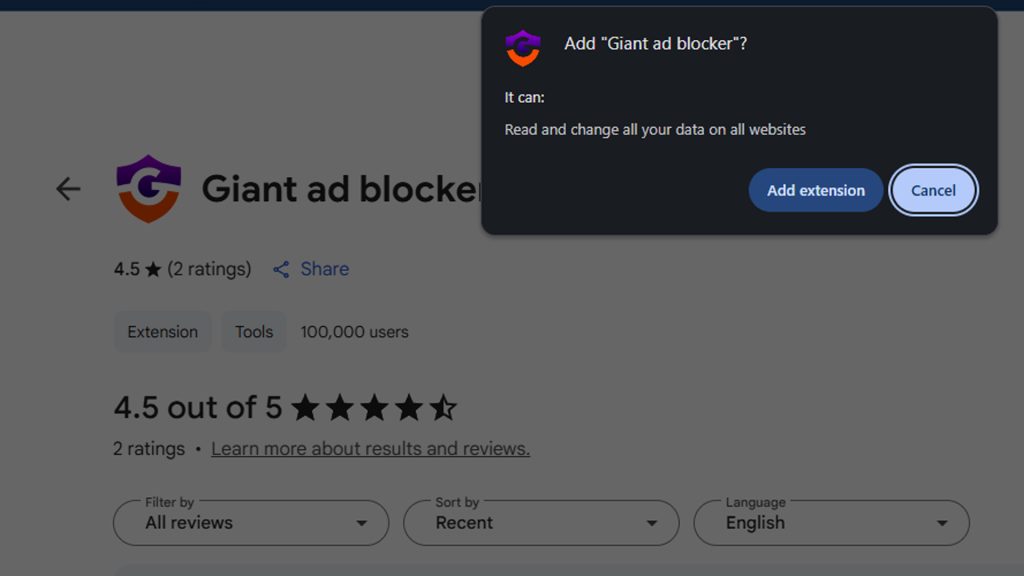
Many users first encounter Giant Ad Blocker through aggressive pop-up ads on shady websites. These ads may appear while streaming pirated movies, downloading torrents, or visiting other sites that rely on deceptive advertising networks. Instead of being listed clearly in a trusted extension store, it is often pushed by full-screen pop-ups that interrupt browsing and pressure users to install it.
Why Giant Ad Blocker Is Considered Dangerous
Although it is presented as a legitimate extension, Giant Ad Blocker creates multiple risks for the user. One of the most concerning issues is how it violates privacy. When installed, it requests permissions that allow it to “read and change all your data on the websites you visit.” That means the extension could monitor browsing activity, record search history, and even alter web pages by inserting ads or redirecting traffic.
These permissions are far more powerful than what a normal ad blocker needs. A true ad blocker does not need to track everything you type or inject its own code into every site you visit. This makes Giant Ad Blocker a potential privacy risk and a doorway for data collection.
Another reason it is considered unsafe is the deceptive and aggressive advertising used to spread it. Instead of being discovered naturally, Giant Ad Blocker is promoted with intrusive ads that may mimic system updates or media player downloads. Some of these pop-ups take over the entire screen and trick users into believing the software is required. This type of advertising is dishonest and often used by adware and malware campaigns.
How People Mistake It for a Virus
Even though Giant Ad Blocker is technically a browser extension, users frequently call it the “Giant Ad Blocker virus.” The reason is simple: it behaves in ways that feel like malware. It installs after a deceptive advertisement, it displays intrusive prompts, and it requests suspicious permissions. These actions mirror what people associate with computer infections, which is why the term “virus” is applied. While the extension does not replicate like a true virus, its behavior is still harmful to privacy and browsing safety.
How to Remove Giant Ad Blocker Manually
You can remove the Giant Ad Blocker extension directly from Google Chrome:
- Open Chrome and click the three-dot menu in the top right corner.
- Go to Settings.
- Select Extensions.
- Find Giant Ad Blocker in the list of installed extensions.
- Click Remove and confirm.
This will delete the extension from your browser. However, extensions distributed in this way are often bundled with other potentially unwanted programs. For complete removal, you should also check your computer for additional software that may have been installed at the same time.
Uninstall Unwanted Programs on Windows
Suspicious browser extensions like Giant Ad Blocker are sometimes bundled with desktop software. It is a good idea to check your computer for any unwanted apps that may have been installed alongside it.
To uninstall programs on Windows 10 or Windows 11:
- Right-click the Start button and select Apps and Features (on Windows 10) or Installed Apps (on Windows 11).
- Scroll through the list of installed applications.
- Look for anything you do not recognize, did not intentionally install, or that appeared around the same time as Giant Ad Blocker.
- Click the three-dot menu (Windows 11) or select the program name (Windows 10), then choose Uninstall.
- Follow the on-screen instructions to complete the removal.
This ensures that any unwanted software associated with Giant Ad Blocker is completely removed from your system, reducing the risk of it returning.
Remove Malware, Viruses, and PUPs with Malwarebytes
Because Giant Ad Blocker is associated with intrusive ads and PUPs, it is important to scan your system for hidden threats. Manual removal may not find everything. Using a trusted tool like Malwarebytes ensures complete cleanup.
Botcrawl may earn a commission from purchases made through links in this article.
How to use Malwarebytes:
- Download and install Malwarebytes from the button above.
- Open the program and allow it to update.
- Run a full system scan to detect malware, adware, and PUPs.
- Quarantine and remove everything detected.
- Restart your computer to finish the process.
Malwarebytes is highly effective against browser hijackers, adware, and other unwanted programs. Running a scan ensures Giant Ad Blocker is completely removed along with any other threats.
How Giant Ad Blocker Ads Mislead Users
The way Giant Ad Blocker is advertised is one of the strongest indicators that it is unsafe. Instead of being marketed like legitimate software, it is spread through intrusive ads that are designed to mislead. Some ads take over the entire screen and prevent the user from browsing until they click. Others disguise the extension as something else, such as a required browser update, a media player installation, or even security software.
These tactics are common with scareware and adware campaigns. They take advantage of less experienced users by creating urgency or confusion. Once installed, the extension may deliver even more ads, defeating the purpose of claiming to block them.
Why Extensions Like Giant Ad Blocker Are a Privacy Risk
Browser extensions can be helpful, but when they request unnecessary permissions, they become dangerous. Giant Ad Blocker is one example. By requesting the ability to read and change all data on websites, it has access to everything you type and view. That includes personal messages, search queries, login details, and shopping activity. Even if the extension does not misuse this data immediately, the possibility exists that it could be harvested or sold.
Extensions that collect this level of data should never be trusted, especially if they are promoted through dishonest ads. A legitimate ad blocker does not need to track every action across every website.
Removing Giant Ad Blocker quickly is the safest choice. Manual removal combined with a full scan using Malwarebytes ensures your browser and computer are secure.
- Shai-Hulud Malware Clone Powers New Npm Infostealer and DDoS Campaign
- FBI Seeks Info in Steam Malware Investigation
- GhostPoster Browser Extensions Reached 840,000 Installs Before Removal From Stores
- Kimwolf Android Botnet Exploits Residential Proxies to Breach Internal Networks
- ClickFix Attack Uses Fake Windows BSOD Screens to Deploy Malware

Related Posts