Everbe Ransomware
Learn what Everbe Ransomware is, how to remove the virus from your computer, and recover files encrypted by Everbe Ransomware.
Botcrawl may earn a commission from purchases made through links in this article.
What is Everbe Ransomware?
Everbe Ransomware (also called EVEREST LOCKER) is a computer virus that uses encryption algorithms to encrypt files on a computer in order to restrict access to them. The purpose of this is to obtain a payment from the victim in exchange for a file recovery program.
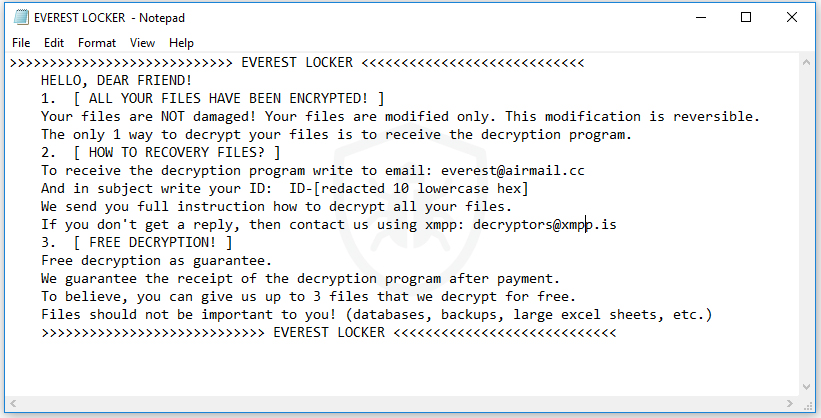
When Everbe Ransomware has infected a computer it will encrypt files and change the file extensions. One of the file extensions used by this ransomware is .[everest@airmail.cc].EVEREST. The ransomware will then drop a text file such as EVEREST LOCKER .txt, Everbe.txt, and/or 新建文本文档.txt on the desktop and every root folder the virus encrypted files in.
The files act as a ransom note that the malware author or distributor uses to explain to the victim what happened to their files and how to recover the files by paying a ransom. The note claims that they will decrypt files after a payment has been made but first you must write an email message with your ID as the subject to everest@airmail.cc (or other) and they will send you instructions. They also state that if they do not reply to contact them at decryptors@xmpp.is.
Here’s what is written on the text file:
>>>>>>>>>>>>>>>>>>>>>>>>>>>> Everbe < <<<<<<<<<<<<<<<<<<<<<<<<<<< HELLO, DEAR FRIEND! 1. [ ALL YOUR FILES HAVE BEEN ENCRYPTED! ] Your files are NOT damaged! Your files are modified only. This modification is reversible. The only 1 way to decrypt your files is to receive the decryption program. 2. [ HOW TO RECOVERY FILES? ] To receive the decryption program write to email: everest@airmail.cc And in subject write your ID: ID-[redacted 10 lowercase hex] We send you full instruction how to decrypt all your files. If you don't get a reply, then contact us using xmpp: decryptors@xmpp.is 3. [ FREE DECRYPTION! ] Free decryption as guarantee. We guarantee the receipt of the decryption program after payment. To believe, you can give us up to 3 files that we decrypt for free. Files should not be important to you! (databases, backups, large excel sheets, etc.) >>>>>>>>>>>>>>>>>>>>>>>>>>>> Everbe < <<<<<<<<<<<<<<<<<<<<<<<<<<<
It should be advised that paying a ransom or contacting the people behind the ransomware will not guarantee that your files will be recovered. It does not guarantee that the ransomware infection will be removed and will not appear again in the future.
How to remove Everbe Ransomware
1. Download Malwarebytes Anti-Malware software to scan your computer and remove malicious files and potentially unwanted programs.
2. To install the program, click the file you just downloaded. It can usually be located in the Download folder.
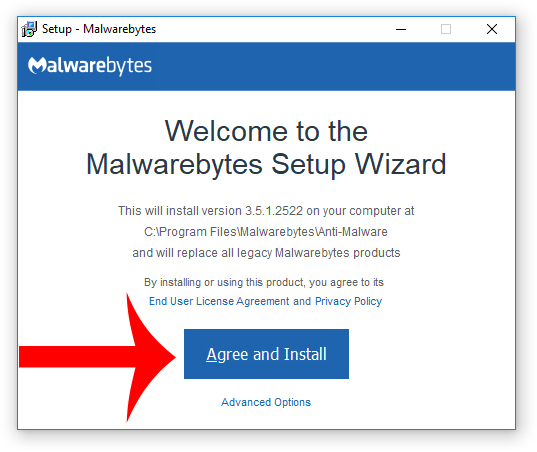
3. A window that says “Welcome to the Malwarebytes Setup Wizard” will appear. Click Agree and Install to begin the installation. Once complete, click Finish.

4. Now the Malwarebytes is installed, open the program and click the Scan Now button – or go to the Scan tab and click the Start Scan button.

5. When the scan is complete click the Quarantine Selected button.
6. If Malwarebytes says “All selected items have been removed successfully. A log file has been saved to the logs folder. Your computer needs to be restarted to complete the removal process. Would you like to restart now?” click the Yes button to restart your computer.
7. Next, Download HitmanPro to perform a second-opinion scan and remove any remaining malicious trace files.
8. Once installed, open HitmanPro and click Next to start scanning your computer. *If you are using the free version you may chose to create a copy or perform a one-time scan.
9. When the HitmanPro scan is complete click the Next button.
10. To activate the free version of HitmanPro: enter your email address twice and click the Activate button.
11. Click the Reboot button.
File Recovery Software
| NAME | DESCRIPTION | DOWNLOAD |
|---|---|---|
| Shadow Explorer | Restores lost or damaged files from Shadow Copies | Download (Free) |
| Photorec | Recovers lost files | Download (Free) |
| Recuva | Recovers lost files | Download (Free) | Buy |
Troubleshooting
Alternative methods are suggested if there are issues removing Everbe ransomware from an infected computer.
How to Restore your computer
If a restore point has previously been established on your machine you will be able to perform a system restore in order to restore your machine to a date and time before it was infected. You will lose files on your computer that were obtained prior to the restore point.
There are several options to restore your computer. Most computers have their own restore software that can be found by performing a search. Additionally, computers that run the Windows Operating System have a default restore program that can also be found by performing a search.
A boot screen that can be used to access options to restore your computer can be reached by rebooting your computer and pressing the F8 key once the manufacture screen is displayed.
How to Recover your computer to factory settings
A system recovery (or reset) will recover your computer to factory settings. You will lose the current programs and files on your computer.
There are several options to recover your computer to factory settings. Most computers have their own recovery software that can be found by performing a search. Additionally, computers that run the Windows Operating System have a default recovery program that can also be found by performing a search.
A boot screen that can be used to access options to restore your computer can be reached by rebooting your computer and pressing the F8 key once the manufacture screen is displayed.