Skip to content
Monitor live humans, bots, and datacenters Botcrawl Edge Try Edge Free

Latest posts

Filter by topic

Cybersecurity 7 min read

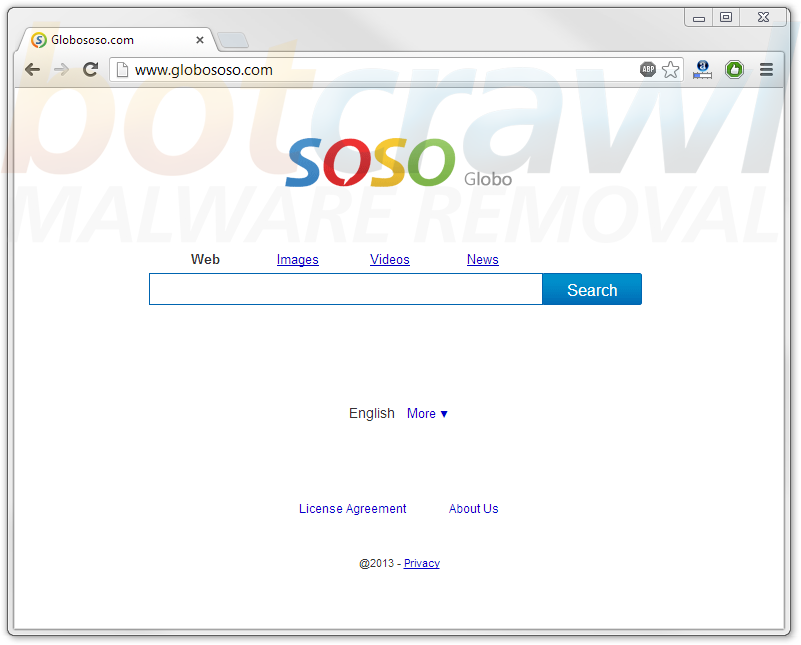
How To Remove The Globososo Virus – Globososo.com Redirect Removal Instructions (Hijack)

The Globososo virus, or Globososo redirection virus is malware or a potentially unwanted program (PUP) developed by Kingtale Technology Inc.. Globososo is categorized as a browser hijacker that changes Internet browser settings without direct permission of the computer user, often entrapping victims to terms they would never agree with. The Globososo virus changes the default search engines, homepages, and browser shortcuts of popular Internet browsers including Google Chrome, Mozilla Firefox, and Microsoft Internet Explorer, in turn causing infected Internet browsers to target globososo.com on startup and redirect to globososo.com and other websites. Browser redirections to http://globososo.com and the Globososo search results page primarily occur when attempting to search the web using the infected browser’s address bar.

Read article
Cybersecurity 5 min read

How To Remove Arcade Safari Virus – Arcade Safari Malware Removal Instructions

Arcade Safari, commonly referred to as the Arcade Safari virus or Arcade Safari spyware, is a potentially unwanted program (PUP) that installs to a computer without consent or malware, categorized as a browser hijacker and adware, that changes internet browser settings without permission, including the home page, default search engine, and browser shortcut, as well as displays unwanted in-text advertisements such as Text Enhance and unwanted pop-up advertisements. By doing so, the Arcade Safari virus causes Google Chrome, Mozilla Firefox, and Microsoft Internet Explorer to redirect to and start up on unwanted websites.

Read article
Cybersecurity 5 min read

How To Remove Headlinealley Toolbar Malware – Headlinealley Virus Removal Instructions

Headlinealley Toolbar (Headline Alley Toolbar), also referred to as the Headlinealley virus, Headlinealley Toolbar virus, or Headlinealley malware, is a potentially unwanted program (PUP), or potential malware, categorized as an internet browser hijacker that “hijacks” Google Chrome, Mozilla Firefox, and Microsoft Internet Explorer browser settings without permission, including the home page, default search engine, and browser shortcut. In turn, Headlinealley Toolbar causes internet browsers to redirect to headlinealley.com releated websites, including mywebsearch.com, delta-search.com, and other domain names. Headlinealley Toolbar also causes internet browsers to target and ultimately start up on unwanted websites and the Headlinealley virus allows potential third-party malware to install to the computer system without direct authorization.

Read article
Cybersecurity 5 min read

How To Remove Freecorder Malware (Freecorder Virus Removal Instructions)

Freecorder, also referred to as the Freecorder virus or Freecorder malware is malware, categorized as an Internet browser hijacker and adware that essentially installs to computer systems without consent, but can be manually and voluntarily installed from Freecorder.com, as Freecorder advertises itself as a free tool, or freeware used to record video and audio from a variety of websites. The downside to Freecorder, is that in monetization efforts, the free product bundles additional malware with install, also without consent. Furthermore, those who install Freecorder malware voluntarily are often entrapped to very unethical terms that they would never agree with if presented to properly. Even though the Freecorder software installer allows users to opt out of installing additional software that will alter Internet settings, including homepages, default search engines, and Internet browser shortcuts, the installment process is designed to trick victims into installing third-party products.

Read article
Cybersecurity 7 min read

How To Remove The MyPlayCity Virus – Start.myplaycity.com Redirect Malware Removal

The MyPlayCity virus, otherwise known as the Search MyPlayCity virus or start.myplaycity.com redirect virus is potentially alware, categorized as a browser hijacker that changes Internet browser settings without consent of the user, including the homepage and default search engine, causing Internet browsers to redirect to start.myplaycity.com and start up on start.myplaycity.com, as well as other websites. MyPlayCity malware may also infect a computer without consent often bundling alongside or inside third party browser add-on , extensions and toolbars. Furthermore, MyPlayCity products can be manually and voluntarily installed from a variety of websites such as search.myplaycity.com and myplaycity.com as MyPlayCity claims to be the leading game portal with a variety of free games for download where you undoubtedly find your full version games (their words). MyPlayCity may also be referred to as freeware or offerware that targets and enraps Internet users to terms they would neverwise agree with.

Read article
Cybersecurity 4 min read

How To Remove The CashU Virus – CashU Remove Screenlock (Ransomware)

The CashU virus is a term for malware, categorized as ransomware that attempts to pose as a company or organization of authority such as the police force (Civil Police Force), the FBI, or even websites such as Spamhaus. The CashU virus takes complete control the computer system, locks the computer, and ultimately blocks or restricts the computer user from accessing the desktop by displaying a full page screen or window that claims to be from an authority (as previously described) stating that the computer was used illegally and may have been involved in the distribution of illegal media files, malware and or illegal pornography such as child porn, or zoophilia. Furthermore, the CashU virus screen demands of fine by use of CashU online payment services (cashu.com). Please note, CashU is not assocaited with this ransomware and you are not in any trouble with the police, federal federal agencies, and organizations. This is dangerous ransomware and paying the fine or penalty described on the locked screen using CashU services may lead to further complications. To remove the CashU virus, follow the instructions provided in this article.

Read article
Cybersecurity 9 min read

How To Remove Browwse2Saavei Virus – Browwse2Saavei Malware Removal Instructions

Browwse2Saavei (Browwse2Saavei virus) is malware categorized as combo adware and browser hijacker that primarily infects computer systems without detection by uninstalling unwanted software and attaching to Internet browsers as a Browwse2Saavei add-on or extension in order to display unwanted advertisements and coupons, including in text advertisements, pop up advertisements, and pop under advertisements. Browwse2Saavei primarily displays unwanted in text advertisements associated with the Text Enhance adware platform. The Browwse2Saavei add-on for Mozilla Firefox and Microsoft Internet Explorer and Browwse2Saavei extension for Google Chrome is essentially Browse22Save and Browse2Save malware using a different name, possibly to trick victims and remain undetected.

Read article
Windows 4 min read

What Is NTVDM.EXE ? NTVDM.EXE File Information – Remove NTVDM.EXE Malware

Ntvdm.exe is a legitimate Windows operating system file and process used to handle a single MS DOS environment but may also be the name of a malicious file and Windows process relating to malware and computer viruses. Though ntvdm.exe is a name of a file and process utilized by cyber criminals, most of the time errors and issues concerning the ntvdm.exe file are related to bugs in system updates and it has been reported that uninstalling both KB2707511 and KB2709162 system updates has fixed problems concerning the NTVDM.exe file.

Read article
Cybersecurity 6 min read

How To Remove Price Blink Virus – PriceBlink Malware Removal (PUP – Adware)

The Price Blink virus (Priceblink virus) is malware, categorized as adware and browser hijacker that displays unwanted advertisements and coupons, including pop-up advertisements and a pop-up yellow coupon bar from priceblink.com. The Price Blink virus uses browser attachments such as add-ons, extensions, and toolbars, including third-party toolbars, to infect computers with Price Blink malware without authorized agent in to generate and unethical revenue stream via third-party sponsors and associations. Furthermore Price Blink and related malware may change browser settings without consent including the homepage settings, the false search incident settings, and targeted shortcut settings.

Read article
Cybersecurity 7 min read

How To Remove The Spamhaus Virus – Spamhaus Remove (Spamhaus Ransomware)

The Spamhaus virus or The Spamhaus Project virus, are terms for dangerous malware, categorized as ransomware (Spamhaus ransomware), that infects computer systems using trojan horses, in order to restrict access to the infected computer system and trick unsuspecting victims to pay a fine to unlock the computer again. The Spamhaus virus engages in social engineering by claiming they track internet spam and may state that the computer user lost control over their computer (you have lost control over your computer) and the computer began to spread malware, viruses, trojans, and worms, upon other fraudulent allegations, therefore must be locked. The Spamhaus virus further begins to fraudulently detail that the computer user is breaking numerous international and USA laws and attempts to get victims to purchase Green Dot Moneypark cards and other credit vouchers to pay the unnecessary $300 fine. The Spamhaus virus may also contain a picture of the logo for the grocery store Ralphs. Ralphs is an American Kroger store on the west coast of the United States.

Read article
Cybersecurity 5 min read

How To Remove Onlinefwd virus – Onlinefwd.com Redirect Removal (Browser Hijacker)

Onlinefwd.com is a website if redirected to indicates that the computer user has an additional browser attachment installed or is infected with a browser hijacker. The website Onlinefwd.com is associated with third-party malware, in particular adware and additional browser hijackers, that may cause infected internet browsers to redirect to onlinefwd.com and start up on www.onlinefwd.com, as well as third-party domain names. The Onlinefwd virus has also been reported to associate with adware such as Text Enhance, causing unwanted in-text and pop-up advertisements. If your internet browser is redirecting to onlinefwd.com and prompting unwanted advertisements, a third-party browser add-on and extension such as thebflix may be the cluprit, and if removed will cause internet browsers to stop redirecting to http://onlinefwd.com and other websites, as well as display symptoms of additional malware.

Read article
Cybersecurity 5 min read

How To Remove UnfriendApp Malware – Facebook Unfriend App Virus Removal (Hijacker/Adware)

The Facebook UnfriendApp (Facebook Unfriend Application), otherwise known as the Unfriend App, or even mistakenly as the UnfriendApp virus or Unfriend App virus is essentially potential malware, categorized as a combination of a browser hijacker and mixed with adware. The Facebook UnfriendApp has been reported to display pop-up advertisements, as well as unethical pop-under advertisements which pop-up under an opened browser window and are often noticed when the internet user closes the primary browser window. Pop-under and pop-up ads related to UnfriendApp may contain links to dangerous websites and software, including rogue software and unethical phishing websites such as update91.com.

Read article