How to change your Mozilla Firefox search engine
Follow the instructions on this webpage to change your Mozilla Firefox homepageMozilla Firefox search engine (default search engine).
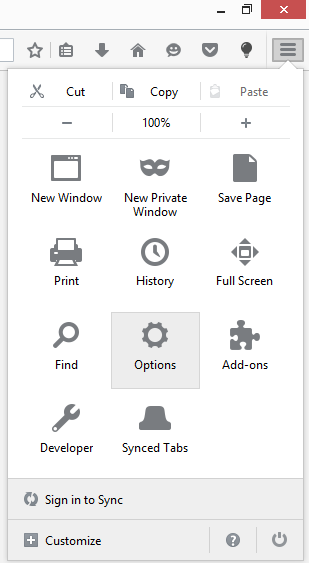
1. Click the Open menu icon  in the Mozilla Firefox Toolbar and go to Options.

2. To change your Mozilla Firefox search engine click Search on the left sidebar and chose your default search engine from the drop-down list.
3. If you want to add another search engine that is not available in the One-click search engines list then click the Add more search engines… link at the bottom of the page.

4. On Add-ons page select the new search engine you want to use by hovering your mouse over the selection and clicking the + Add to Firefox button that appears.
5. Click the Add button on the Add Search Engine notification window. To make the new search engine the current search engine select the Make this the current search engine radio box and click Add.