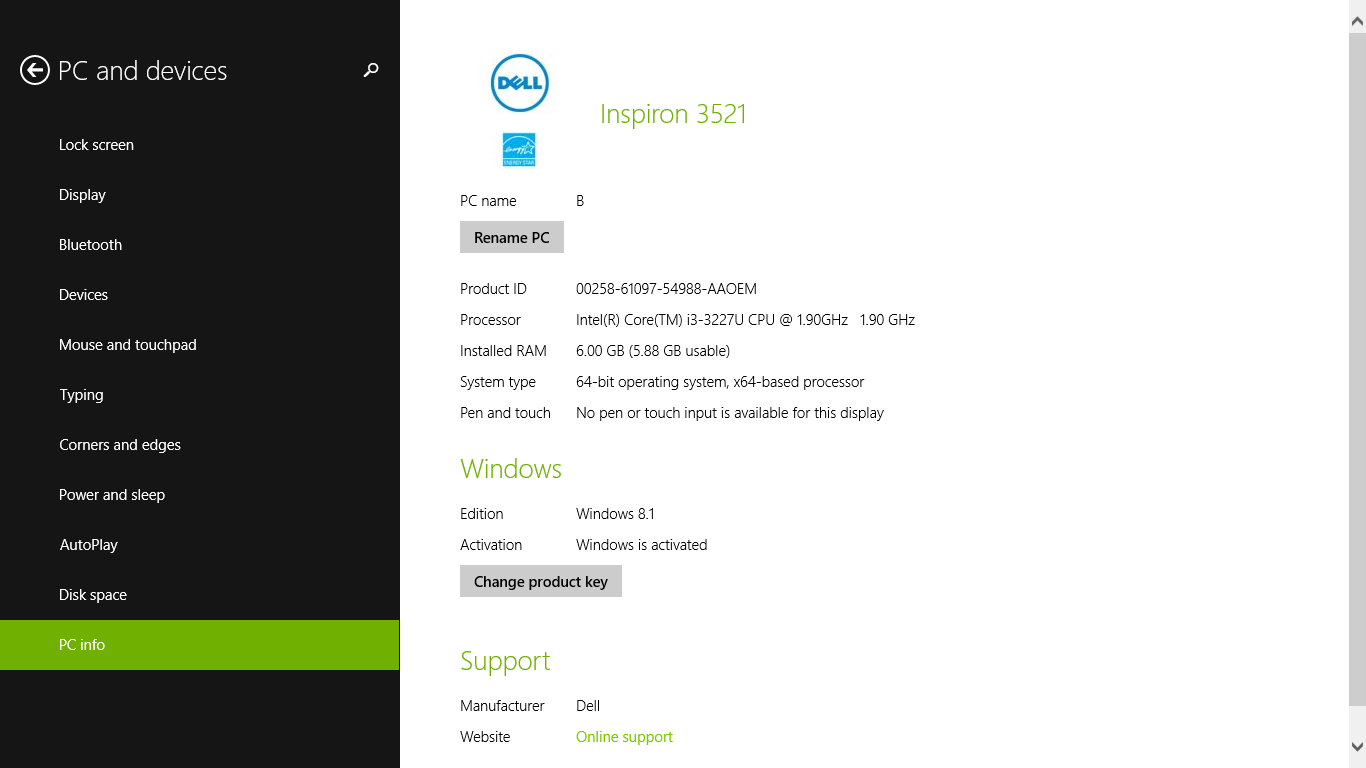
Your computer’s PC info contains specifications about your computer. Your PC info tells you your Product ID, Processor, Installed RAM, System type, Pen and touch availability, Windows Edition, Windows Activation, and more. Some PC info pages will additionally contain links to the manufacture’s support website and consists of other similar information.
1. Go to Windows Start screen
2. Go to PC Settings or search for the term “PC settings” to locate your PC settings
3. In the PC settings tab select PC and devices
4. In the PC and devices tab select PC info
5. The PC info page will tell you the specifications of your computer and allow you to change your product key and rename your PC
- How to Remove the “Drop Here to Share, Move, or Do More” Popup in Windows 11
- Microsoft Confirms Windows 11 Shutdown Bug After January Update
- Manus AI Is the First Agent That Can Read Your Files Through Windows’ New Agent Connector
- Windows 11 AI Feature Sparks Privacy Concerns After Gaining Access to Personal Folders
- Microsoft Confirms “Update and Shut Down” Was Actually Restarting Windows 10/11 and Patches the Bug
Sean Doyle
Sean is a tech author and security researcher with more than 20 years of experience in cybersecurity, privacy, malware analysis, analytics, and online marketing. He focuses on clear reporting, deep technical investigation, and practical guidance that helps readers stay safe in a fast-moving digital landscape. His work continues to appear in respected publications, including articles written for Private Internet Access. Through Botcrawl and his ongoing cybersecurity coverage, Sean provides trusted insights on data breaches, malware threats, and online safety for individuals and businesses worldwide.