Skip to content
Monitor live humans, bots, and datacenters Botcrawl Edge Try Edge Free

Latest posts

Filter by topic

Cybersecurity 7 min read

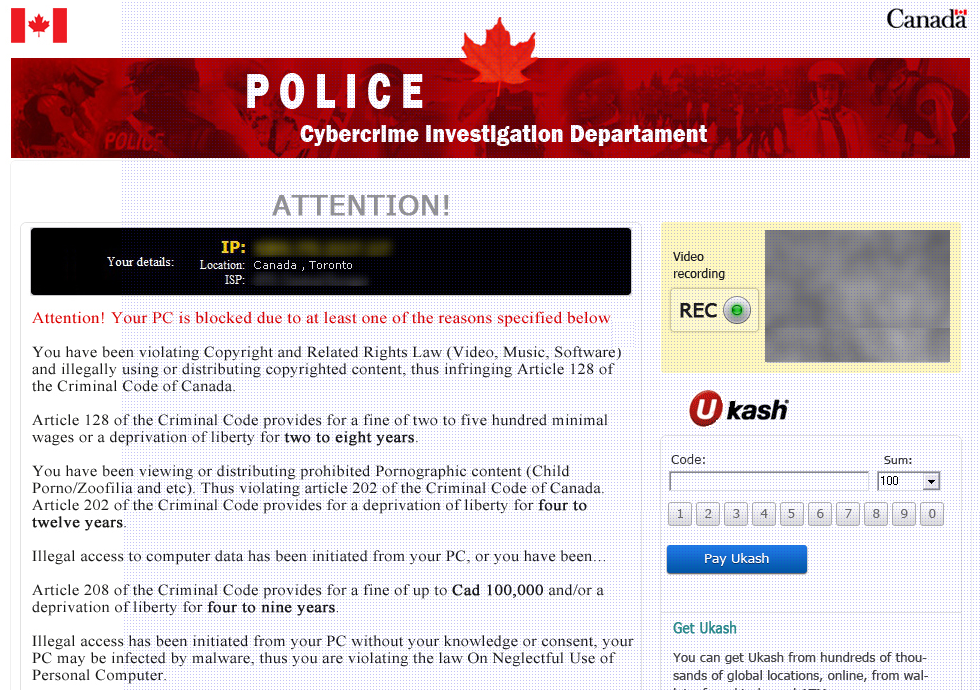
How To Remove The Canadian Police Cybercrime Investigation Department Ransomware Virus

The Police Cybercrime Investigation Department ransomware virus (fake Canadian Police virus, Canada Police Ransomware, Criminal Code of Canada Virus) is a virus (categorized as ransomare) that attempts scams infected users by “holding their systems hostage” by taking control of the infected computer, locking the computer from use. The virus then prompts a fake “Attention!” style alert page which accuses the computer user (identified by IP and ISP) of violating several different Copyright (& Related Rights Laws/Video, Music, Software) and Criminal Codes of Canada (Child porno, Zoofilia, and etc).

Read article
Cybersecurity 7 min read

How To Remove The Interpol Department Of Cybercrime Ransomware Virus (Fake Interpol Virus, Interpol Trojan)

The Interpol Department Of Cybercrime virus is ransomware controlled by the use of trojans that holds computer systems hostage and displays a fake Interpol screen which frightens computer users to suspect their computer was used in cybercrime such as child porn, zoofilia, and the Interpol virus will most likely state the computer was used to download or distribute video, music, and software against copyright and related rights laws in the country of Great Britain. The Internpol Department Of Cybercrime virus then demands a penalty fine to be paid either by Paypal, UKash, or Playsafecard in order to unlock and use the locked computer. Though this fake Interpol malware is likely to strike in Europe, users have been infected throughout other continents.

Read article
Search Engine Optimization 1 min read

How To Prevent Outside Users From Browsing Your WordPress Directory Files

When it comes to improving the security of your WordPress website, it is recommended to prevent outside visitors from browsing your WordPress directory files. It is very simple to do using the .htaccess file in the WordPress root directory. The simple line provided will prevent outside visitors from seeing a list of available files in your WordPress directory.

Read article