

Privaky ransomware is a type of malicious software that locks files on Windows computers and demands payment in cryptocurrency to unlock them. Sometimes called the Privaky virus, it belongs to a family of file-encrypting malware designed to cause maximum disruption. Victims often find that important documents, photos, and even backups have been scrambled with strong encryption, while ransom notes appear across the system demanding payment for recovery.
What makes this ransomware especially harmful is that it rarely stops at file encryption. Many variants disable Windows Defender, delete shadow volume copies, and block normal recovery tools. In some cases it spreads to other devices on the same network, putting entire businesses at risk. Because payment is demanded in Bitcoin or other cryptocurrencies, transactions are untraceable and victims have no guarantee of receiving a working decryption tool. This creates a high-pressure situation where people feel forced to pay, even though experts strongly warn against it.
Botcrawl may earn a commission from purchases made through links in this article.
This guide provides a complete overview of the Privaky ransomware threat. It explains how the malware spreads, how the encryption process works, the symptoms of infection, and the broader risks tied to ransomware campaigns. Most importantly, it includes detailed instructions to remove Privaky ransomware with Malwarebytes and proven methods to recover encrypted files safely. By following these steps carefully, victims can contain the infection, restore data, and strengthen defenses against future attacks.
Table of Contents
- What Is Privaky Ransomware?
- Why Is Privaky Ransomware Dangerous?
- How the Privaky Ransomware Infects Systems
- How the Privaky Ransomware Encryption Process Works
- Common Symptoms of a Privaky Ransomware Attack
- Examples of Privaky Ransom Notes
- Risks Tied to the Privaky Ransomware Ecosystem
- How to Detect an Ongoing Privaky Ransomware Attack
- What to Do If You Are Infected with Privaky
- Remove Privaky Ransomware with Malwarebytes (Recommended)
- How to Recover Files Encrypted by Privaky
- Why Paying the Ransom Is Risky
- Advanced Checks for Persistent Malware
- Why Antivirus Sometimes Misses Ransomware
- How to Prevent Privaky Ransomware Infections
- Frequently Asked Questions About Privaky
- What is Privaky ransomware?
- Why is Privaky ransomware dangerous?
- How does Privaky ransomware spread?
- What file types does it encrypt?
- What does the ransom note look like?
- Should I pay the ransom?
- Can I decrypt files without paying?
- Does antivirus protect against Privaky?
- What should I do if my computer is infected?
- How can I prevent Privaky ransomware in the future?
- Key Takeaways
- Ransomware is preventable
- Malwarebytes should be your first line of defense
- Backups are critical
- Paying the ransom is not a solution
- Post-infection cleanup is essential
- Preparation is the best defense
What Is Privaky Ransomware?
Privaky ransomware is a file-encrypting type of malware that targets Windows systems and prevents victims from opening their data until a ransom is paid. Once installed, it searches through personal folders, business databases, and connected network drives to locate valuable files. These files are then scrambled with strong encryption algorithms such as AES and RSA, making them unreadable without a unique decryption key controlled by the attackers. To pressure victims, the malware renames encrypted files with new extensions and drops ransom notes demanding payment in cryptocurrency, typically Bitcoin. The primary goal of the Privaky virus is extortion, attackers block access to important data and attempt to profit from fear and urgency.
Although commonly referred to as a virus, Privaky ransomware behaves differently from traditional self-replicating viruses. Instead of spreading automatically, it is distributed through deliberate infection methods such as phishing emails with malicious attachments, fake software installers, cracked programs, and weakly secured Remote Desktop Protocol (RDP) connections. Once launched, it is capable of disabling Windows Defender, altering security policies, and deleting shadow volume copies that could otherwise allow recovery. This ensures that victims cannot rely on built-in recovery tools and are left with few options.
For individuals, the consequences of a Privaky ransomware attack often include the loss of family photos, personal records, tax files, and school projects. For businesses, the impact can be catastrophic, ranging from inaccessible customer databases to halted production systems and the loss of intellectual property. In either case, the attackers aim to create maximum disruption in order to pressure victims into paying quickly. Unfortunately, there is no guarantee that paying will restore the files. Many victims who comply with the demands receive either broken decryption tools or no response at all.
Key characteristics of Privaky ransomware include:
- File encryption: Uses strong AES and RSA algorithms to make files inaccessible without the attacker’s decryption key.
- File renaming: Encrypted files often include victim IDs, attacker contact details, and random extensions.
- Ransom notes: Instructions are dropped as text files or displayed as desktop wallpapers, demanding cryptocurrency payment.
- Persistence: Can create registry changes or scheduled tasks to relaunch after reboot.
- Recovery blocking: Deletes shadow copies and disables Windows recovery features to prevent simple fixes.
Because of these behaviors, Privaky ransomware is considered a severe and high-risk cyber threat. It can cause permanent data loss, financial damage, and long-term downtime. Early detection and immediate removal with tools like Malwarebytes give victims the best chance of stopping the encryption process and safely recovering files from backups or decryptors when available.
Why Is Privaky Ransomware Dangerous?
Privaky ransomware is one of the most destructive types of malware because it directly targets the files that individuals and organizations rely on most. Unlike spyware or adware, which often operate in the background, ransomware makes its presence immediately known by encrypting documents, photos, videos, and databases, then demanding payment for decryption. This visible and disruptive impact creates panic, forcing victims to make quick decisions under pressure. The Privaky virus is especially dangerous because its encryption cannot be bypassed without the attacker’s private key.
The encryption methods used by Privaky are designed to be unbreakable without access to that key. Even advanced forensic techniques cannot reverse the damage once files are scrambled. While security researchers occasionally release free decryptors for certain ransomware families, in most cases the encryption remains intact indefinitely. For victims who do not have recent backups, this means permanent data loss is a very real possibility.
Beyond encryption, Privaky ransomware often includes additional capabilities that make recovery even harder. Many variants disable Windows Defender and other antivirus tools, delete Volume Shadow Copies, and block recovery features that could otherwise help restore files. More advanced strains employ double extortion tactics, where attackers first steal sensitive data and then threaten to leak it publicly if the ransom is not paid. This exposes victims to the risk of privacy violations, identity theft, regulatory penalties, and reputational harm in addition to losing access to their data.
Key reasons Privaky ransomware is considered highly dangerous include:
- Permanent data loss: Without backups or a working decryptor, files encrypted by Privaky may be lost forever.
- Costly extortion: Ransom demands are made in untraceable cryptocurrencies like Bitcoin, leaving victims with no legal recourse.
- Disruption of defenses: The ransomware disables security features, deletes restore points, and prevents easy recovery.
- Network-wide spread: Privaky can move across shared drives, mapped folders, and cloud storage, affecting entire organizations.
- Data breaches: Double extortion campaigns mean sensitive data may be leaked or sold even if the ransom is paid.
For businesses, an attack can lead to compliance violations, lawsuits, loss of customer trust, and downtime that disrupts operations. For individuals, it can mean the permanent loss of irreplaceable memories, financial documents, or school projects. In both cases, the Privaky ransomware attack is more than an inconvenience — it is a high-severity event with long-lasting consequences.
Recommended action: Never rely on paying the ransom as a solution. Instead, isolate the infected system, remove the ransomware with Malwarebytes, and explore safe recovery options such as backups or legitimate decryptors. This approach minimizes financial loss and avoids fueling future ransomware campaigns.
How the Privaky Ransomware Infects Systems
Privaky ransomware does not appear on a system by accident. Attackers use deliberate infection methods designed to reach as many victims as possible while staying hidden until encryption begins. Understanding these attack vectors is one of the most important steps in preventing infection. The Privaky virus spreads through phishing campaigns, exposed remote access services, malicious downloads, and unpatched software vulnerabilities.
Phishing emails are the most common entry point. Criminals craft messages that appear to come from trusted companies such as banks, shipping services, or cloud providers. These emails may include attachments disguised as invoices, delivery updates, or account alerts. When the recipient opens the attachment or clicks on a malicious link, the ransomware is silently installed. These phishing campaigns are convincing because they use professional layouts, spoofed addresses, and urgent language to trick victims into acting quickly.
Remote Desktop Protocol (RDP) exploitation is another frequent method. Attackers scan the internet for systems with RDP enabled and then use brute force attacks to guess weak or reused passwords. Once inside, they gain full administrative control and can install Privaky ransomware manually. Organizations that do not enforce strong password policies or multi-factor authentication are especially vulnerable to this type of compromise.
Software vulnerabilities also play a significant role. Outdated operating systems, web browsers, and popular applications often contain unpatched flaws. Exploit kits and drive-by download attacks take advantage of these weaknesses. Simply visiting a compromised website with an unpatched browser may trigger an automatic download of the ransomware payload. Attackers also distribute ransomware through pirated software, cracks, and key generators. Users who install these unverified programs often infect their systems themselves without realizing it.
Malvertising and compromised websites complete the picture. In these cases, a victim may click on what looks like a legitimate online ad or land on a trusted site that has been secretly injected with malicious code. Without needing to download or run a file manually, the system can be infected with Privaky ransomware. These drive-by attacks are effective because they bypass cautious user behavior and require no interaction beyond loading a web page.
Why this matters: The infection chain highlights how the Privaky ransomware exploits both human mistakes and technical vulnerabilities. A single careless click, a weak RDP password, or an outdated program can allow ransomware to compromise an entire computer or even a company network. Once attackers gain a foothold, the encryption process begins almost immediately, leaving little time to react.
Recommended protection: To reduce the risk of infection, keep your operating system and applications fully updated, disable RDP unless absolutely required, and avoid downloading pirated or suspicious software. In business environments, staff training on spotting phishing attempts is critical. Most importantly, run a trusted security solution such as Malwarebytes. Malwarebytes can block malicious downloads, stop exploit attempts, and remove active ransomware infections before files are encrypted.
How the Privaky Ransomware Encryption Process Works
Once Privaky ransomware gains access to a system, the most damaging phase of the attack begins: file encryption. The encryption routine is designed to maximize damage, remove recovery options, and pressure victims into paying the ransom. By understanding how the Privaky virus encrypts files, victims can recognize the signs of an active attack and make informed decisions about recovery.
Step 1: Preparing the environment. Before encrypting files, the ransomware ensures it can operate without interference. It checks for security tools, disables Windows Defender, and may terminate processes that interfere with file access. In some cases, it also escalates privileges, creates persistence mechanisms through registry changes or scheduled tasks, and ensures it will relaunch after a reboot.
Step 2: Locating valuable files. The malware scans local drives, external storage, mapped network shares, and even cloud-synced folders for common file types. Documents, spreadsheets, databases, images, videos, and archives are primary targets, while critical Windows system files are usually skipped so the computer can still run and display ransom instructions.
Step 3: Terminating active processes. To prevent conflicts, the ransomware shuts down applications that keep files open. Databases, Microsoft Office programs, and backup tools are frequent targets. Victims may notice programs closing unexpectedly or the system slowing down during this stage.
Step 4: Encrypting files. The ransomware uses a hybrid encryption method. Each file is locked with a unique AES-256 symmetric key for speed, and then those AES keys are encrypted with the attacker’s RSA public key (often RSA-2048 or higher). Only the attacker’s private key can unlock the files. This layered approach makes brute-force decryption impossible.
Step 5: Renaming files. After encryption, file names are altered to include a victim ID, an attacker contact address, and a unique extension. For example, document.docx may become document.docx.id-123456.[attacker@example].XXXX. This both signals infection and helps attackers track paying victims.
Step 6: Dropping ransom notes. A ransom note is placed in each affected folder, often under names like README.txt or HOW_TO_DECRYPT_FILES.html. The ransomware may also change the desktop wallpaper or create pop-ups. These notes demand cryptocurrency payment and sometimes offer to decrypt a small number of files for free as “proof” of legitimacy.
Step 7: Blocking recovery. To prevent victims from restoring files, Privaky commonly deletes Windows Volume Shadow Copies with commands like vssadmin delete shadows /all /quiet. It may also disable System Restore, wipe backup catalogs, or attempt to encrypt external and cloud backups. Some advanced variants also exfiltrate files before encryption, threatening to leak them publicly if the ransom is not paid.
What this means for victims: The encryption process used by Privaky ransomware is systematic and highly destructive. Indicators of compromise include renamed files, ransom notes, missing restore points, and unusual spikes in CPU or disk activity. Because the encryption algorithms are strong, files cannot be unlocked without the attacker’s key unless a free decryptor is released. The safest response is to isolate the system, preserve evidence, remove the ransomware with Malwarebytes, and attempt recovery using backups or safe decryption tools.
Common Symptoms of a Privaky Ransomware Attack
Recognizing the early warning signs of Privaky ransomware can make the difference between partial data loss and total system compromise. Unlike stealthy malware that hides in the background, ransomware creates visible damage quickly. The following indicators of compromise (IOCs) are the most common symptoms of an ongoing ransomware attack:
1. Renamed files with strange extensions.
The clearest symptom of infection is file renaming. The Privaky virus appends unique extensions, victim IDs, or attacker contact addresses to encrypted files. For example, project.docx may suddenly change to project.docx.id-123456.[attacker@example].XXXX. These renamed files cannot be opened by normal applications, since their contents have been encrypted.
2. Ransom notes in folders and on the desktop.
Privaky ransomware drops instructions in every affected directory, often under names such as README.txt or HOW_TO_DECRYPT_FILES.html. Many variants also replace the desktop wallpaper or launch pop-up windows with ransom demands. These notes provide attacker contact information, payment instructions, and deadlines intended to pressure victims into paying quickly.
3. Files that no longer open.
Victims may first notice that familiar documents, images, or videos suddenly fail to open. Applications may display errors like “file format not recognized” or “this file is corrupt.” This is caused by the encryption process scrambling the file contents.
4. Unusual system performance.
During active encryption, ransomware consumes heavy CPU and disk resources. Systems may become unusually slow, programs may freeze, and Task Manager may show unknown processes consuming large amounts of resources. This slowdown often coincides with files being locked in bulk.
5. Disabled or missing security tools.
Many Privaky variants disable Windows Defender, antivirus programs, and firewalls. Victims may find that security software closes unexpectedly, refuses to launch, or appears to be uninstalled. This is a deliberate tactic to block defenses.
6. Deleted backups and restore points.
The ransomware frequently deletes Volume Shadow Copies and disables System Restore. Victims who attempt to roll back files or use “Previous Versions” will discover that recovery points are missing.
7. Changed desktop background or new pop-ups.
Some ransomware families replace the user’s desktop background with an image explaining the ransom demand. Others generate pop-up windows that remain on-screen until the system is restarted.
8. Spread across networks and cloud storage.
If the infected computer is connected to a network or cloud-synced folder, the ransomware may encrypt shared files, mapped drives, or synchronized backups. This makes the impact far greater in business environments, where one infected device can cripple entire departments.
What to do if you see these symptoms: Treat any of these signs as confirmation of an active ransomware attack. Disconnect the computer from the internet and local networks immediately to stop further spread. Preserve a copy of encrypted files and ransom notes for analysis. Then run a full system scan with Malwarebytes to remove the active Privaky ransomware payload before attempting recovery. Early detection and decisive action are critical to minimizing the damage.
Examples of Privaky Ransom Notes
Once Privaky ransomware finishes encrypting files, it leaves behind ransom notes that act as the main communication channel between the attackers and the victim. These notes serve multiple purposes: they confirm that encryption has taken place, explain how to contact the attackers, and demand payment in cryptocurrency. Recognizing the format of these ransom notes is important because it helps victims confirm the infection and identify which ransomware family is responsible.
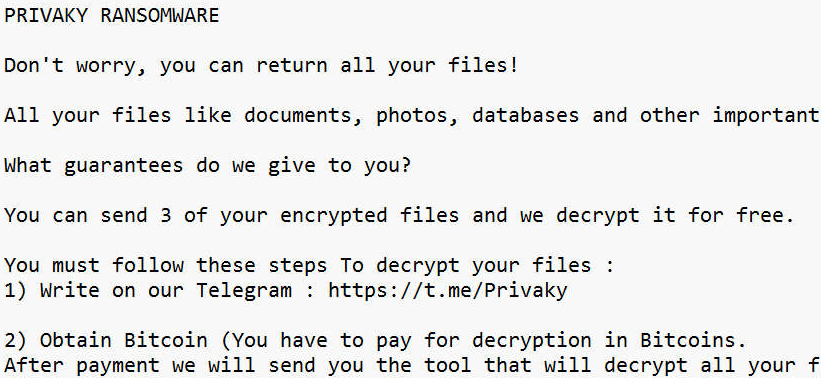
Ransom notes are usually created as plain text files, but some families use HTML pages, pop-up windows, or even desktop wallpaper changes. Common filenames include README.txt, HOW_TO_DECRYPT_FILES.txt, or RECOVER_DATA.html. Many versions of the Privaky virus will also add a full-screen message or alter the desktop background so that victims cannot ignore the instructions.
Below is a generic example of what a ransom note from Privaky ransomware may look like:
Privaky RANSOMWARE

Attention! All your files have been encrypted.

Your documents, photos, videos, and databases are now locked with strong encryption.
Do not attempt to rename files or use third-party recovery tools — this may cause
permanent damage.

To restore your files, follow these steps:

1. Contact us at: [attacker_contact@example.com]
2. Purchase Bitcoin and send payment to the wallet we provide.
3. After payment, you will receive the decryption tool and private key.

We will decrypt up to three small files for free as proof that decryption is possible.
Do not waste time — if payment is not received within the deadline, your files may
be permanently lost or deleted.
Key elements typically found in Privaky ransom notes include:
- Clear statement of encryption: The note explains that files are locked and cannot be accessed without the attacker’s key.
- Contact instructions: Usually one or more email addresses or links to a Tor-based payment site.
- Payment demand: Instructions to buy cryptocurrency, most often Bitcoin, and send it to a specific wallet address.
- Deadline and threats: Messages often include a countdown timer or warn of permanent data loss if payment is delayed.
- Proof of decryption: Offers to restore a few files for free to convince victims that paying will work.
While ransom notes may appear to offer a clear path to recovery, following the instructions is extremely risky. Many victims who pay never receive a working decryption tool, and attackers may continue to demand additional payments. Security experts strongly recommend that victims preserve the ransom note for analysis but avoid making contact with the attackers. Instead, isolate the infected machine and run a full scan with Malwarebytes to remove the active Privaky ransomware payload. The ransom note itself can still be useful to investigators, as it helps determine whether a free decryptor exists for the variant in question.
Risks Tied to the Privaky Ransomware Ecosystem
The damage from Privaky ransomware goes far beyond locked files. Modern ransomware is part of a larger criminal ecosystem involving developers, affiliates, data brokers, and extortion groups. This means that a single infection can lead to many different risks, ranging from permanent data loss to financial fraud and compliance violations. Understanding these risks is critical for both individuals and organizations because they highlight why removing Privaky quickly is only the first step.
1. Permanent data loss
The most obvious risk is losing access to valuable information. Encrypted files cannot be opened without the attacker’s private key, and in most cases no free decryptor exists. If backups were unavailable or also encrypted, victims may permanently lose business records, customer data, or personal files such as photos and documents. Even paying the ransom does not guarantee recovery, and many victims never regain access to their files.
2. Financial extortion
The Privaky virus is designed to force victims into sending money. Ransom demands are almost always requested in Bitcoin or another cryptocurrency to make transactions anonymous and irreversible. Victims who pay often lose thousands of dollars with no legal protection or guarantee of decryption. In some cases, attackers send partial or broken tools, leaving victims with both lost money and unusable data.
3. Secondary malware infections
Ransomware attacks are often just one stage of a broader compromise. Attackers may also install banking trojans, spyware, or remote access tools while inside the system. This means that even if files are restored, the machine may remain compromised. Stolen credentials, financial information, or ongoing surveillance can continue long after the ransomware has been removed.
4. Data theft and public leaks
Many ransomware groups now use a double extortion model. Before encrypting files, they copy sensitive data and threaten to leak or sell it on the dark web if the ransom is not paid. This can lead to identity theft for individuals and regulatory fines or lawsuits for businesses. Leaked data may include financial information, medical records, or customer databases, creating long-term reputational harm.
5. Network-wide compromise
Privaky does not stop at a single device. If connected to a business network or shared folders, it can spread to file servers, cloud storage, and other endpoints. This multiplies the damage, leading to downtime across entire departments or organizations. For individuals, this often means external hard drives and cloud accounts are also encrypted, wiping out backup options.
6. Compliance and trust issues
For businesses, a ransomware incident can trigger regulatory investigations and legal consequences. Privacy laws such as GDPR and HIPAA require that organizations protect personal data. If stolen files are leaked, companies may face fines and loss of customer trust. Even after recovery, reputational damage can last for years, affecting future sales and partnerships.
Summary of risks:
- Irreversible loss of personal or business data
- Costly ransom payments with no guarantee of recovery
- Additional malware infections and stolen credentials
- Exposure of sensitive data on the dark web
- Disruption across entire networks and cloud storage
- Regulatory fines, lawsuits, and reputational damage
Recommended response: Do not treat Privaky ransomware as a single isolated program. It is part of a professionalized criminal operation designed to maximize profit and damage. The best defense is a layered strategy: apply updates, restrict remote access, maintain offline backups, and train users to recognize phishing attempts. If you suspect infection, immediately disconnect the affected system and run a full scan with Malwarebytes to remove the ransomware payload before addressing file recovery.
How to Detect an Ongoing Privaky Ransomware Attack
Early detection of Privaky ransomware can mean the difference between losing a handful of files and suffering a complete system lockdown. Because ransomware works quickly — sometimes encrypting entire drives in minutes — recognizing the indicators of an ongoing ransomware attack is critical. The Privaky virus follows predictable steps during its execution, which provides victims with opportunities to detect and stop it before total damage occurs.
1. Unusual file activity.
The earliest warning sign is files being renamed in real time. Encrypted files may suddenly display random extensions, victim IDs, or attacker email addresses, such as report.docx.id-12345.[attacker@example].XXXX. If you notice files across multiple folders changing names at once, disconnect the system immediately.
2. High system resource usage.
During encryption, ransomware consumes heavy CPU and disk input/output resources. Victims often notice their computer slowing down, freezing, or becoming unresponsive. Task Manager may reveal unknown processes consuming excessive resources, often with random filenames.
3. Unexpected application closures.
To lock files effectively, the Privaky ransomware terminates applications such as Microsoft Office, databases, or backup utilities. If programs suddenly close without reason, especially alongside renamed files, it is a strong indicator of encryption in progress.
4. Ransom notes appearing in real time.
As encryption continues, ransom notes like README.txt or HOW_TO_DECRYPT_FILES.html begin appearing in multiple folders. Victims may also see new files appear on the desktop or sudden wallpaper changes that deliver ransom demands.
5. Changes to the desktop wallpaper.
Some ransomware strains immediately alter the desktop background to display instructions. This ensures victims cannot ignore the attack and serves as a visual confirmation that the system has been compromised.
6. Missing backups and restore points.
If Windows System Restore or “Previous Versions” no longer work, it is likely because the ransomware issued commands to delete Volume Shadow Copies. This symptom usually appears after the encryption process has begun.
7. Suspicious network activity.
Many ransomware families, including Privaky, contact remote servers to transmit encryption keys, victim IDs, or stolen data. If you detect unusual outbound traffic to unfamiliar IPs or domains, it may indicate active communication between your machine and a command-and-control server.
How to respond if you detect these signs: Immediately disconnect the device from all networks and the internet to stop further spread. Avoid powering down the machine before preserving evidence, as forensic details may help researchers or law enforcement. Next, run a full scan with Malwarebytes to remove the active Privaky ransomware payload. Once the system is confirmed clean, recovery steps such as backups or decryptors can be attempted safely.
Because ransomware relies on speed and surprise, early detection and isolation are the most effective ways to reduce the impact of an attack. Monitoring for file renaming, resource spikes, ransom notes, or unusual network activity gives you a critical opportunity to contain the Privaky virus before encryption is complete.
What to Do If You Are Infected with Privaky
Discovering that your system has been compromised by Privaky ransomware is alarming. Important files are suddenly locked, ransom notes demand cryptocurrency, and normal recovery options are disabled. In these high-pressure situations, many victims panic and consider paying. Security experts strongly advise against paying the ransom. There is no guarantee you will receive a working decryption tool, and payment only encourages more attacks. Instead, act quickly but calmly to contain the infection, remove the Privaky virus, and begin safe recovery.
Step 1: Disconnect the infected computer immediately.
The first action is to isolate the device from all networks. Unplug the Ethernet cable, turn off Wi-Fi, and disconnect any external storage devices. This prevents the ransomware from spreading to shared folders, network drives, or cloud storage accounts. If you are part of a business, alert your IT or security team right away so they can take containment steps across the network.
Step 2: Assess the scope of the damage.
Determine how far the Privaky ransomware has spread. Check whether local drives, USB storage, or network shares are encrypted. Look for ransom notes, renamed files, and inaccessible data. Document what you find — this will help guide your recovery strategy and support forensic analysis later.
Step 3: Preserve encrypted files and evidence.
Before attempting removal, make a secure backup of all encrypted files and ransom notes. Store them on an external drive that you disconnect afterward. Even though the files are locked, they may be useful if a free decryptor becomes available in the future. Keeping original ransom notes and system logs also helps investigators identify the specific ransomware variant.
Step 4: Remove the ransomware payload.
Manual removal is risky because ransomware often hides in multiple system locations. Instead, use a trusted security tool. The recommended method is to run a full scan with Malwarebytes. Malwarebytes is effective at detecting and removing ransomware payloads, trojans, and persistence mechanisms. If necessary, boot into Safe Mode with Networking, install Malwarebytes, enable rootkit scanning in the settings, and quarantine all detected threats. Restart your system when prompted, then run another scan in normal mode to confirm it is clean.
Step 5: Begin data recovery only after cleanup.
Do not attempt to restore files until you are certain the system is free of the Privaky virus. Otherwise, the malware may re-encrypt your recovered files. Once the system is verified clean, attempt recovery using backups, ShadowExplorer, or free decryptors if available. A detailed breakdown of recovery options is provided in the next section of this guide.
Step 6: Report the ransomware incident.
Reporting is critical for both individuals and organizations. In the United States, ransomware attacks should be reported to the FBI’s Internet Crime Complaint Center (IC3). Other countries have their own national cybercrime reporting centers. Providing details such as ransom notes, Bitcoin wallet addresses, and encrypted samples helps law enforcement track and disrupt ransomware groups. For businesses, reporting may also be a regulatory requirement.
Step 7: Strengthen your defenses after removal.
Once cleanup and recovery are complete, take proactive steps to prevent reinfection. Apply all pending security updates to your operating system and applications, reset account passwords, and configure multi-factor authentication wherever possible. Keep Malwarebytes Premium active for real-time protection against ransomware and other advanced threats. Regularly test your backup strategy to ensure you can restore files quickly if an attack happens again.
By following these steps, victims of Privaky ransomware can safely remove the infection, recover their files where possible, and prevent future attacks. The key is to act methodically: isolate the system, preserve evidence, remove the malware with trusted tools, and explore safe recovery options. Paying the ransom should always be the last resort — and only if every other path to recovery has failed.
Remove Privaky Ransomware with Malwarebytes (Recommended)
The fastest and most reliable way to remove Privaky ransomware from Windows is by using a trusted anti-malware program. Manual cleanup is risky because ransomware often hides in multiple folders, registry keys, and scheduled tasks that allow it to relaunch even after you think it is gone. To ensure complete removal, we recommend Malwarebytes, a leading ransomware removal tool that can detect and eliminate malicious files, registry entries, and background processes safely. Malwarebytes also offers real-time ransomware protection to block future attacks before they start.
Follow the step-by-step instructions below to boot into Safe Mode, install Malwarebytes, run a full scan, and confirm your system is completely clean before attempting file recovery.
Step 1: Boot into Safe Mode with Networking
Safe Mode with Networking loads only essential Windows services and prevents many ransomware processes from starting automatically. It also gives you internet access so you can download Malwarebytes if it is not already installed.
- Restart your PC.
- On Windows 10/11: Hold Shift and click Restart. Then navigate to Troubleshoot > Advanced Options > Startup Settings and click Restart. On reboot, press F5 (or select option 5) to start in Safe Mode with Networking.
- Log into Windows. You will see a simplified desktop with “Safe Mode” in the corners.
Step 2: Download and Install Malwarebytes
If Malwarebytes is not installed, download it now and complete the installation process.

- Download the Malwarebytes setup file. The file will usually be saved in your Downloads folder as
MBSetup.exe. Double-click it to begin installation.

- Follow the on-screen prompts. Choose whether you are installing for personal or business use, then continue with the installation wizard.
Step 3: Run a Full System Scan
Once installed, configure Malwarebytes for the deepest possible scan and then remove all threats it detects.

- Open Malwarebytes and go to Settings > Security. Enable Scan for rootkits and Scan within archives for maximum detection.
- Return to the Dashboard and click Scan. Malwarebytes will check memory, startup items, registry entries, scheduled tasks, and all files on your system.
- Allow the scan to complete. Depending on your drive size and number of files, this may take 10–30 minutes.

- If threats are detected, click Quarantine. Malwarebytes will isolate malicious files, delete registry changes, and stop ransomware processes.
- Restart your computer when prompted to finish removal.
Step 4: Confirm the System is Clean
After rebooting into Normal Mode, open Malwarebytes again and run a second full system scan. If no new threats are found, the Privaky ransomware payload has been successfully removed. If Malwarebytes detects additional items, quarantine them and repeat the process until scans come back clean.
For ongoing protection against ransomware, phishing, and other advanced malware, keep Malwarebytes Premium active. Its real-time protection can stop encryption attempts before files are locked, block malicious websites, and prevent repeat infections.
How to Recover Files Encrypted by Privaky
After you remove the Privaky ransomware payload with Malwarebytes, the next step is recovery. Attempting file restoration before cleaning the system is risky, since active ransomware may re-encrypt your recovered data. Always verify the computer is clean first, then proceed with recovery using one or more of the methods below.
Preparation Tips Before Recovery
- Create a full backup of your encrypted files on an external drive. Work only on copies — never the originals.
- Save ransom notes, encrypted samples, and system logs. They may help identify your ransomware variant.
- Disconnect external drives and pause cloud sync during testing to avoid overwriting clean files with encrypted ones.
Option 1: Check for Free Decryptors
Security researchers sometimes release free decryptors for ransomware families with cracked or leaked keys. Whether you can use one depends on your exact variant of the Privaky virus.
How to identify your ransomware variant:
- Look at the file extension added to your locked files. Many families use unique patterns, such as
.id-12345.[attacker@example].XXXX. - Check the ransom note for attacker contact information, wallet addresses, or specific wording.
- Submit one encrypted file and the ransom note to a trusted service such as ID Ransomware. This tool will tell you which family it belongs to and whether a free decryptor exists.
If a decryptor exists:
- Download it only from legitimate sources such as the No More Ransom Project or reputable vendors.
- Test it on a small batch of encrypted files before large-scale recovery.
- Always run on copies, not originals, to avoid accidental corruption.
If no decryptor is available: Save your encrypted files and notes anyway. A free solution may be released later. Keeping backups of encrypted data gives you a chance to recover in the future.
Option 2: Use Data Recovery Tools
If the ransomware created new encrypted copies and deleted the originals, undelete software may be able to recover those original files. While results vary, recovery tools can be especially useful if you act quickly and minimize writing new data to the disk.
Best practices:
- Do not write anything new to the affected drive. New data overwrites deleted sectors.
- Clone the disk first using forensic imaging software. Perform recovery on the clone, not the original.
- Use a recovery program that can carve file types such as
.docx,.xlsx,.jpg, and.sql. - Validate recovered files by opening them to ensure they are complete and readable.
Tools to try:
- EaseUS Data Recovery Wizard Free – restores up to 2 GB for free, good for testing feasibility.
- Recuva – useful for simple undelete attempts on lightly used drives.
- R-Studio or similar forensic-grade utilities – recommended for large or complex cases.
Option 3: Restore with ShadowExplorer
Windows creates Volume Shadow Copies of files during system restore points. Many ransomware families attempt to delete them, but if they survived, you may be able to recover earlier versions of your files using a tool called ShadowExplorer.
How to use ShadowExplorer:
- Ensure the ransomware payload is removed with Malwarebytes.
- Install and run ShadowExplorer with administrator rights.
- Select a drive, then browse available restore points created before the attack.
- Right-click the folder or file you want, choose Export, and save it to a safe location.
If no restore points are found, Privaky likely deleted them. In that case, continue with backups or other recovery methods.
Option 4: Restore from Backups
Clean, offline backups remain the most reliable method of recovery. If you have backups made before the attack, you can restore them after confirming your system is malware-free.
Backup recovery strategy:
- Run a second Malwarebytes scan in normal mode to confirm the system is clean.
- Connect your backup media only when you are ready to restore, then disconnect it afterward.
- Restore to a new folder or separate drive first. Validate that files open correctly before replacing production data.
- Use built-in features like OneDrive Version History, Google Drive Restore, or Dropbox Rewind to roll back cloud-stored files to a pre-infection state.
If backups are missing or encrypted: Keep your encrypted files stored securely. Security researchers may release a decryptor for your variant later. For businesses with critical data, consider engaging professional incident response teams for advanced recovery attempts.
By working through these recovery options step by step, you can maximize your chances of regaining access to your data without paying the ransom. In many cases, backups or free decryptors provide the safest path forward. For long-term protection, keep Malwarebytes Premium active to block ransomware before it ever encrypts your files again.
Why Paying the Ransom Is Risky
When victims discover their files locked by Privaky ransomware, the ransom note makes one promise: pay in cryptocurrency and receive a decryption tool. While this may seem like the fastest path to recovery, in reality paying the ransom is one of the riskiest decisions you can make. Security experts and law enforcement agencies worldwide strongly advise against it. The reasons are both practical and ethical, and understanding them can prevent you from wasting money or exposing yourself to more danger.
1. No guarantee of decryption.
Ransomware operators are criminals. There is no contract, customer support, or obligation to help you once you send payment. Many victims report receiving a broken tool, a wrong key, or no response at all. Even working decryptors may fail on large files, databases, or network shares, leaving critical data permanently corrupted.
2. Incomplete or corrupted recovery.
Even if attackers provide a decryptor, the process is often unreliable. Files may be partially restored, lose important metadata, or become corrupted beyond repair. This forces victims to spend additional time and money trying to fix broken data, often with limited success.
3. Double extortion threats.
Modern ransomware groups frequently use a tactic called double extortion. Before encrypting files, they steal sensitive data and threaten to publish it online if the ransom is not paid. Paying does not guarantee the stolen data will be deleted. In many cases, attackers leak or sell it anyway, exposing victims to identity theft, fraud, or compliance violations.
4. Risk of repeat targeting.
Once a victim pays, attackers know they are willing to comply. Payment lists are often shared between cybercriminal groups, increasing the chances of being targeted again. Businesses that pay may also face attacks against partners, suppliers, or customers through compromised trust.
5. Prolonged downtime and costs.
Decryption is not fast. Negotiations, payment confirmation, and key delivery can take days. Even after that, restoring large amounts of data with criminal tools is slow and resource intensive. In many cases, restoring from clean backups or shadow copies is faster and safer once the ransomware has been removed with Malwarebytes.
6. Legal and compliance risks.
Some ransomware groups are linked to sanctioned entities. Paying them could result in fines or legal action in certain jurisdictions. Businesses in regulated industries must also consider privacy and compliance obligations when handling stolen or encrypted data.
7. Funding the ransomware economy.
Every payment supports the ransomware ecosystem. Criminals use profits to develop new malware, expand their operations, and target more victims. By paying, you are indirectly financing the same groups that caused the damage in the first place.
8. False urgency tactics.
Ransom notes often use countdown timers, threats of higher payments, or warnings of permanent file loss to pressure victims. In practice, attackers frequently extend deadlines once they see a victim is considering payment. Do not let scare tactics force you into a hasty decision.
9. Hidden backdoors remain.
Decrypting files does not remove the ransomware or other malware that may have been installed. Attackers often leave backdoors or stolen credentials on compromised systems, allowing them to return later. Without thorough cleanup using tools like Malwarebytes, paying only solves part of the problem.
Safer alternatives:
Instead of paying, victims should focus on isolating the infected machine, removing the ransomware payload, and exploring safe recovery methods. Free decryptors, shadow copies, file recovery software, and clean backups often provide a path forward without risking money or supporting cybercrime. If your case involves sensitive or business-critical data, consult professional incident response teams or legal counsel for guidance.
Bottom line: Paying the ransom is not a solution. It is a gamble that often ends in disappointment and additional harm. A more reliable approach is to remove the infection with Malwarebytes, explore legitimate recovery methods, and strengthen defenses to prevent future ransomware attacks.
Advanced Checks for Persistent Malware
Removing the main Privaky ransomware payload is only the first step. Many ransomware campaigns involve multiple tools, persistence mechanisms, and backdoors that remain hidden after the initial infection. If these traces are not eliminated, attackers may regain access, reinfect your system, or steal sensitive information in the background. Performing advanced checks after cleanup ensures the Privaky virus is fully eradicated and your computer is safe for long-term use.
1. Review startup items and scheduled tasks.
Open Task Manager, Windows Task Scheduler, and the Run registry keys. Look for suspicious entries that launch random executables, scripts, or files from unusual locations such as %AppData% or %Temp%. Delete or disable any entries you do not recognize. Ransomware operators often use these mechanisms to relaunch the malware after reboot.
2. Inspect running processes and network connections.
Use tools like netstat, Resource Monitor, or third-party network analyzers to check for unexplained outbound connections. Persistent malware may continue contacting command-and-control (C2) servers even after encryption is complete. Investigate and terminate any suspicious processes or traffic to unknown IP addresses and domains.
3. Audit user accounts and permissions.
Attackers sometimes create new administrative accounts to maintain access. Open the Windows User Accounts panel and review all accounts on the system. Disable or delete any accounts you do not recognize. Change passwords for all legitimate accounts, and enable multi-factor authentication wherever possible.
4. Check for credential theft tools.
Ransomware operators often deploy keyloggers or credential dumpers such as Mimikatz. These tools can silently collect passwords even after ransomware removal. Run a second full system scan with Malwarebytes and review security logs for signs of credential harvesting. Reset passwords for sensitive accounts, especially if the system was accessed through Remote Desktop Protocol (RDP).
5. Examine system and event logs.
Open Windows Event Viewer and look for unusual log entries during the timeframe of the attack. Failed login attempts, service installation events, or privilege escalation attempts may reveal how the attackers gained access. This information is valuable for tightening your defenses and preventing reinfection.
6. Confirm backups are safe.
Before restoring from backups, scan the backup media with Malwarebytes to ensure they do not contain hidden malware. Attackers sometimes encrypt or backdoor backup files to sabotage recovery. Always validate backups on a clean system before reconnecting them to production machines.
7. Monitor the system after cleanup.
Even after advanced checks, continue monitoring for suspicious activity. Keep Malwarebytes Premium active with real-time protection, and watch for sudden ransom notes, unusual processes, or unexpected network traffic. If any signs reappear, disconnect the system immediately and perform another deep scan.
By completing these advanced checks, victims can be confident that the Privaky ransomware infection has been fully removed. Skipping these steps leaves open the possibility of reinfection, stolen data, or long-term compromise. A thorough post-incident audit is the best way to ensure your system is truly secure.
Why Antivirus Sometimes Misses Ransomware
Many victims of Privaky ransomware wonder why their antivirus did not prevent the infection. Traditional antivirus software is important, but it is not foolproof. Attackers constantly adapt their techniques to bypass defenses, and standard signature-based protection cannot always keep up. Understanding why antivirus misses ransomware helps explain why layering defenses with behavior-based tools like Malwarebytes is essential.
1. Signature-based detection is limited.
Classic antivirus engines rely on known “fingerprints” of malicious files. When attackers create new variants of the Privaky virus with even minor code changes, existing signatures may not match. Until antivirus vendors update their databases, these variants slip through undetected.
2. Fileless and memory-based techniques.
Modern ransomware often runs directly from system memory without dropping obvious files. These “fileless” infections exploit trusted Windows components like PowerShell or WMI (Windows Management Instrumentation). Traditional antivirus tools may overlook them because the activity looks like legitimate system behavior.
3. Abuse of built-in system tools.
Ransomware frequently uses trusted programs already on your computer. For example, attackers run vssadmin to delete shadow copies or wmic to execute scripts remotely. Since these are legitimate Windows commands, many antivirus products do not treat them as threats, even when used maliciously.
4. Encrypted or packed payloads.
Attackers often compress, obfuscate, or encrypt ransomware payloads. This disguises the malicious code, preventing antivirus engines from analyzing it quickly enough. By the time the payload is unpacked and executed, the encryption process may already be underway.
5. Zero-day exploits and unpatched software.
The Privaky ransomware may use vulnerabilities in Windows or popular applications that have not yet been patched. These zero-day exploits allow the malware to bypass defenses entirely. Antivirus software cannot always recognize these attacks until updates are released.
6. Social engineering bypasses technology.
Phishing emails remain one of the most effective delivery methods for ransomware. Even the best antivirus cannot stop a user from clicking a malicious link, opening a dangerous attachment, or enabling macros in a fake document. Once the victim approves the action, the ransomware installs with elevated privileges.
7. Lack of behavioral monitoring.
Not all antivirus solutions monitor suspicious behavior. Malwarebytes does. It looks for patterns such as mass file encryption, attempts to disable backups, or unauthorized registry changes. By analyzing behavior rather than just file signatures, Malwarebytes can stop ransomware activity in real time, even if the variant has never been seen before.
Key takeaway: Antivirus alone is not enough to stop ransomware. The Privaky virus and similar threats use evasion tactics that traditional tools miss. Pairing antivirus with Malwarebytes Premium provides layered protection that combines signature-based detection with advanced behavioral monitoring, giving you a much stronger defense against ransomware attacks.
How to Prevent Privaky Ransomware Infections
Removing the Privaky ransomware and recovering files is only part of the solution. The most important step is preventing future attacks. Ransomware groups constantly develop new variants, so a strong prevention strategy is essential. By combining good security habits with modern protection tools, you can dramatically reduce the risk of reinfection.
1. Keep your system and software updated.
Ransomware often exploits unpatched vulnerabilities in Windows, web browsers, and popular applications. Enable automatic updates where possible, and regularly install patches for operating systems, office suites, and security tools. This closes the loopholes attackers rely on.
2. Use strong authentication for remote access.
Weak or reused passwords are one of the most common entry points for ransomware via Remote Desktop Protocol (RDP). Disable RDP if it is not needed. If it is required, enforce strong, unique passwords, limit login attempts, and protect accounts with multi-factor authentication (MFA).
3. Train users to spot phishing attempts.
Phishing emails remain the leading delivery method for ransomware. Teach staff and family members to be cautious with attachments, links, and unexpected messages that claim to be invoices, shipping notifications, or account alerts. Hover over links before clicking and verify suspicious emails with the sender directly.
4. Maintain offline and cloud backups.
Backups are the most reliable defense against permanent data loss. Use a mix of offline (external drives disconnected after use) and cloud backups with versioning enabled. Test backups regularly to make sure files can be restored. Never leave backup drives permanently connected, since ransomware can encrypt them too.
5. Segment and secure your network.
In business environments, separate critical systems from everyday workstations to contain infections. Limit user permissions so that ransomware cannot spread across the entire network. Use firewalls and intrusion prevention systems to block suspicious traffic.
6. Disable macros and restrict risky features.
Many ransomware infections begin with malicious Office macros or scripts. Configure Microsoft Office to block macros from the internet and use Group Policy to prevent unauthorized scripts from running. Disable autorun features for external media as well.
7. Monitor system activity for suspicious behavior.
Early detection reduces the damage of an attack. Use tools that can alert you to unusual CPU or disk usage, files being renamed in bulk, or unknown processes running in memory. Malwarebytes Premium provides behavioral monitoring that can stop ransomware activity before files are locked.
8. Protect your email and web browsing.
Use email filtering to block malicious attachments and links, and install browser extensions such as Malwarebytes Browser Guard to block malvertising, phishing sites, and drive-by downloads. These extra layers of defense stop common infection vectors before they reach your system.
9. Regularly audit user accounts and permissions.
Attackers often create new admin accounts or exploit unused accounts. Review user accounts periodically, remove old or unnecessary profiles, and enforce the principle of least privilege to minimize exposure.
10. Keep a dedicated security solution active.
Traditional antivirus is not always enough to block ransomware. Malwarebytes Premium combines signature-based detection with real-time behavioral protection, stopping encryption attempts, exploit attacks, and malicious websites. Keeping it active provides a strong, layered defense against evolving ransomware threats.
Summary: The best defense against Privaky ransomware is preparation. Update your software, secure accounts, train users, and maintain safe backups. Combined with ongoing protection from Malwarebytes Premium, these practices greatly reduce the chance of falling victim to ransomware again.
Frequently Asked Questions About Privaky
This section answers the most common questions about Privaky ransomware. If you are dealing with an infection, these quick answers explain what the malware is, how it spreads, and what your best recovery options are.
What is Privaky ransomware?
Privaky ransomware is a type of malicious software that encrypts files on a computer and demands payment, usually in cryptocurrency, in exchange for a decryption key. It belongs to the family of file-encrypting ransomware and is designed to cause maximum disruption to both individuals and organizations.
Why is Privaky ransomware dangerous?
The Privaky virus uses strong encryption that cannot be broken without the attacker’s private key. Many versions also disable recovery tools, delete shadow copies, and steal sensitive data before encryption. This combination makes it one of the most destructive forms of malware, with risks of permanent data loss, financial extortion, and data leaks.
How does Privaky ransomware spread?
Common infection methods include phishing emails with malicious attachments, weak or exposed Remote Desktop Protocol (RDP) connections, drive-by downloads from compromised websites, unpatched software vulnerabilities, and malicious ads (malvertising). Attackers also spread ransomware through pirated software and fake installers.
What file types does it encrypt?
Privaky ransomware targets documents, spreadsheets, databases, photos, videos, archives, and even backups. It scans local drives, external storage, and network shares, often appending a unique extension, victim ID, or attacker email address to each encrypted file.
What does the ransom note look like?
A ransom note is dropped in each folder containing encrypted files. It usually has names like README.txt or HOW_TO_DECRYPT_FILES.html. The note explains what happened, provides attacker contact details, demands payment in cryptocurrency, and may threaten permanent data loss if payment is delayed. Many notes also offer to decrypt a few small files for free as proof.
Should I pay the ransom?
No. Paying is not recommended because there is no guarantee you will get a working decryptor. Many victims lose both their money and their files. Paying also funds cybercriminal operations and increases the risk of repeat targeting. Instead, remove the ransomware with Malwarebytes and attempt safe recovery through backups, shadow copies, or free decryptors if available.
Can I decrypt files without paying?
Sometimes. If security researchers have released a free decryptor for your specific ransomware variant, you may be able to unlock your files. Use services like ID Ransomware to identify the strain and check the No More Ransom project for available tools. If no decryptor exists yet, keep your encrypted files backed up safely, one may be released in the future.
Does antivirus protect against Privaky?
Traditional antivirus may not always detect ransomware because attackers use new variants, obfuscation, and fileless techniques. For stronger protection, use Malwarebytes Premium, which combines signature-based detection with behavioral monitoring to stop encryption attempts in real time.
What should I do if my computer is infected?
Disconnect the infected device from the internet and local networks immediately. Preserve encrypted files and ransom notes for evidence, then run a full system scan with Malwarebytes to remove the ransomware payload. Once the system is clean, attempt recovery from backups, shadow copies, or decryptors if available. Report the attack to law enforcement if possible.
How can I prevent Privaky ransomware in the future?
Keep your operating system and software patched, use strong passwords with multi-factor authentication, disable unused RDP access, and train staff to recognize phishing attempts. Most importantly, maintain offline backups and keep Malwarebytes Premium active for real-time ransomware protection.
Key Takeaways
Privaky ransomware is one of the most destructive forms of malware, capable of encrypting files, disabling recovery options, and pressuring victims to pay cryptocurrency ransoms. While the impact is severe, careful response and smart preparation significantly reduce the damage. Below are the most important lessons to remember from this guide.
1. Ransomware is preventable.
Most infections spread through phishing emails, exposed RDP services, or unpatched vulnerabilities. Keeping your system updated, disabling unused remote access, and training users to spot phishing attempts removes the main entry points attackers rely on.
2. Malwarebytes should be your first line of defense.
Malwarebytes is highly effective at detecting and removing ransomware infections. Its behavior-based detection can stop suspicious encryption activity in real time, protecting your files before they are lost. Running Malwarebytes Premium with real-time protection enabled offers the strongest ongoing defense.
3. Backups are critical.
Offline or cloud-based backups remain the most reliable recovery method. Store backups disconnected from your main system and verify them regularly. A tested backup strategy ensures you can recover quickly without relying on criminals.
4. Paying the ransom is not a solution.
Payment does not guarantee file recovery and often results in both data loss and wasted money. It also funds further attacks. Safer alternatives include free decryptors, shadow copies, file recovery tools, and clean backups.
5. Post-infection cleanup is essential.
Even after removing the visible payload, ransomware campaigns often leave behind persistence mechanisms, stolen credentials, or backdoors. Completing advanced checks and monitoring your system prevents reinfection and protects against future compromise.
6. Preparation is the best defense.
Ransomware will continue to evolve, but layered security makes you a much harder target. Combine regular updates, offline backups, strong authentication, phishing awareness, and a trusted security solution like Malwarebytes Premium for maximum protection.
By understanding how Privaky ransomware works and responding with a clear plan, you can minimize its impact and recover more effectively. Staying prepared, proactive, and protected with the right tools is the best way to ensure you never have to face the worst-case scenario of data loss again.
- IDScan Data Breach May Expose 153 Million Driver’s Licenses
- Cloudflare Says Anthropic Mythos Can Chain Bugs Into Working Exploits
- DigiCert Revokes 60 Code Signing Certificates After Support Malware Incident
- cPanel Down Reports Were Linked to CVE-2026-41940 Emergency Patches
- cPanel Down for Some Users After Emergency Authentication Security Update

Related Posts