How to remove RevServicesX Bitcoin Miner (Virus Removal Guide)
RevServicesX is as a Trojan that utilizes a victim’s computer resources to mine for digital currency called Bitcoin. The RevServicesX Bitcoin miner will attempt to use the CPU power of the computer to mine for digital currency. This can cause your CPU to run at hot temperatures for a long period of time which overall can decrease the life of the CPU.
↓ Skip this and go to the virus removal guide

Once the minter is running will see a process named app_loader.exe or SystemUpdate64x.exe engaging in task manager.
One of the biggest concerns with the RevServicesX miner is that it is typically advertised by questionable advertising networks and on websites that also promote malware, adware, spyware, and other malicious threats. This means that if you found RevServicesX running on your computer without your consent it is likely that your computer is also infected with other malicious programs that should be removed immediately.
How was RevServicesX installed?
The RevServicesX miner is primarily distributed by third-party malware and potentially unwanted programs. Malware that distributes the miner can be found in free downloadable content, including freeware and torrent files. The malware is often advertised as something it is not in order to trick victims into installing it.
How to remove RevServicesX (Removal Guide)
The best way to remove RevServicesX and other threats from your computer is to scan your computer for malware using Malwarebytes Anti-Malware and HitmanPro software. Malwarebytes and HitmanPro will locate and eradicate this threat and other malicious files installed on your machine automatically.
Botcrawl may earn a commission from purchases made through links in this article.
1. Download Malwarebytes Anti-Malware software to scan your computer and remove malicious files and potentially unwanted programs.


2. To install the program, click the file you just downloaded. It can usually be located in the Download folder.
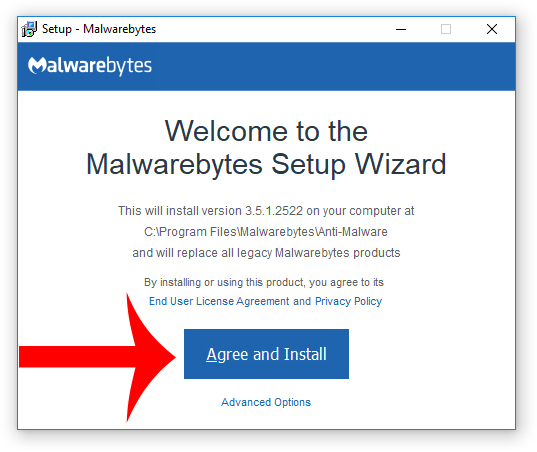
3. A window that says “Welcome to the Malwarebytes Setup Wizard” will appear. Click Agree and Install to begin the installation. Once complete, click Finish.

4. Now the Malwarebytes is installed, open the program and click the Scan Now button – or go to the Scan tab and click the Start Scan button.

3. When the scan is complete click the Quarantine Selected button.
4. If Malwarebytes says “All selected items have been removed successfully. A log file has been saved to the logs folder. Your computer needs to be restarted to complete the removal process. Would you like to restart now?” click the Yes button to restart your computer.
5. Next, Download HitmanPro to perform a second-opinion scan and remove any remaining malicious trace files.

6. Once installed, open HitmanPro and click Next to start scanning your computer. *If you are using the free version you may chose to create a copy or perform a one-time scan.
7. When the HitmanPro scan is complete click the Next button.
8. To activate the free version of HitmanPro: enter your email address twice and click the Activate button.
9. Click the Reboot button.
Your computer should now be completely free of RevServicesX Extension and other malicious files.
TIPS: Stay protected against future infections
The key to staying protected against future infections is to follow guidelines and take advantage of reputable Antivirus and Anti-Malware security software with real-time protection.
Real-time security software
Security software like Malwarebytes and Norton Security have real-time features that can block malicious files before they get onto your computer. The 2 programs bundled together can establish a wall between your computer and cyber criminals in real-time; disallowing threats and hackers from getting onto your machine.

Guidelines
The guidelines listed below are a great way to help you maintain a safe environment and ensure that the files on your computer are intact.
- Backup your computer and personal files to an external drive or online backup service
- Create a restore point on your computer in case you need to restore your computer to a date before infection
- Avoid downloading and installing apps, browser extensions, and programs you are not familiar with
- Avoid downloading and installing apps, browser extensions, and programs from websites you are not familiar with – some websites use their own download manager to bundle additional programs with the initial download
- Avoid visiting fake “spyware removal” blogs and websites that promote “spyware removal software.” These are usually malicious websites designed to phish your personal information, infect your computer with a rogue program and trick you into paying for rogue “spyware removal software.”
- If you plan to download and install freeware, open source software, or shareware make sure to be alert when you install the object and read all the instructions presented by the download manager
- Avoid torrents and P2P clients
- Do not open email messages from senders you do not know