Windows Essentials 2012
On January 10, 2017 Microsoft stopped supporting Windows Essentials 2012 and removed links to download Windows Essentials 2012 from their websites.
Many third-party websites that claim to offer Windows Essentials 2012 and similar software contain malware and viruses so it’s a challenge to locate where you can download Windows Essentials 2012 for free without compromising your integrity.
What is Windows Essentials 2012?
Windows Essentials 2012 is a software suite of Microsoft freeware that included Windows Movie Maker, Windows Photo Gallery, Windows Live Writer, Windows Live Mail, Windows Live Family Safety, and the OneDrive desktop app for Windows.

Microsoft claims that Windows 10 offers features similar to those that were bundled in Windows Essentials 2012. However, they are not the same. For example, if you are looking for a simple and free program to edit and cut videos like Windows Movie Maker, you won’t find it so easily on Windows 10. Most full versions of Windows 10 movie editors and cutters are not free to use. They include watermarks, sloppy editing, advertisements, improper ratios, and no option to use 720, 1080, and higher video definitions.
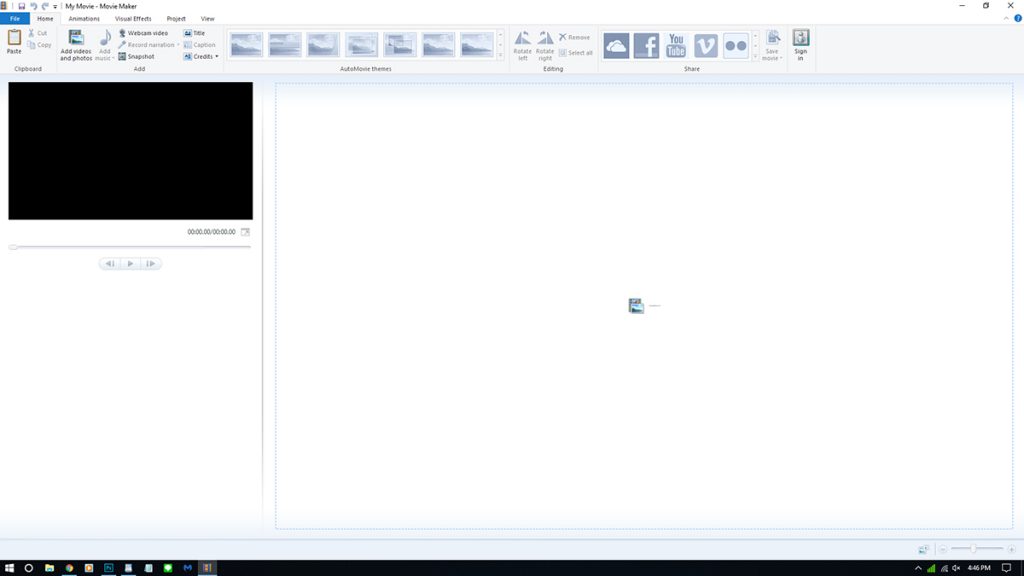
Windows Essentials 2012 is compatible with most versions of Windows including Windows XP, Windows Vista, Windows 7, Windows 8.1, and Windows 10. The image above shows the Movie Maker program running on a Windows 10 Operating System.
Download Windows Essentials 2012
Luckily, you can still download Windows Essentials 2012 from a safe source (microsoft.com) using the Wayback Machine.
>> Download Windows Essentials 2012 <<
Available download links
- English (United Kingdom): http://web.archive.org/web/20160423192125/http://wl.dlservice.microsoft.com/download/1/9/4/194B1919-A211-441F-BC0E-34F6B533B876/en-gb/wlsetup-all.exe
- English (United States): http://web.archive.org/web/20170112124505/http://wl.dlservice.microsoft.com/download/C/1/B/C1BA42D6-6A50-4A4A-90E5-FA9347E9360C/en/wlsetup-all.exe